> ## Documentation Index
> Fetch the complete documentation index at: https://docs.assetinfinity.ai/llms.txt
> Use this file to discover all available pages before exploring further.
# Bills
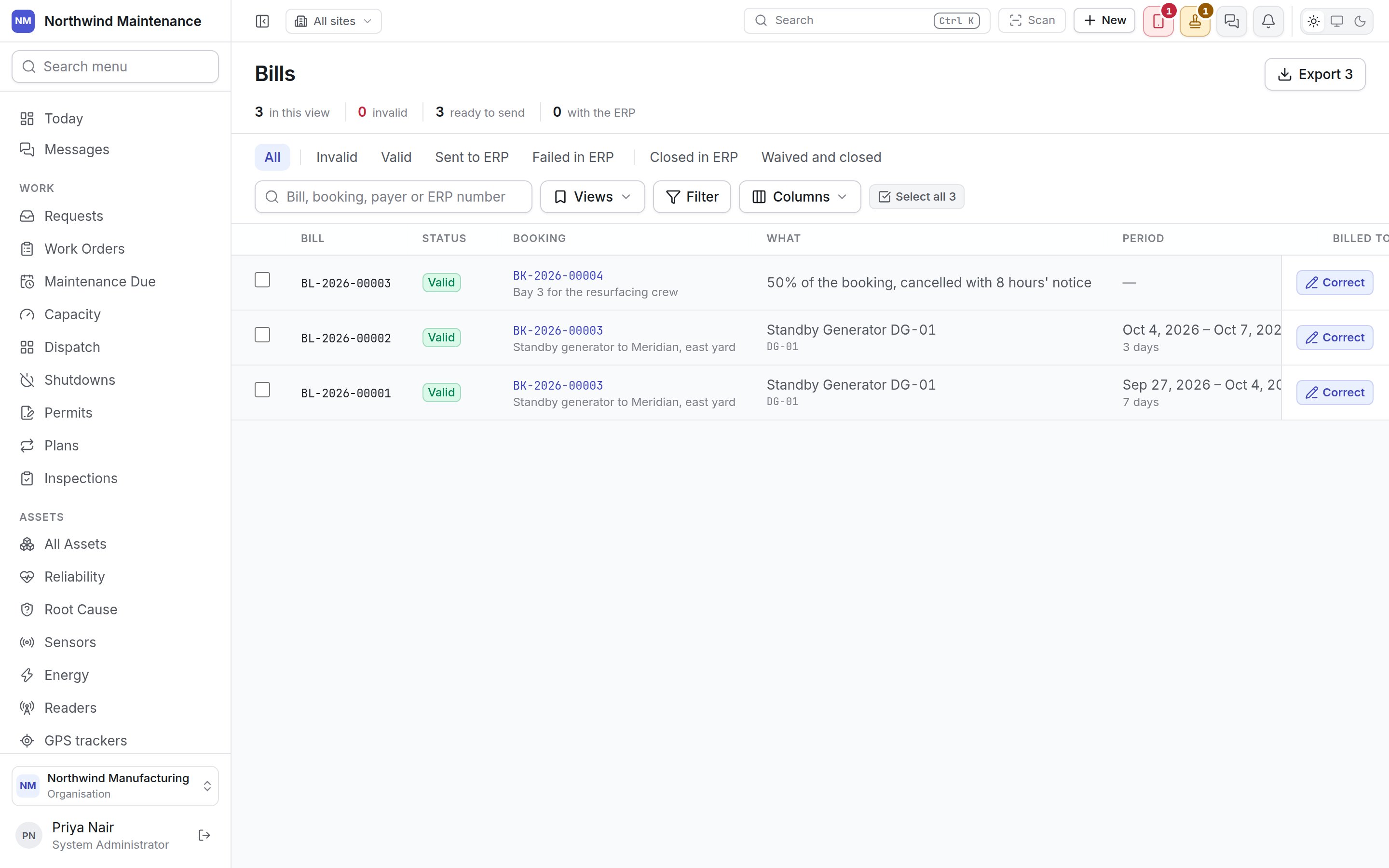
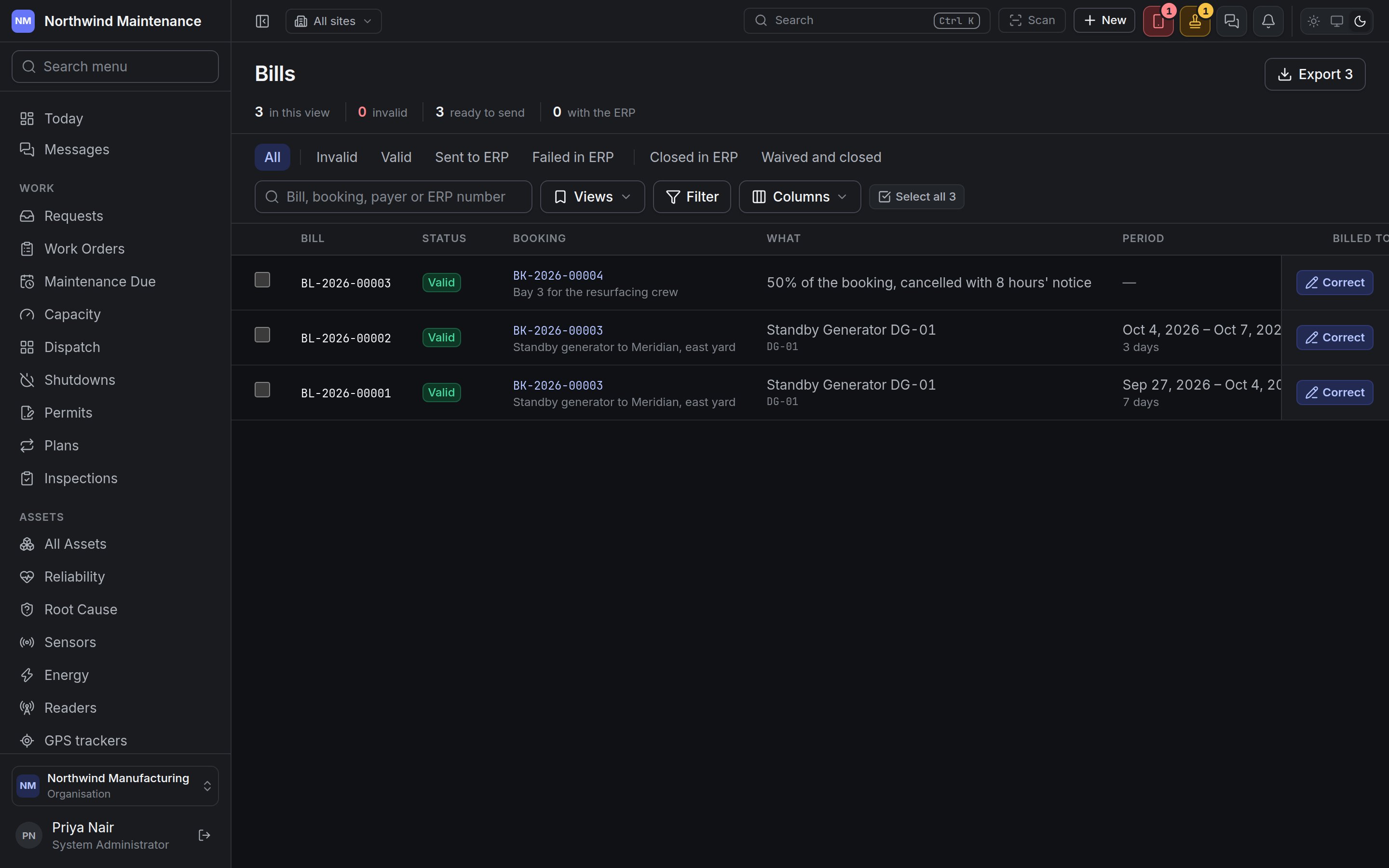
> What the charges on your bookings were billed as — one bill per charge per payer — checked, corrected, sent to your ERP and followed through its answer.
Bills is where the finance desk sees what the charges on your [bookings](/assets/bookings) were
billed as, checks that each bill can be sent, corrects it if not, and follows it through your ERP.
Open it from **Assets → Bills**, beside Bookings, or from **Bills** at the top of the bookings
register.
If you don't see this in your navigation, your administrator can switch the module on under **Administration → Modules**, or it may not be included in your plan. Bills also has a permission of its own, **View bills**, so somebody who books a machine need not be able to see the money.
 ## Where bills come from
You never raise a bill by hand. Every time a booking's [charge ledger](/assets/bookings#deposits-and-charges)
banks a charge — a week of hire, a cancellation fee, a damage charge — a bill is written for it
automatically: one bill per charge per payer. A booking charged to several projects gets one bill per
project task, so a hire split across two tasks is two bills. A correction to a charge is billed as a
**credit** on the same tasks rather than by changing the bill that was already sent.
Bills are numbered from their own series (*BL-2026-00001*), which your administrator can change under
[numbering](/config/numbering).
## Status
A bill is checked the moment it is written, and again whenever something it depends on changes.
| Status | What it means |
| - | - |
| **Pending validation** | Written and not yet checked |
| **Valid** | Ready to send to the ERP |
| **Invalid** | Something stops it being sent. Every reason is listed under the status — no price, a project task switched off or ended before the period ended, a closed project, or a task that is not billable |
| **Sent to ERP** | Marked as sent. The ERP has not answered yet |
| **Closed in ERP** | The ERP has accepted it, with its own reference where it gave one |
| **Waived and closed** | Forgiven — billed to nobody, with the reason |
A bill the ERP refuses goes straight back to validation, is checked again at once, and keeps the
ERP's reason in red under its status — *ERP refused it on …* — so the person fixing it reads why. A
bill is also re-checked when its task or project changes, and every night.
The link to the ERP is by hand: export the valid bills, load them into the ERP, mark them sent, and
then mark each closed or failed as the ERP answers.
## The register
### The header
| Item | What it means |
| - | - |
| **in this view** | How many bills match the lens, search and filters |
| **invalid** | How many bills are invalid across the whole register, in red when there are any |
| **ready to send** | How many are valid |
| **with the ERP** | How many have been sent and not yet answered |
| **Export** | Downloads what the list shows — the same filters and columns — for loading into the ERP. An invalid bill's export carries its reasons. Needs **Export bills for the ERP** |
### Lenses and toolbar
The row of lenses narrows the list by where a bill has got to: **All**; then what is still somebody's
to do — **Invalid**, **Valid**, **Sent to ERP** and **Failed in ERP** (bills the ERP refused, now
back in validation); then what is finished — **Closed in ERP** and **Waived and closed**.
The search box finds a bill by its number, its booking, the payer or the ERP's reference. **Views**,
**Filter** and **Columns** work as on any [list](/get-started/navigating), and **Select all** ticks
every bill on the page.
### Columns
| Column | Shown by default | What it means |
| - | - | - |
| **Bill** | Yes (always) | The bill number, marked **credit** where it reverses an earlier charge |
| **Status** | Yes | The status above, with every reason an invalid bill cannot be sent, the ERP's refusal, or why it was waived |
| **Booking** | Yes | The booking number, as a link, and its title |
| **What** | Yes | What was hired, with its reference, or the charge's own description — *50% of the booking, cancelled with 8 hours' notice* |
| **Period** | Yes | The days the charge covers, and how many |
| **Billed to** | Yes | The payer — a customer, a cost centre, or a project and task |
| **Rate card** | Yes | The card the charge was priced on, with its number |
| **Amount** | Yes | The amount with its currency, or **no price** where no card matched |
| **ERP reference** | No | The ERP's own number for the bill, once it is closed |
| **Site** | No | The booking's site |
| Row button | — | **Correct**, on a bill that can still be corrected, for people with **Correct, waive and send bills to the ERP** |
## Acting on bills
Tick bills and a bar opens at the foot of the register.
## Where bills come from
You never raise a bill by hand. Every time a booking's [charge ledger](/assets/bookings#deposits-and-charges)
banks a charge — a week of hire, a cancellation fee, a damage charge — a bill is written for it
automatically: one bill per charge per payer. A booking charged to several projects gets one bill per
project task, so a hire split across two tasks is two bills. A correction to a charge is billed as a
**credit** on the same tasks rather than by changing the bill that was already sent.
Bills are numbered from their own series (*BL-2026-00001*), which your administrator can change under
[numbering](/config/numbering).
## Status
A bill is checked the moment it is written, and again whenever something it depends on changes.
| Status | What it means |
| - | - |
| **Pending validation** | Written and not yet checked |
| **Valid** | Ready to send to the ERP |
| **Invalid** | Something stops it being sent. Every reason is listed under the status — no price, a project task switched off or ended before the period ended, a closed project, or a task that is not billable |
| **Sent to ERP** | Marked as sent. The ERP has not answered yet |
| **Closed in ERP** | The ERP has accepted it, with its own reference where it gave one |
| **Waived and closed** | Forgiven — billed to nobody, with the reason |
A bill the ERP refuses goes straight back to validation, is checked again at once, and keeps the
ERP's reason in red under its status — *ERP refused it on …* — so the person fixing it reads why. A
bill is also re-checked when its task or project changes, and every night.
The link to the ERP is by hand: export the valid bills, load them into the ERP, mark them sent, and
then mark each closed or failed as the ERP answers.
## The register
### The header
| Item | What it means |
| - | - |
| **in this view** | How many bills match the lens, search and filters |
| **invalid** | How many bills are invalid across the whole register, in red when there are any |
| **ready to send** | How many are valid |
| **with the ERP** | How many have been sent and not yet answered |
| **Export** | Downloads what the list shows — the same filters and columns — for loading into the ERP. An invalid bill's export carries its reasons. Needs **Export bills for the ERP** |
### Lenses and toolbar
The row of lenses narrows the list by where a bill has got to: **All**; then what is still somebody's
to do — **Invalid**, **Valid**, **Sent to ERP** and **Failed in ERP** (bills the ERP refused, now
back in validation); then what is finished — **Closed in ERP** and **Waived and closed**.
The search box finds a bill by its number, its booking, the payer or the ERP's reference. **Views**,
**Filter** and **Columns** work as on any [list](/get-started/navigating), and **Select all** ticks
every bill on the page.
### Columns
| Column | Shown by default | What it means |
| - | - | - |
| **Bill** | Yes (always) | The bill number, marked **credit** where it reverses an earlier charge |
| **Status** | Yes | The status above, with every reason an invalid bill cannot be sent, the ERP's refusal, or why it was waived |
| **Booking** | Yes | The booking number, as a link, and its title |
| **What** | Yes | What was hired, with its reference, or the charge's own description — *50% of the booking, cancelled with 8 hours' notice* |
| **Period** | Yes | The days the charge covers, and how many |
| **Billed to** | Yes | The payer — a customer, a cost centre, or a project and task |
| **Rate card** | Yes | The card the charge was priced on, with its number |
| **Amount** | Yes | The amount with its currency, or **no price** where no card matched |
| **ERP reference** | No | The ERP's own number for the bill, once it is closed |
| **Site** | No | The booking's site |
| Row button | — | **Correct**, on a bill that can still be corrected, for people with **Correct, waive and send bills to the ERP** |
## Acting on bills
Tick bills and a bar opens at the foot of the register.
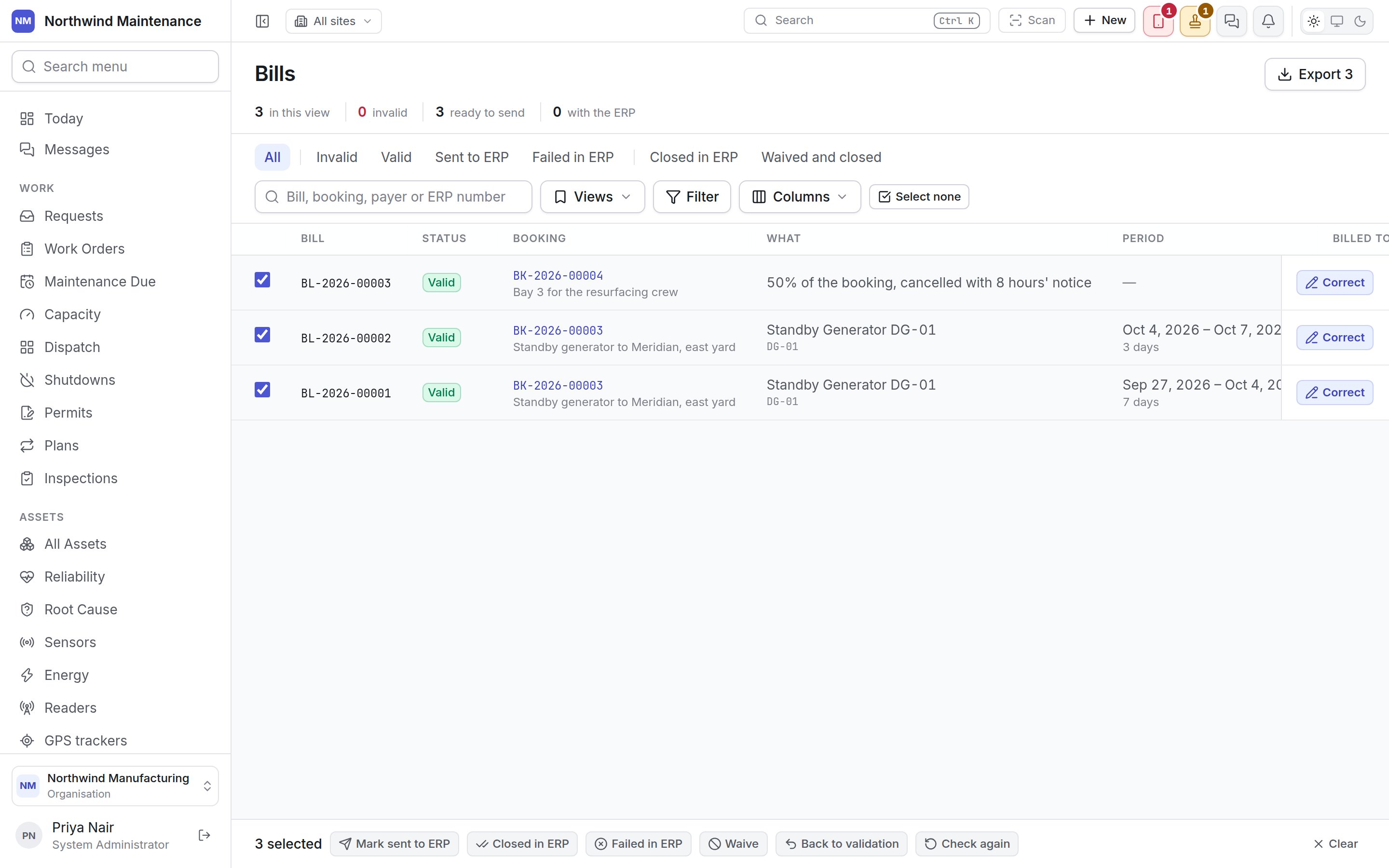
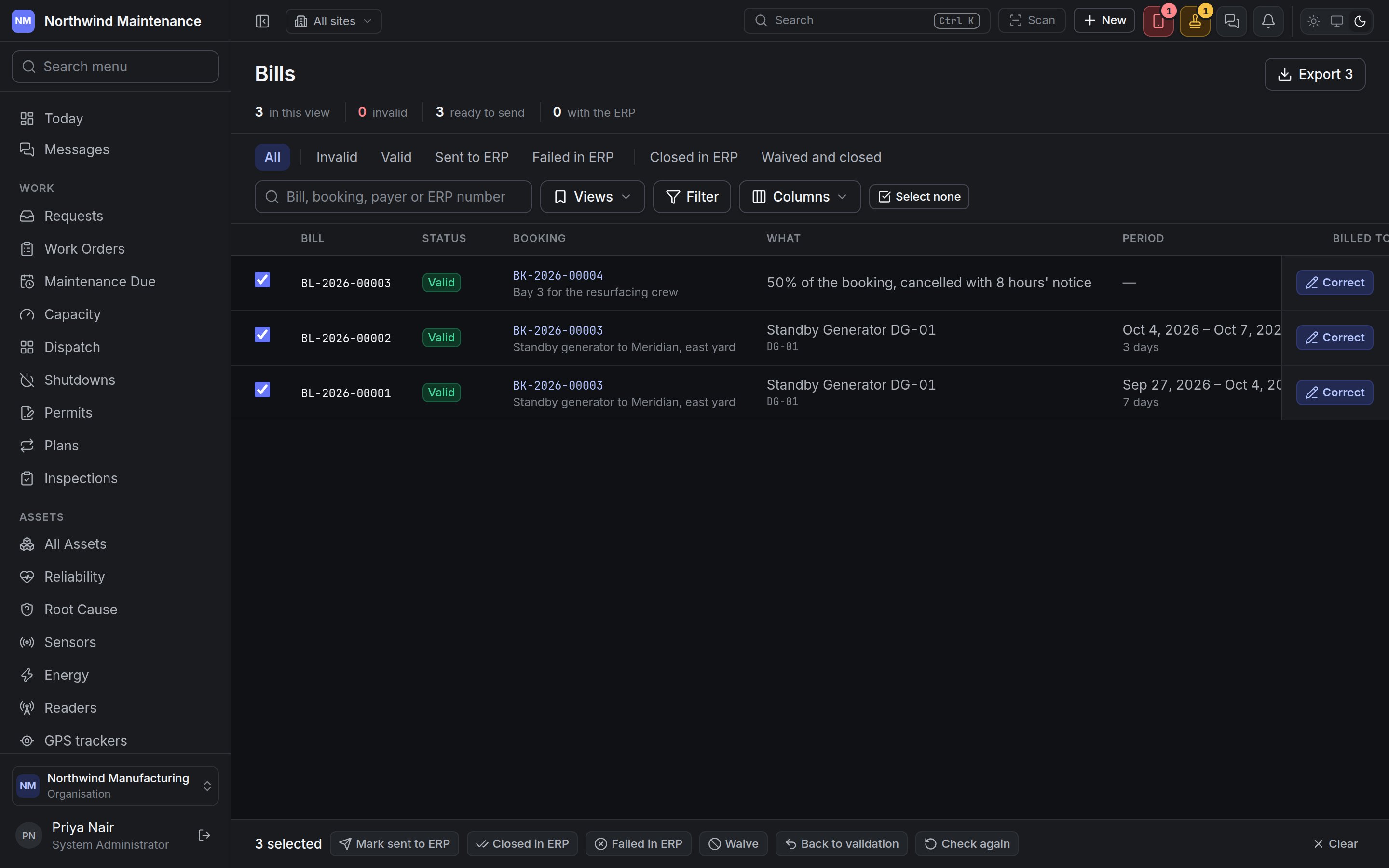 | Action | What it does | Takes bills that are | Asks for |
| - | - | - | - |
| **Mark sent to ERP** | Re-checks the bills, then records that they have gone to the ERP | **Valid** | Nothing |
| **Closed in ERP** | Records that the ERP accepted them | **Sent to ERP** | **ERP reference** — the ERP's own number for the bill, where it gave one. Optional |
| **Failed in ERP** | Records that the ERP refused them. They go back to validation, are checked again at once and keep the reason | **Sent to ERP** | **Why the ERP refused it**. Required |
| **Waive** | Waives and closes them — billed to nobody | Not yet sent | **Why it is waived**. Required |
| **Back to validation** | Brings waived bills back and checks them again | **Waived and closed** | Nothing |
| **Check again** | Re-checks the bills now, rather than waiting for tonight — after you have fixed a project or a rate card, say | Any | Nothing |
Each action is all or nothing: if any ticked bill cannot take it — a bill marked closed that was
never sent, say — nothing changes and the message names the bills that were refused. Every action
needs **Correct, waive and send bills to the ERP**.
## Correcting a charge's bills
**Correct** opens every bill of that charge together, because they are one charge divided — moving
days from one project task to another changes two bills at once.
| Action | What it does | Takes bills that are | Asks for |
| - | - | - | - |
| **Mark sent to ERP** | Re-checks the bills, then records that they have gone to the ERP | **Valid** | Nothing |
| **Closed in ERP** | Records that the ERP accepted them | **Sent to ERP** | **ERP reference** — the ERP's own number for the bill, where it gave one. Optional |
| **Failed in ERP** | Records that the ERP refused them. They go back to validation, are checked again at once and keep the reason | **Sent to ERP** | **Why the ERP refused it**. Required |
| **Waive** | Waives and closes them — billed to nobody | Not yet sent | **Why it is waived**. Required |
| **Back to validation** | Brings waived bills back and checks them again | **Waived and closed** | Nothing |
| **Check again** | Re-checks the bills now, rather than waiting for tonight — after you have fixed a project or a rate card, say | Any | Nothing |
Each action is all or nothing: if any ticked bill cannot take it — a bill marked closed that was
never sent, say — nothing changes and the message names the bills that were refused. Every action
needs **Correct, waive and send bills to the ERP**.
## Correcting a charge's bills
**Correct** opens every bill of that charge together, because they are one charge divided — moving
days from one project task to another changes two bills at once.
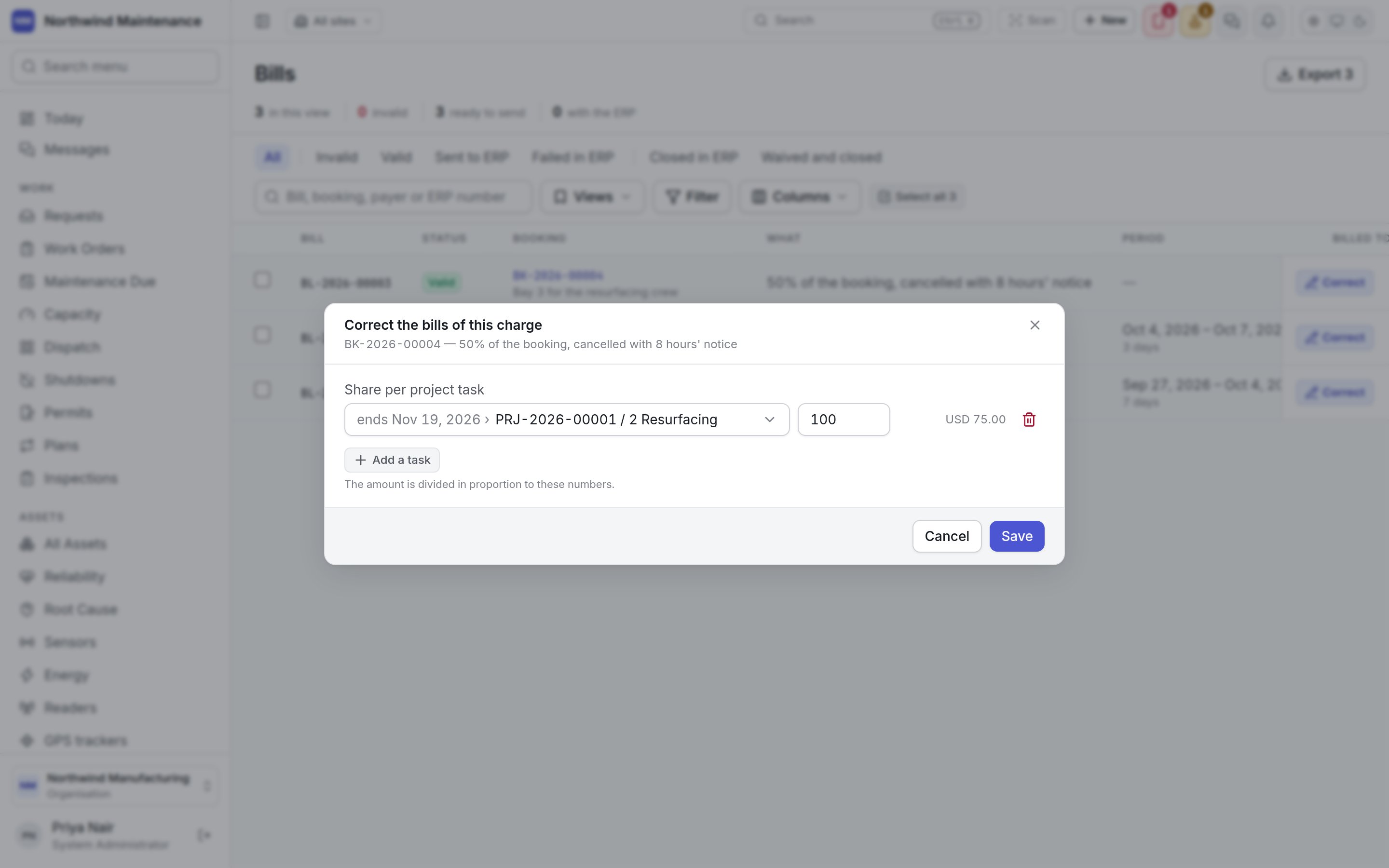
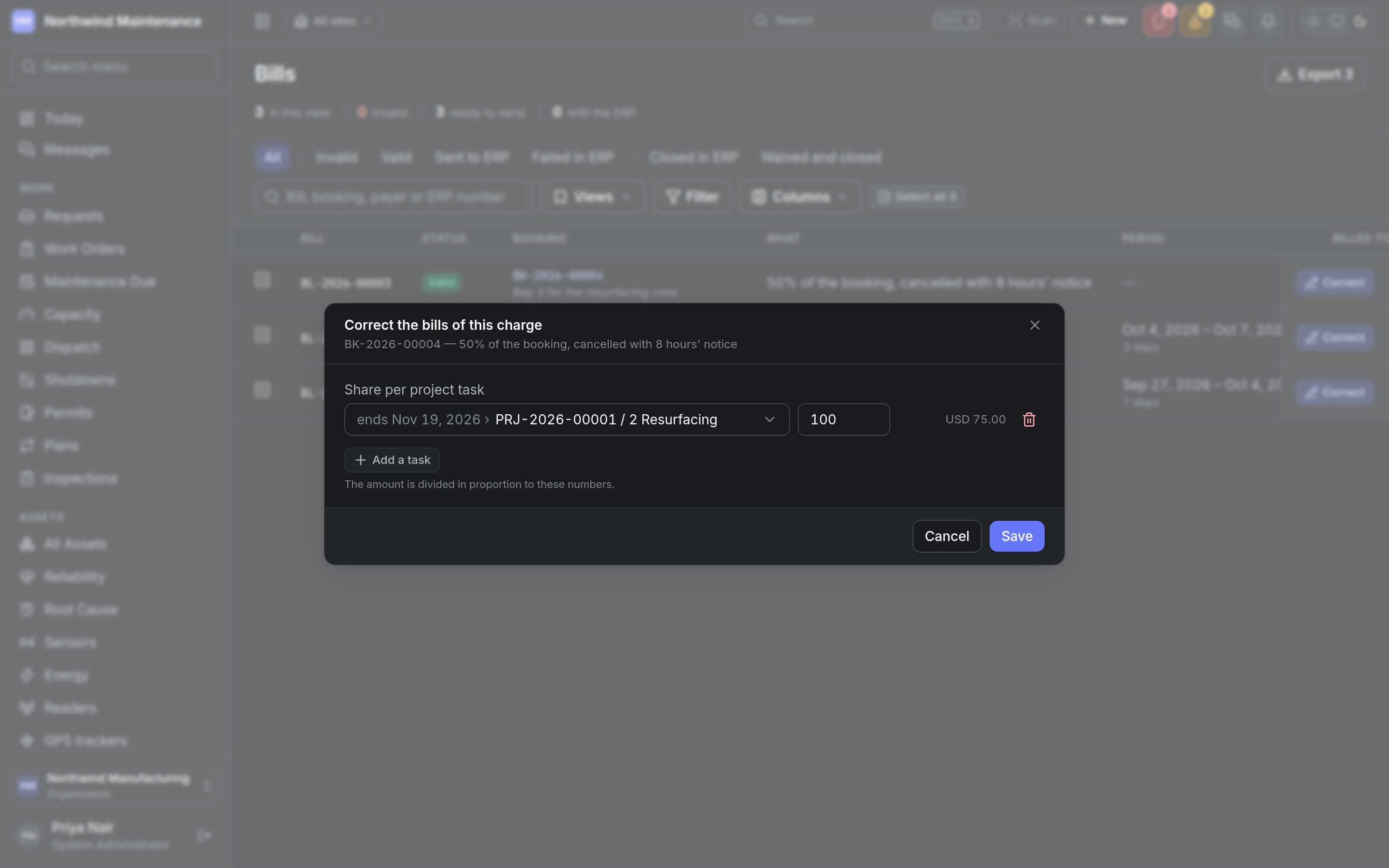 | Field | What it means | Notes |
| - | - | - |
| **Rate card** | The card the charge is priced on | Shown where what was hired can be priced. Offers the cards that applied at that site on the day, with their price. Choosing another card re-prices the charge: the ledger keeps the old entry with a reversal beside it and a new entry, and the bills follow |
| **Days per project task** | How the charge's days are split across project tasks | Shown for a charge to a project with a period. The days must add up to the period — the dialog counts *n of N days* as you type — and each bill's amount follows its days. A hire that ran five days on one task and five on another is billed that way rather than half and half |
| **Share per project task** | The same, for a charge with no period, such as a cancellation fee | The amount is divided in proportion to these numbers |
| **Add a task** | Adds another project task to split across | Only active tasks are offered; the list shows when each one ends |
**Save** re-writes the bills of the charge and checks them again. **Correct** is offered only while
every bill of the charge is still pending validation, valid or invalid — once one has gone to the
ERP, been closed or been waived, the charge stays as it was billed. A credit, and a charge that has
already been reversed, cannot be corrected either.
## Who can do what
| Permission | What it allows |
| - | - |
| **View bills** | See the Bills register and the **Bills** button on Bookings |
| **Correct, waive and send bills to the ERP** | Correct bills and use every action on the bar |
| **Export bills for the ERP** | Export |
Permissions are granted under [roles](/setup/roles).
Raising a booking, choosing its rate cards and billing rhythm, and the charge ledger the bills are
written from.
This documentation is built and hosted on [Mintlify](https://mintlify.com), a developer documentation platform.
| Field | What it means | Notes |
| - | - | - |
| **Rate card** | The card the charge is priced on | Shown where what was hired can be priced. Offers the cards that applied at that site on the day, with their price. Choosing another card re-prices the charge: the ledger keeps the old entry with a reversal beside it and a new entry, and the bills follow |
| **Days per project task** | How the charge's days are split across project tasks | Shown for a charge to a project with a period. The days must add up to the period — the dialog counts *n of N days* as you type — and each bill's amount follows its days. A hire that ran five days on one task and five on another is billed that way rather than half and half |
| **Share per project task** | The same, for a charge with no period, such as a cancellation fee | The amount is divided in proportion to these numbers |
| **Add a task** | Adds another project task to split across | Only active tasks are offered; the list shows when each one ends |
**Save** re-writes the bills of the charge and checks them again. **Correct** is offered only while
every bill of the charge is still pending validation, valid or invalid — once one has gone to the
ERP, been closed or been waived, the charge stays as it was billed. A credit, and a charge that has
already been reversed, cannot be corrected either.
## Who can do what
| Permission | What it allows |
| - | - |
| **View bills** | See the Bills register and the **Bills** button on Bookings |
| **Correct, waive and send bills to the ERP** | Correct bills and use every action on the bar |
| **Export bills for the ERP** | Export |
Permissions are granted under [roles](/setup/roles).
Raising a booking, choosing its rate cards and billing rhythm, and the charge ledger the bills are
written from.
This documentation is built and hosted on [Mintlify](https://mintlify.com), a developer documentation platform.