> ## Documentation Index
> Fetch the complete documentation index at: https://docs.assetinfinity.ai/llms.txt
> Use this file to discover all available pages before exploring further.
# Meters and readings
> Recording run hours, cycles and measurements, and using them to trigger maintenance.
A meter is something you count on a machine: run hours, cycles, kilometres, production units,
temperature, pressure, vibration.
 ## Why they matter
Two reasons:
1. **Meter-based maintenance.** *Every 2,000 run hours* only works if somebody is recording run
hours. See [triggers](/maintenance/plan-builder).
2. **Condition.** A vibration reading climbing over three months is the machine telling you
something before it stops.
## Meter types
Configure the types your plant uses under [asset settings](/config/assets) — the name, the unit, and
whether it only ever goes up.
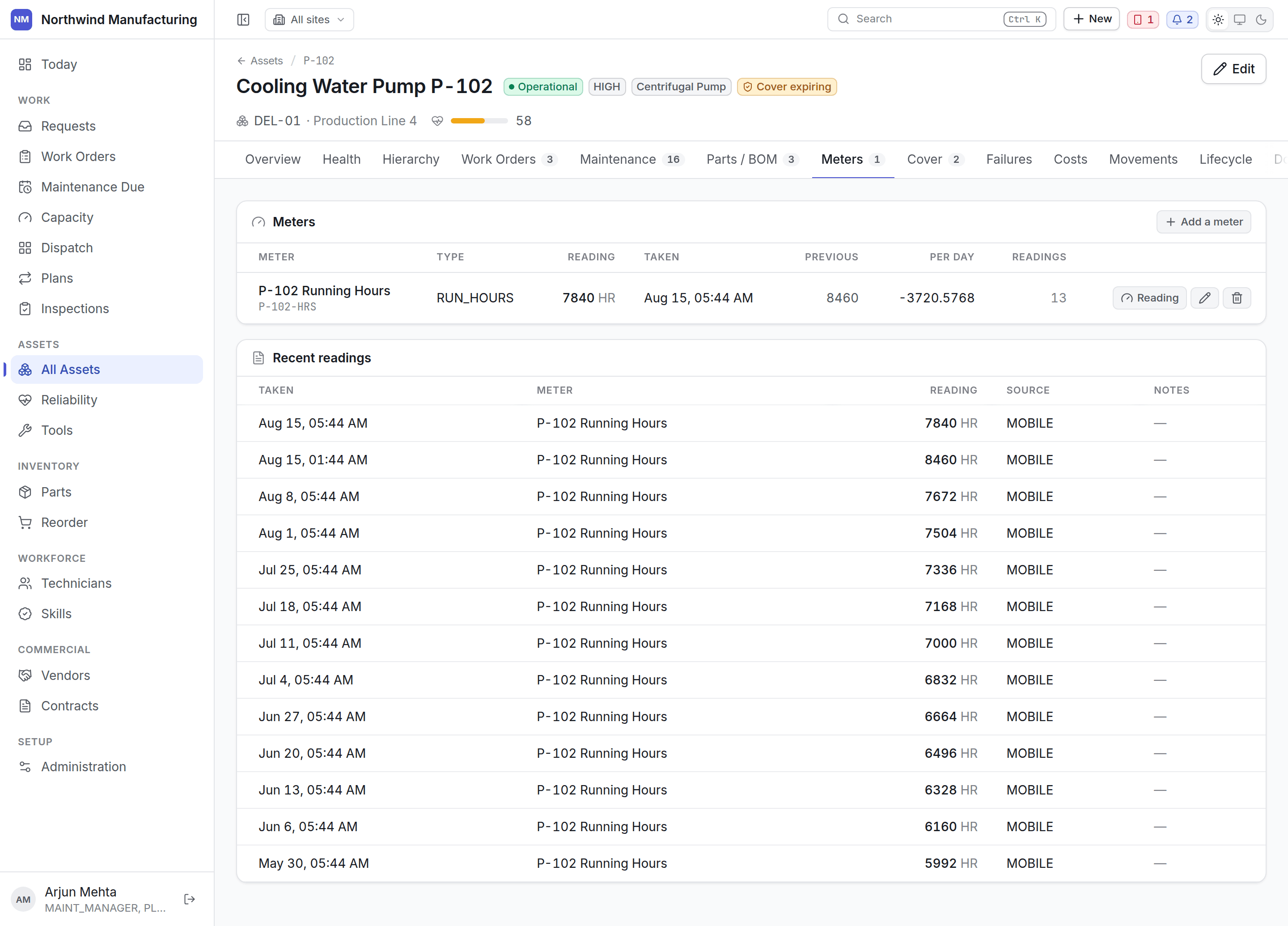
A **cumulative** meter (run hours, cycles) never decreases; a reading below the last one is a
mistake or a replaced counter, and the system will say so. A **point-in-time** meter (temperature,
pressure) goes up and down freely.
## Recording a reading
A technician records the reading at the machine, in the field app, as part of the job. This is
the normal path and the most reliable, because the person is standing in front of the counter.
Readings taken offline queue and arrive when signal returns.
Open the asset, go to **Meters**, and add a reading. Useful for a catch-up after a manual round.
A sensor bound to this meter writes its readings through automatically, which is what turns a
live measurement into maintenance that comes due on its own. See [sensors](/assets/sensors).
Every reading records who took it, when, and by what means.
## Rollover and replacement
When a counter is replaced or rolls over, record that rather than entering a lower number as if it
were normal. The history stays correct and meter-based triggers keep working from the right base.
## Who can record readings
Technicians can, by default — it is the most ordinary thing a technician does. See
[roles](/setup/roles).
## Related topics
- [Role reference](/setup/roles.md)
- [Asset settings](/config/assets.md)
- [Sensors and condition alerts](/assets/sensors.md)
- [Working a job](/field/job.md)
- [What this system does](/introduction.md)
## Why they matter
Two reasons:
1. **Meter-based maintenance.** *Every 2,000 run hours* only works if somebody is recording run
hours. See [triggers](/maintenance/plan-builder).
2. **Condition.** A vibration reading climbing over three months is the machine telling you
something before it stops.
## Meter types
Configure the types your plant uses under [asset settings](/config/assets) — the name, the unit, and
whether it only ever goes up.
A **cumulative** meter (run hours, cycles) never decreases; a reading below the last one is a
mistake or a replaced counter, and the system will say so. A **point-in-time** meter (temperature,
pressure) goes up and down freely.
## Recording a reading
A technician records the reading at the machine, in the field app, as part of the job. This is
the normal path and the most reliable, because the person is standing in front of the counter.
Readings taken offline queue and arrive when signal returns.
Open the asset, go to **Meters**, and add a reading. Useful for a catch-up after a manual round.
A sensor bound to this meter writes its readings through automatically, which is what turns a
live measurement into maintenance that comes due on its own. See [sensors](/assets/sensors).
Every reading records who took it, when, and by what means.
## Rollover and replacement
When a counter is replaced or rolls over, record that rather than entering a lower number as if it
were normal. The history stays correct and meter-based triggers keep working from the right base.
## Who can record readings
Technicians can, by default — it is the most ordinary thing a technician does. See
[roles](/setup/roles).
## Related topics
- [Role reference](/setup/roles.md)
- [Asset settings](/config/assets.md)
- [Sensors and condition alerts](/assets/sensors.md)
- [Working a job](/field/job.md)
- [What this system does](/introduction.md)