> ## Documentation Index
> Fetch the complete documentation index at: https://docs.assetinfinity.ai/llms.txt
> Use this file to discover all available pages before exploring further.
# Network topology
> The physical network as discovery found it: which switch port each device is plugged into, the links between network equipment, and neighbours that announced themselves but have not been discovered.
The **Network topology** screen draws the physical network as the network itself reports it — what
is behind this switch, what this desktop is plugged into. Open it from **Assets → Topology**.
If you don't see this in your navigation, your administrator can switch the module on under **Administration → Modules**, or it may not be included in your plan. It is part of **IT asset discovery** there.
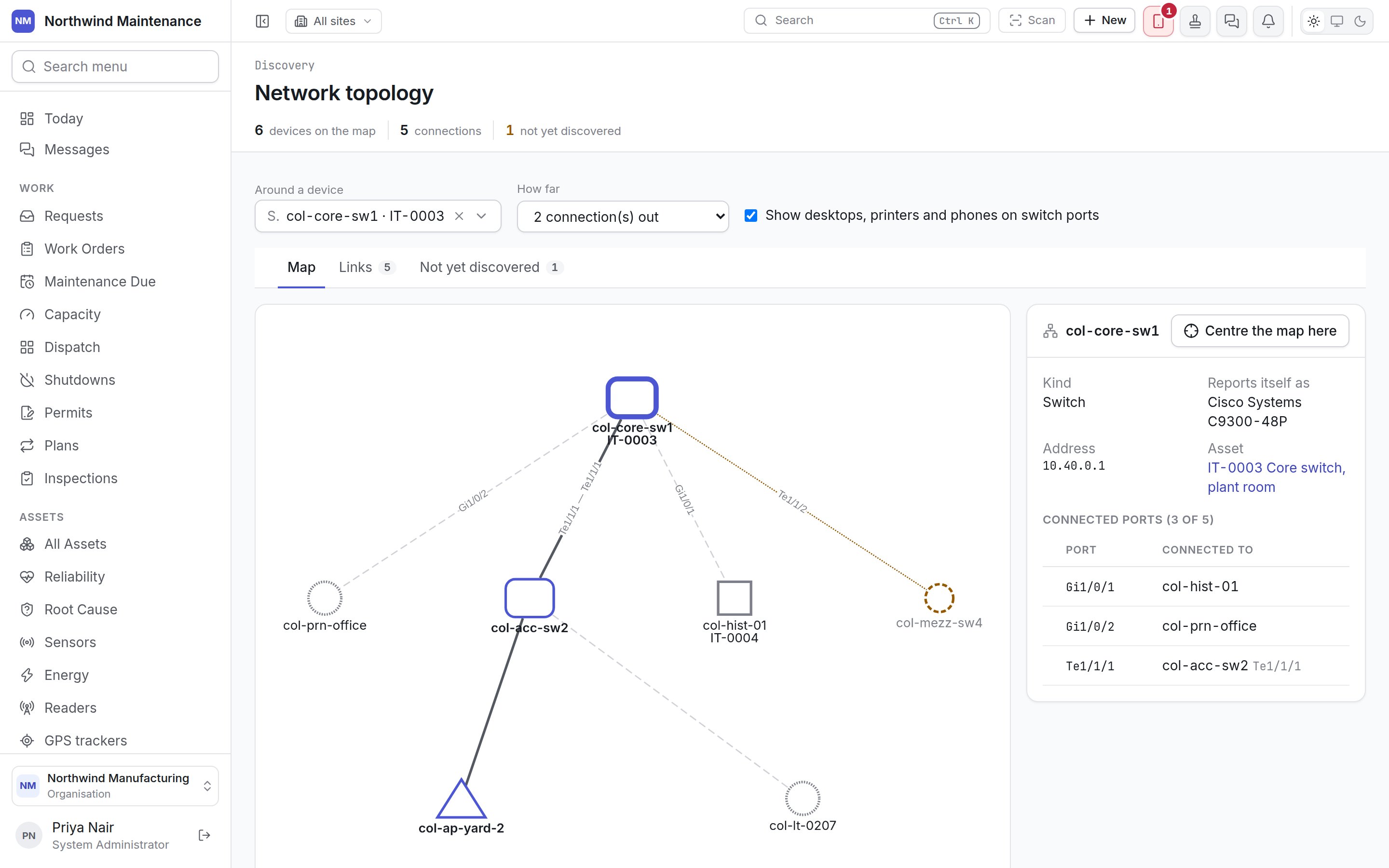
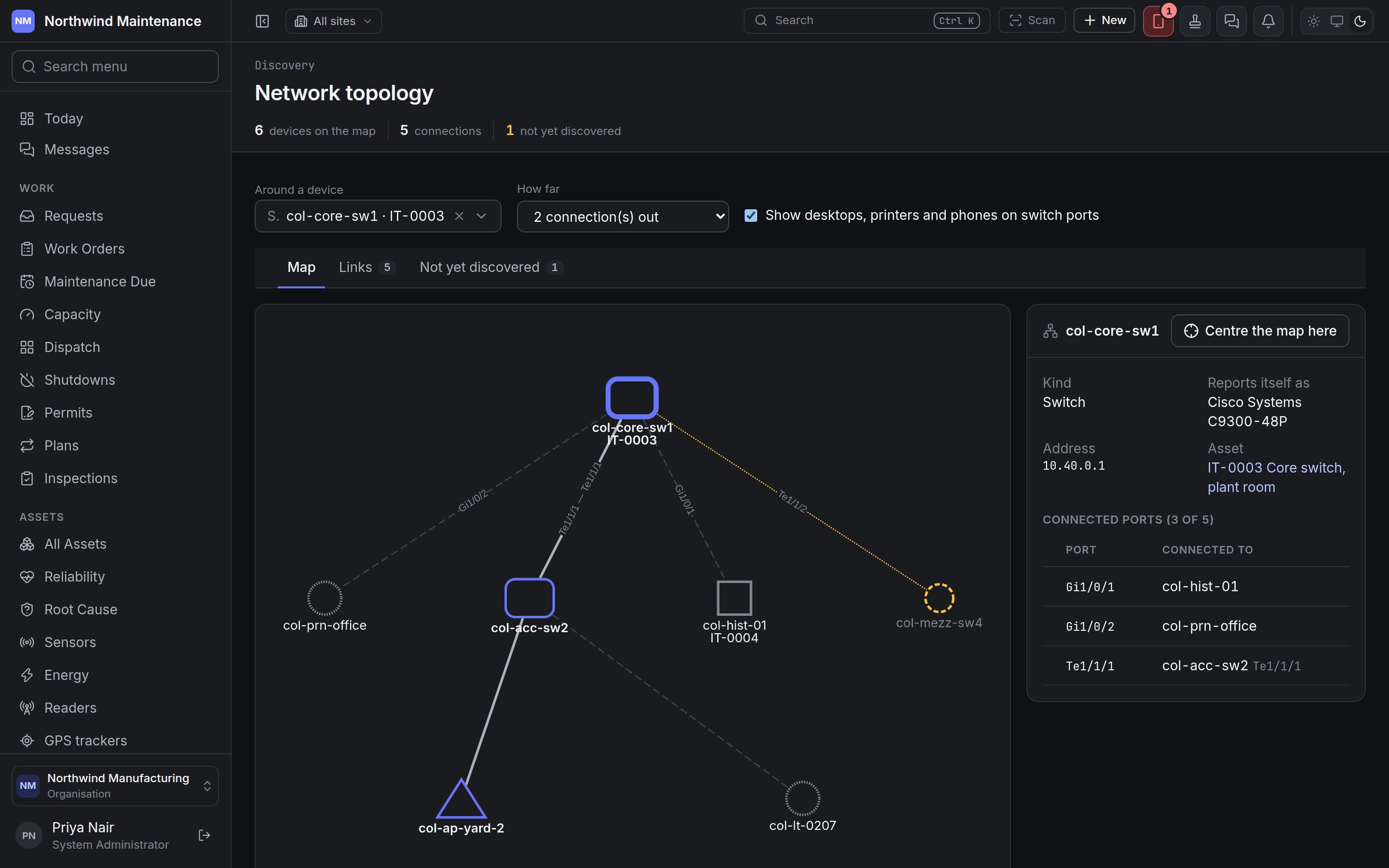 The map is built from what [discovery](/assets/discovery) collects from network equipment: the
neighbours each device announces on its ports (by LLDP or CDP) and the addresses each switch has
learned on its ports. Nothing here is drawn by hand.
## The header
| Figure | What it counts |
| - | - |
| **devices on the map** | Devices currently drawn |
| **connections** | Links currently drawn |
| **not yet discovered** | Neighbours announced on a port that no sweep has found |
## Choosing what to draw
| Control | What it does |
| - | - |
| **Around a device** | Centres the map on one device. Empty (**The whole site**) draws everything |
| **How far** | Appears once a device is chosen: how many connections out from it to draw |
| **Site** | Limits the map to one site. Empty means **Every site**. Hidden while the map is centred on a device |
| **Show desktops, printers and phones on switch ports** | On by default. Turn it off to draw only the network equipment and the links between it |
A very large network is cut at a maximum number of devices; the screen says so, and centring on a
device shows the rest around it.
## Map
How to read it:
| On the map | What it means |
| - | - |
| A coloured outline | Network equipment — switches, routers, firewalls, access points |
| A dotted outline | A device not yet linked to an asset |
| A solid line | A link between two pieces of network equipment, labelled with the ports at each end |
| A dashed line | A device on a switch port |
| A dashed amber outline | A neighbour that announced itself but has not been discovered |
The shape tells you the kind of device. Click a device to open its panel:
| Part | What it shows |
| - | - |
| **Kind** | Switch, router, firewall, access point, server, virtual machine, printer, laptop, desktop, phone, storage, or device |
| **Reports itself as** | Its make and model as it reports them |
| **Address** | Its IP address |
| **Asset** | The linked asset, as a link, or **not linked to an asset** |
| **Connected ports** | How many of its ports have something discovery knows connected, and a table of each **Port** and what it is **Connected to** |
**Centre the map here** makes that device the centre.
## Links
The map is built from what [discovery](/assets/discovery) collects from network equipment: the
neighbours each device announces on its ports (by LLDP or CDP) and the addresses each switch has
learned on its ports. Nothing here is drawn by hand.
## The header
| Figure | What it counts |
| - | - |
| **devices on the map** | Devices currently drawn |
| **connections** | Links currently drawn |
| **not yet discovered** | Neighbours announced on a port that no sweep has found |
## Choosing what to draw
| Control | What it does |
| - | - |
| **Around a device** | Centres the map on one device. Empty (**The whole site**) draws everything |
| **How far** | Appears once a device is chosen: how many connections out from it to draw |
| **Site** | Limits the map to one site. Empty means **Every site**. Hidden while the map is centred on a device |
| **Show desktops, printers and phones on switch ports** | On by default. Turn it off to draw only the network equipment and the links between it |
A very large network is cut at a maximum number of devices; the screen says so, and centring on a
device shows the rest around it.
## Map
How to read it:
| On the map | What it means |
| - | - |
| A coloured outline | Network equipment — switches, routers, firewalls, access points |
| A dotted outline | A device not yet linked to an asset |
| A solid line | A link between two pieces of network equipment, labelled with the ports at each end |
| A dashed line | A device on a switch port |
| A dashed amber outline | A neighbour that announced itself but has not been discovered |
The shape tells you the kind of device. Click a device to open its panel:
| Part | What it shows |
| - | - |
| **Kind** | Switch, router, firewall, access point, server, virtual machine, printer, laptop, desktop, phone, storage, or device |
| **Reports itself as** | Its make and model as it reports them |
| **Address** | Its IP address |
| **Asset** | The linked asset, as a link, or **not linked to an asset** |
| **Connected ports** | How many of its ports have something discovery knows connected, and a table of each **Port** and what it is **Connected to** |
**Centre the map here** makes that device the centre.
## Links
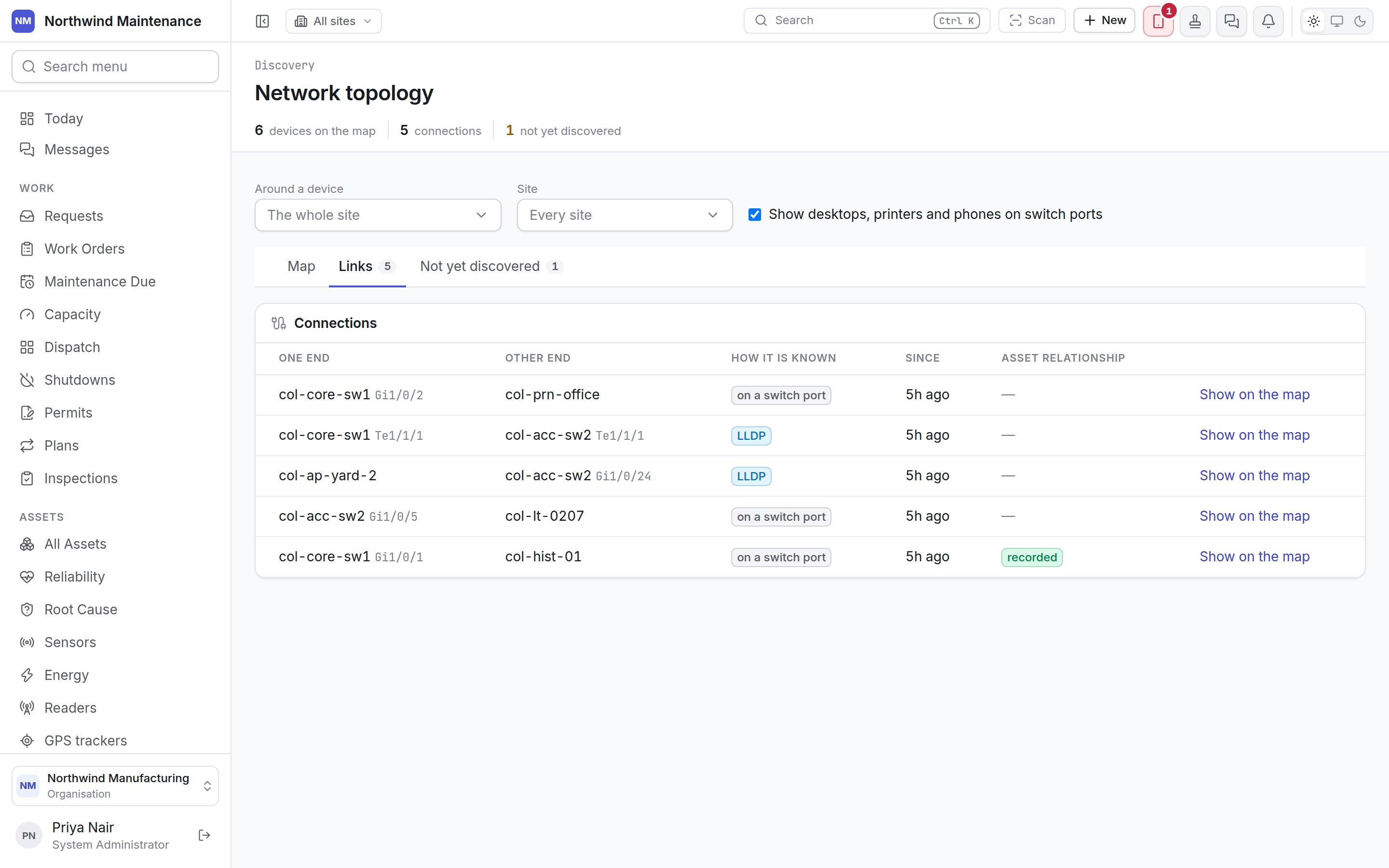
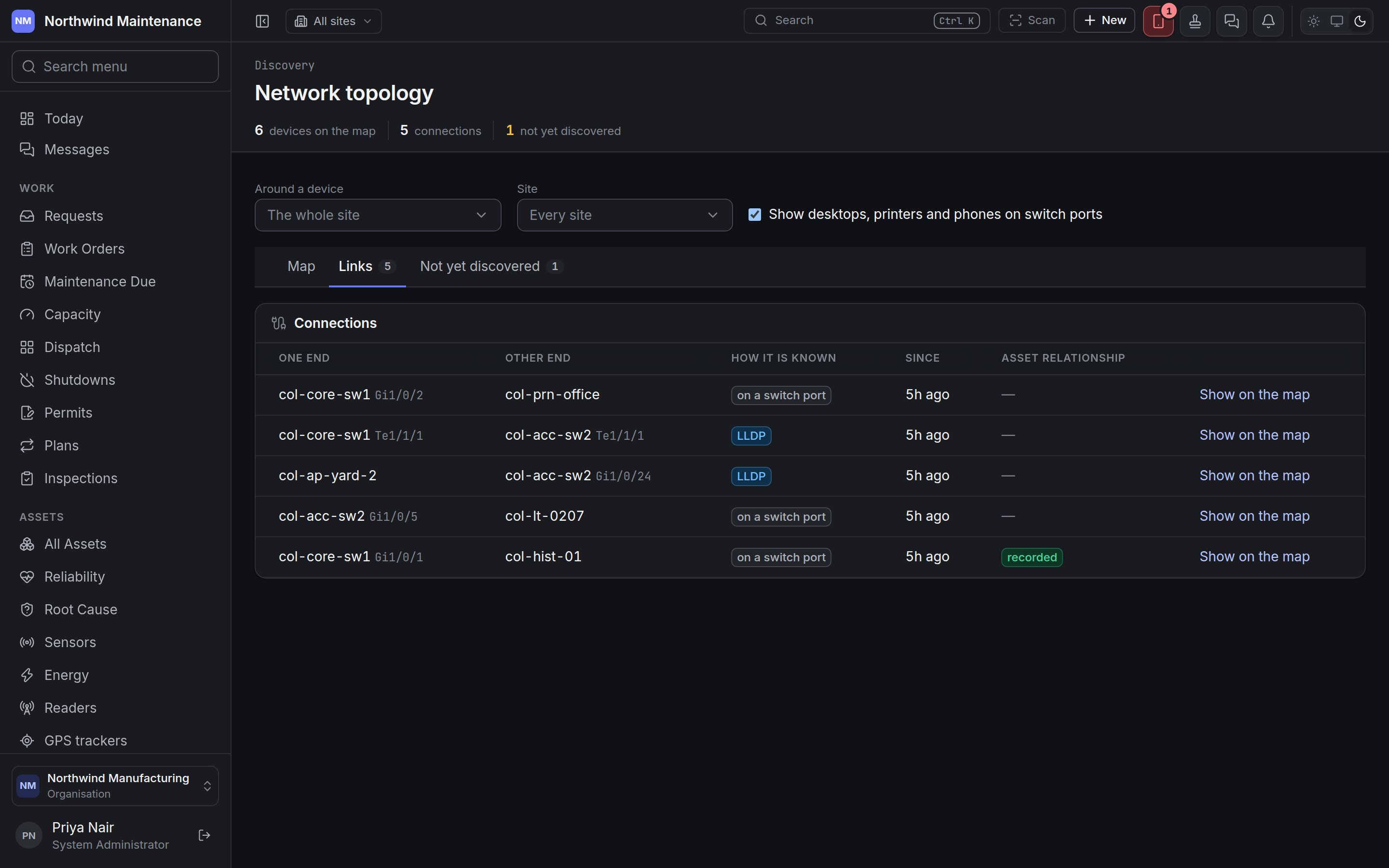 Every line on the map is a row here, so the network can be read without the drawing.
| Column | What it shows |
| - | - |
| **One end** / **Other end** | The two devices, with the port at each end where known |
| **How it is known** | **LLDP** or **CDP** (the devices announced each other), or **on a switch port** (the switch learned the device's address on that port) |
| **Since** | When the link was first seen |
| **Asset relationship** | **recorded** when the connection is also recorded between the two assets in the register |
**Show on the map** switches to the map, centred on the device at the first end and with its panel open.
## Not yet discovered
Every line on the map is a row here, so the network can be read without the drawing.
| Column | What it shows |
| - | - |
| **One end** / **Other end** | The two devices, with the port at each end where known |
| **How it is known** | **LLDP** or **CDP** (the devices announced each other), or **on a switch port** (the switch learned the device's address on that port) |
| **Since** | When the link was first seen |
| **Asset relationship** | **recorded** when the connection is also recorded between the two assets in the register |
**Show on the map** switches to the map, centred on the device at the first end and with its panel open.
## Not yet discovered
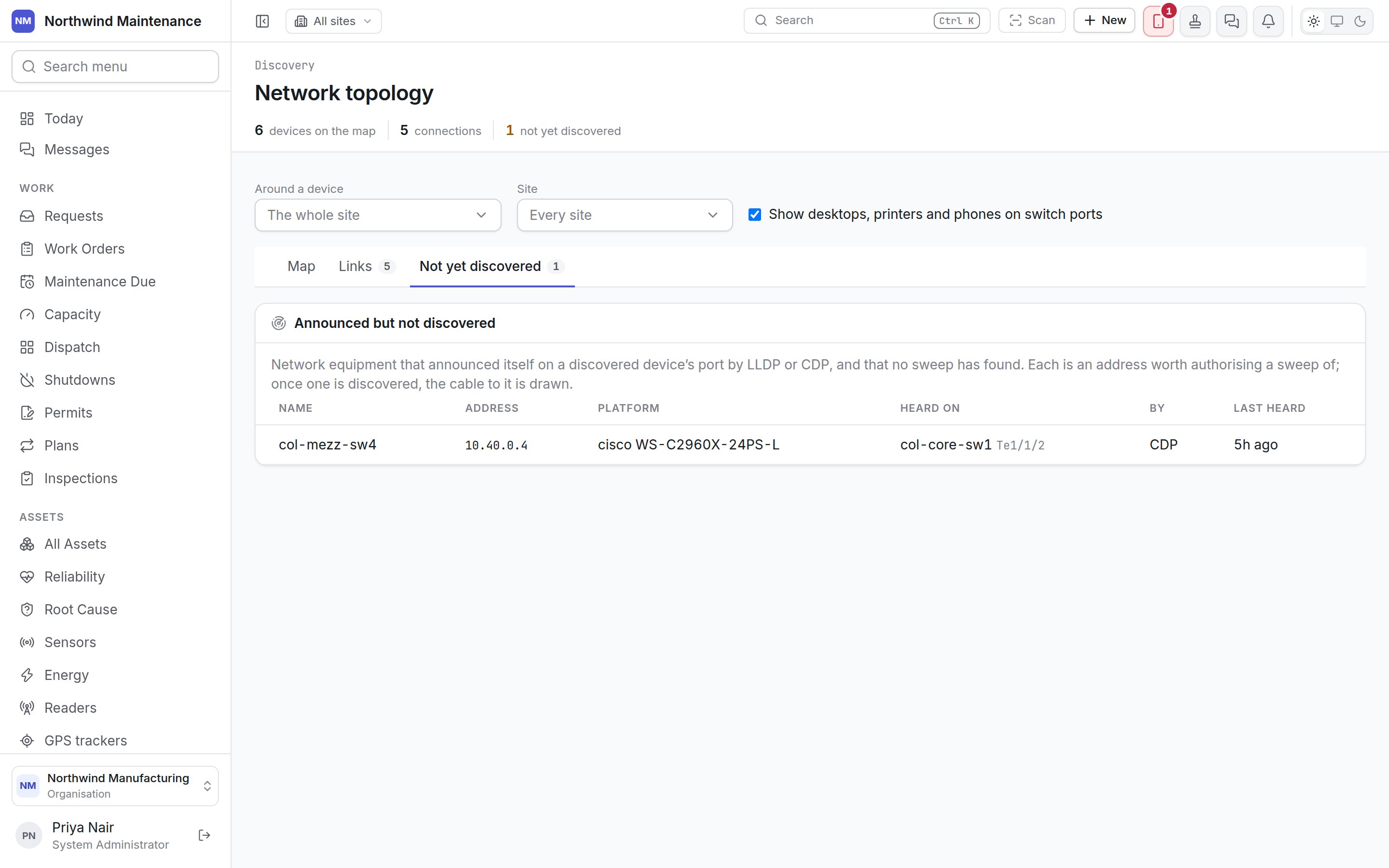
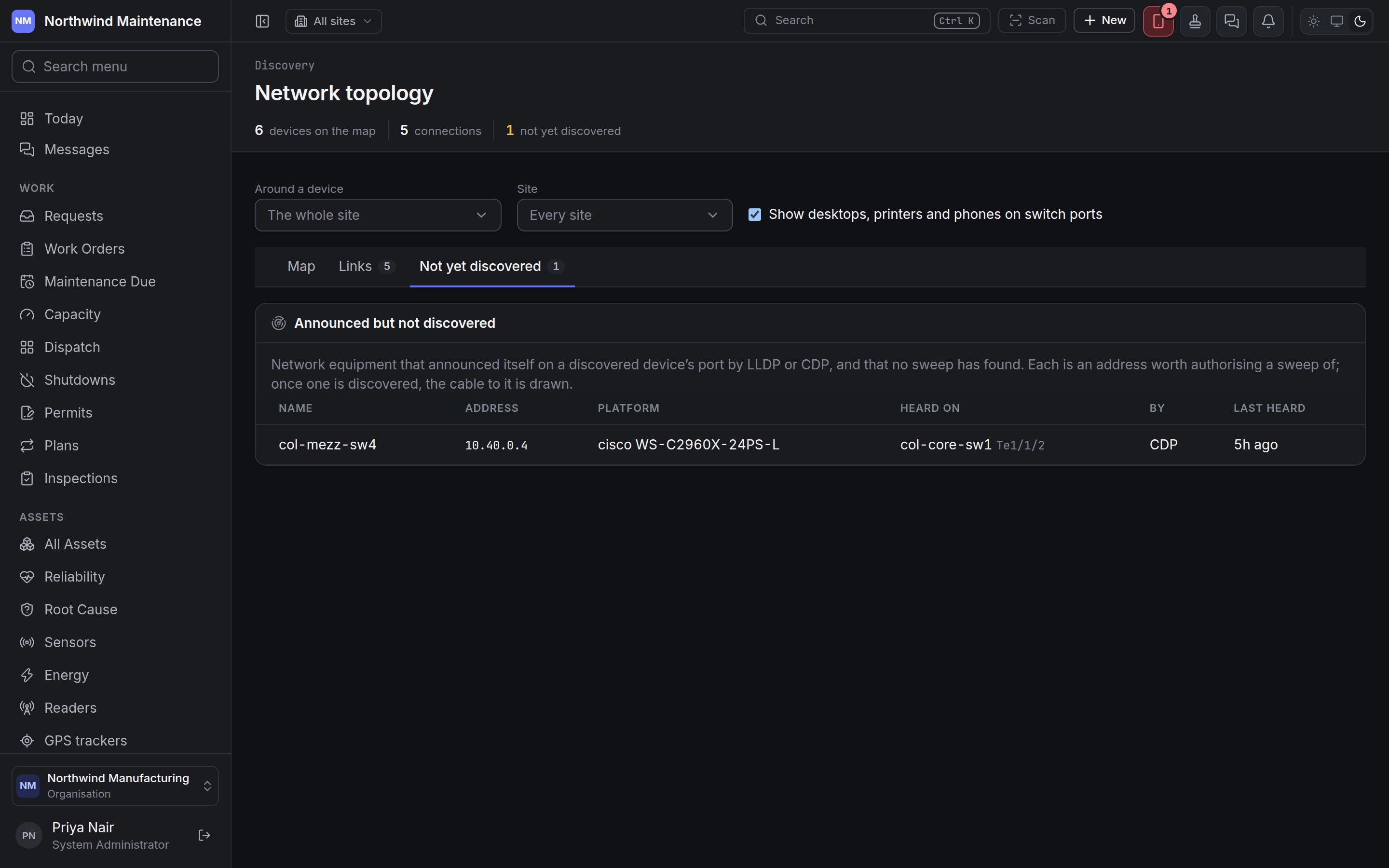 **Announced but not discovered** lists network equipment that announced itself on a discovered
device's port and that no sweep has found. Each is an address worth authorising a sweep of; once it is
discovered, the cable to it is drawn.
| Column | What it shows |
| - | - |
| **Name** | What it calls itself |
| **Address** | Its announced IP address |
| **Platform** | Its make and model as announced |
| **Heard on** | The device and port it was heard on |
| **By** | LLDP or CDP |
| **Last heard** | When it last announced itself |
Seeing this screen needs permission to view scans, discovered devices and the software found on
them.
This documentation is built and hosted on [Mintlify](https://mintlify.com), a developer documentation platform.
**Announced but not discovered** lists network equipment that announced itself on a discovered
device's port and that no sweep has found. Each is an address worth authorising a sweep of; once it is
discovered, the cable to it is drawn.
| Column | What it shows |
| - | - |
| **Name** | What it calls itself |
| **Address** | Its announced IP address |
| **Platform** | Its make and model as announced |
| **Heard on** | The device and port it was heard on |
| **By** | LLDP or CDP |
| **Last heard** | When it last announced itself |
Seeing this screen needs permission to view scans, discovered devices and the software found on
them.
This documentation is built and hosted on [Mintlify](https://mintlify.com), a developer documentation platform.