> ## Documentation Index
> Fetch the complete documentation index at: https://docs.assetinfinity.ai/llms.txt
> Use this file to discover all available pages before exploring further.
# Document settings
> Retention policy, what happens when it runs out, document categories and tags.
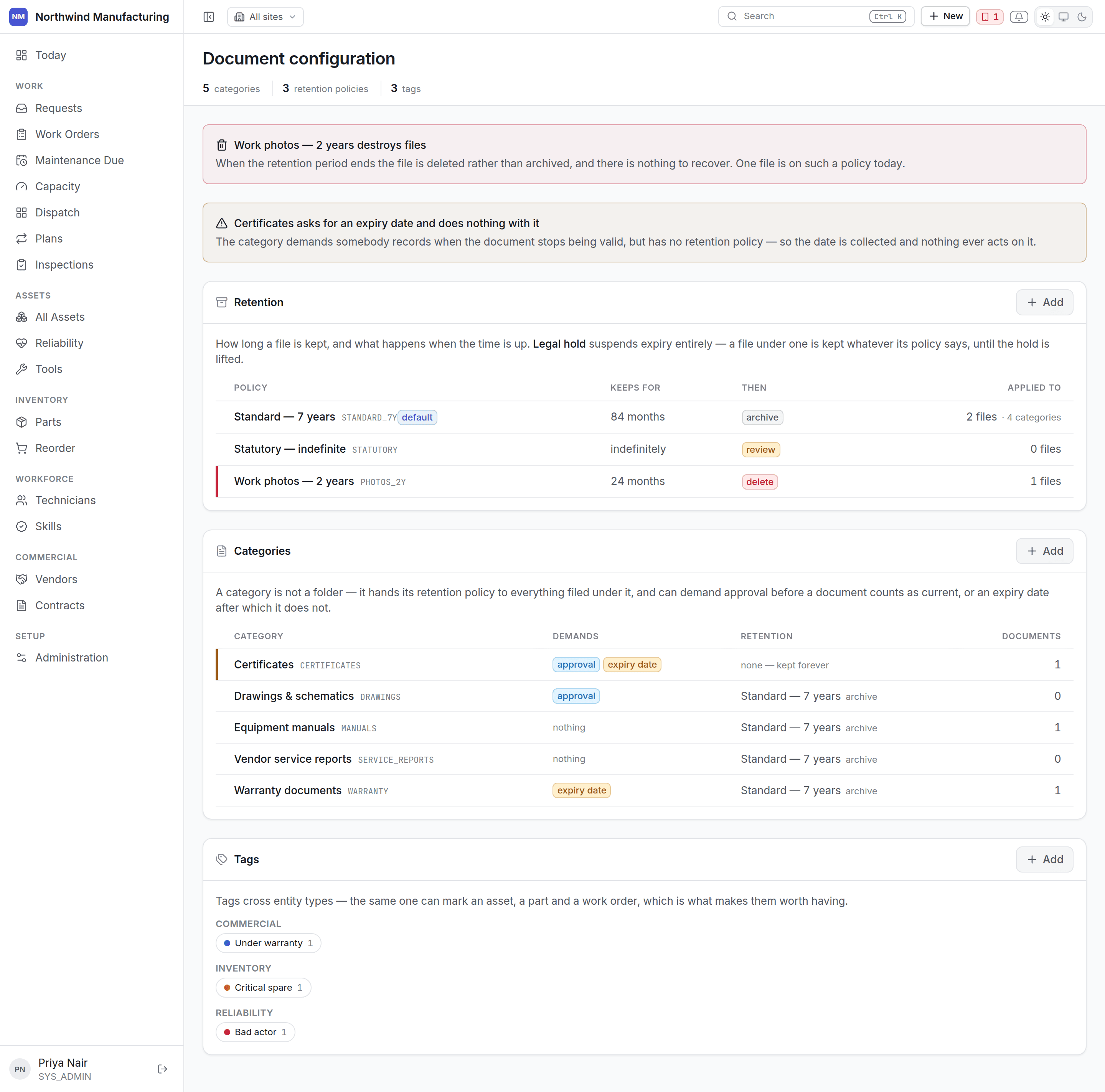 ## Where files live
Files attach to records — manuals and drawings on assets, photographs and signatures on work orders,
signed agreements on contracts, insurance certificates on vendors. They are reached from the
**Files** tab of whatever they belong to.
## Retention policies
How long a file is kept, and **what happens when that runs out**. The second half is the part worth
deciding deliberately:
| On expiry | Effect |
| ------------------- | ------------------------------------------- |
| **Keep** | Nothing happens. The period is advisory |
| **Flag for review** | Someone is asked before anything is removed |
| **Delete** | The file is removed |
A delete policy does what it says. Set it only where you are sure the retention period is right —
a statutory inspection photograph deleted at three years, on a regime that requires seven, is not
recoverable.
Policies are set per document category, so evidence and convenience copies can be treated
differently.
## Document categories
What kind of file this is: manual, drawing, certificate, photograph, report, signed agreement,
safety data sheet.
Categories carry the retention policy, so classifying a file correctly at upload is what makes
retention work at all.
## Tags
A looser way to group files across categories and records — a shutdown name, a project, an audit.
Tags are freely added; categories are a closed list.
## Evidence
Photographs and signatures captured on the [field app](/field/job) arrive as files against the job,
categorised as evidence.
Treat evidence retention separately from convenience copies. A photograph proving a guard was refitted
is a different kind of file from a copy of a manual you can download again.
## Size and type limits
Set centrally. Keep them generous enough for a photograph taken on a modern handset — a limit that
rejects the evidence a technician just captured, at the machine, in the rain, is a limit that costs
you the evidence.
## Related topics
- [Vendor and contract settings](/config/commercial.md)
- [Setting up the plant](/setup/overview.md)
- [Vendors](/commercial/vendors.md)
- [Role reference](/setup/roles.md)
- [Inside a vendor](/commercial/vendor-detail.md)
## Where files live
Files attach to records — manuals and drawings on assets, photographs and signatures on work orders,
signed agreements on contracts, insurance certificates on vendors. They are reached from the
**Files** tab of whatever they belong to.
## Retention policies
How long a file is kept, and **what happens when that runs out**. The second half is the part worth
deciding deliberately:
| On expiry | Effect |
| ------------------- | ------------------------------------------- |
| **Keep** | Nothing happens. The period is advisory |
| **Flag for review** | Someone is asked before anything is removed |
| **Delete** | The file is removed |
A delete policy does what it says. Set it only where you are sure the retention period is right —
a statutory inspection photograph deleted at three years, on a regime that requires seven, is not
recoverable.
Policies are set per document category, so evidence and convenience copies can be treated
differently.
## Document categories
What kind of file this is: manual, drawing, certificate, photograph, report, signed agreement,
safety data sheet.
Categories carry the retention policy, so classifying a file correctly at upload is what makes
retention work at all.
## Tags
A looser way to group files across categories and records — a shutdown name, a project, an audit.
Tags are freely added; categories are a closed list.
## Evidence
Photographs and signatures captured on the [field app](/field/job) arrive as files against the job,
categorised as evidence.
Treat evidence retention separately from convenience copies. A photograph proving a guard was refitted
is a different kind of file from a copy of a manual you can download again.
## Size and type limits
Set centrally. Keep them generous enough for a photograph taken on a modern handset — a limit that
rejects the evidence a technician just captured, at the machine, in the rain, is a limit that costs
you the evidence.
## Related topics
- [Vendor and contract settings](/config/commercial.md)
- [Setting up the plant](/setup/overview.md)
- [Vendors](/commercial/vendors.md)
- [Role reference](/setup/roles.md)
- [Inside a vendor](/commercial/vendor-detail.md)