> ## Documentation Index
> Fetch the complete documentation index at: https://docs.assetinfinity.ai/llms.txt
> Use this file to discover all available pages before exploring further.
# Statuses and transitions
> What each status means to the product, and where a record may go next — the most powerful screen in configuration.
Every other settings screen edits rows. This one edits what the product **means** by them.
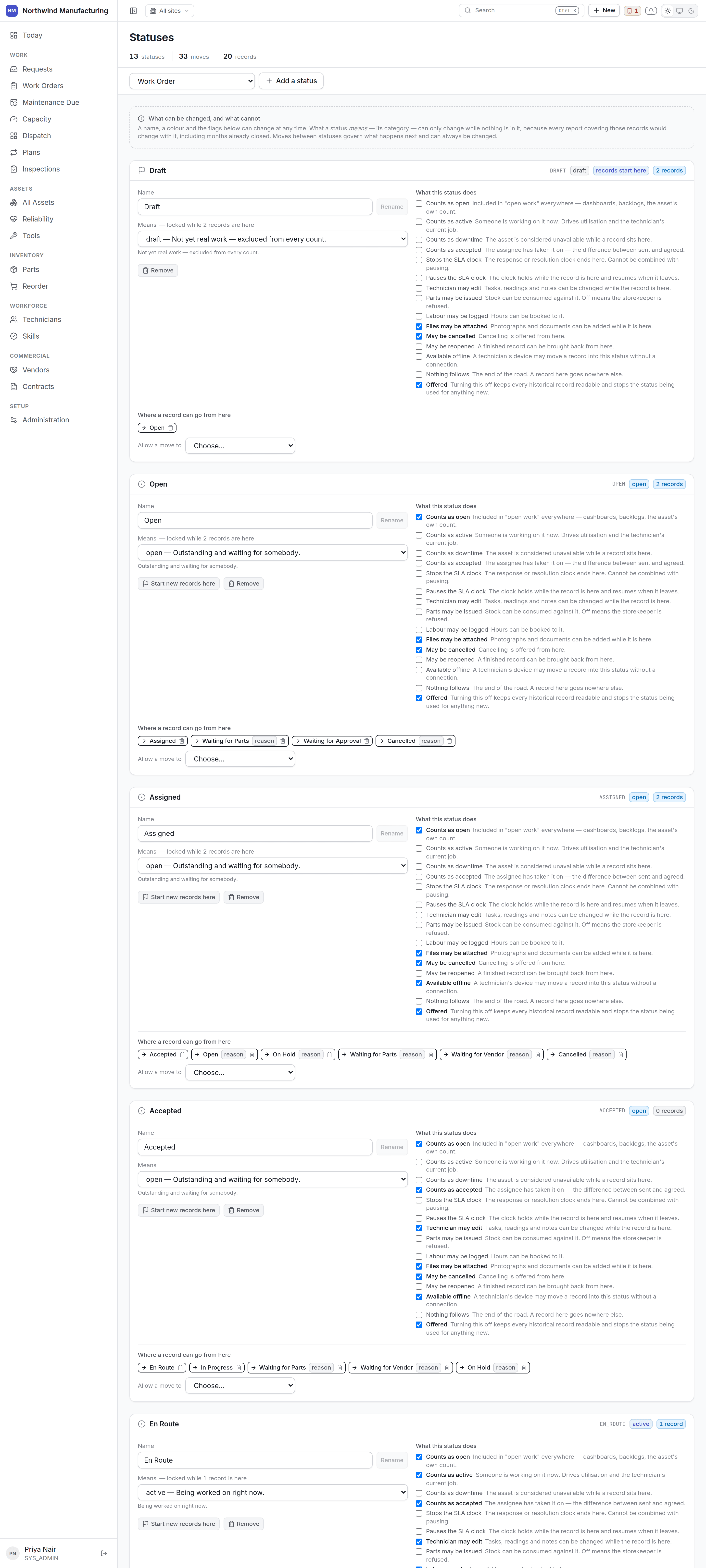 ## What a status decides
A status is not a label. Its flags change what the product does:
| Flag | What it changes |
| ------------------------- | ------------------------------------------ |
| **Counts as open** | What "12 open jobs" counts |
| **Counts as active** | Whether the job is being worked now |
| **Counts as downtime** | Whether the asset is down while here |
| **Stops the SLA clock** | Whether the promise is over |
| **Pauses the SLA clock** | Whether the clock is held |
| **Technician may edit** | Whether the handset can change the job |
| **Parts may be consumed** | Whether a storekeeper may issue against it |
| **Labour may be booked** | Whether hours can go on |
| **May be cancelled** | Whether Cancel is offered |
| **May be reopened** | Whether Reopen is offered |
| **Available offline** | Whether the handset may move a job here |
Thirteen checkboxes in a generic form would be thirteen unexplained levers, which is why this screen
exists and why generic administration is kept away from it.
## The one rule
**What a status means to the records already in it cannot change. What may happen next always can.**
So every status shows its **occupancy** — how many records sit in it right now — and the category
control disables itself when that count is above zero, and says why.
If it did not, changing a status's category would silently rewrite history: every chart counting
"open" would change its answer about last year.
To change a category anyway, move the records out first.
**Transitions are freely editable at all times**, because changing where a record may go next affects
only the future.
## Renaming
Always safe. Rename `WAITING_PARTS` to "Awaiting spares" and the label changes everywhere — the
list chips, the board columns, the notifications — while every report keeps counting it as on hold,
because reports count the **category**, not the name.
## Adding a status
Choose its name and its category, then set its flags. Add transitions into and out of it, or nothing
will ever reach it.
A worked example — a fourth on-hold state, *Waiting for Access*, for jobs blocked because production
will not release the machine:
Category **On hold**. Pauses the SLA clock. Not open to technician edit.
From Assigned, Accepted and In Progress — the states a job can be blocked from.
Back to Assigned ("Access granted") and to In Progress ("Resume").
A new chip appears on the [work order list](/work/work-orders) and a new column on
[dispatch](/work/dispatch), automatically.
## Transitions
Drawn per status rather than as a grid — a 13×13 matrix of checkboxes is unreadable.
Each transition carries:
* **Its label**, which is what the button says. "Wait for parts" reads better than `AWAIT_PARTS`.
* **Whether it requires approval**.
* **Whether it needs a reason**, which is right for anything that undoes or blocks.
* **Whether it is available offline** on the handset.
## The shape of the model
Above the lists, the same model is drawn as a diagram: a box per status, an arrow per allowed move.
The list is the right way to edit a status. What it cannot show is the shape — whether the model has
a dead end, whether anything ever comes back from Cancelled, whether the path from open to closed is
three steps or seven. That is a question about the whole model at once.
* **Drag a box** to arrange the diagram.
* **Drag from the dot** on a box's right edge to another status to allow that move.
* **Click an arrow** to open it.
An arrow carries a number when something stands in the way of that move — a condition, a field that
must be filled in, an action that follows, or an approval. The difference between a move anybody can
make and one carrying four conditions is otherwise invisible.
## What stands on a transition
Selecting an arrow opens four things, none of which had anywhere to live before.
A condition over the record, checked before anything is written. The same builder the
[rules screen](/config/rules) uses: groups combined with **all of these** or **any one of
these**, and **not** where you need it.
You also write **what to tell somebody it refuses** — the sentence they see instead of the move
happening. "Record what was wrong before closing this" beats a generic refusal.
A condition the server cannot read does not block the move. It is recorded as unevaluable
instead, because a mistake in a condition must not strand a job at two in the morning.
A permission code, kept deliberately separate from the condition above. A condition is about the
record, and who is asking is not a property of the record.
A move marked as needing approval additionally requires the approving permission for that record
type — and cannot be made by anything running in the background.
Fields that must have a value before this particular move is allowed. Both the product's own
fields and your [custom fields](/config/custom-fields) are offered.
This is how "you cannot close a job without a resolution code" is expressed, rather than by
making the field mandatory everywhere.
Actions that run once the move has actually happened, so none of them can undo it. Each says
whether it runs immediately or in the background.
**Save this move** saves all four together.
## Which records have state models
Work orders, work requests, assets and vendors, each independently. Versioned and published, so a
change is deliberate rather than immediate.
## Related topics
- [Core concepts](/core-concepts.md)
- [The work order lifecycle](/work/lifecycle.md)
- [What this system does](/introduction.md)
- [Rules](/config/rules.md)
- [Finding your way around](/get-started/navigating.md)
## What a status decides
A status is not a label. Its flags change what the product does:
| Flag | What it changes |
| ------------------------- | ------------------------------------------ |
| **Counts as open** | What "12 open jobs" counts |
| **Counts as active** | Whether the job is being worked now |
| **Counts as downtime** | Whether the asset is down while here |
| **Stops the SLA clock** | Whether the promise is over |
| **Pauses the SLA clock** | Whether the clock is held |
| **Technician may edit** | Whether the handset can change the job |
| **Parts may be consumed** | Whether a storekeeper may issue against it |
| **Labour may be booked** | Whether hours can go on |
| **May be cancelled** | Whether Cancel is offered |
| **May be reopened** | Whether Reopen is offered |
| **Available offline** | Whether the handset may move a job here |
Thirteen checkboxes in a generic form would be thirteen unexplained levers, which is why this screen
exists and why generic administration is kept away from it.
## The one rule
**What a status means to the records already in it cannot change. What may happen next always can.**
So every status shows its **occupancy** — how many records sit in it right now — and the category
control disables itself when that count is above zero, and says why.
If it did not, changing a status's category would silently rewrite history: every chart counting
"open" would change its answer about last year.
To change a category anyway, move the records out first.
**Transitions are freely editable at all times**, because changing where a record may go next affects
only the future.
## Renaming
Always safe. Rename `WAITING_PARTS` to "Awaiting spares" and the label changes everywhere — the
list chips, the board columns, the notifications — while every report keeps counting it as on hold,
because reports count the **category**, not the name.
## Adding a status
Choose its name and its category, then set its flags. Add transitions into and out of it, or nothing
will ever reach it.
A worked example — a fourth on-hold state, *Waiting for Access*, for jobs blocked because production
will not release the machine:
Category **On hold**. Pauses the SLA clock. Not open to technician edit.
From Assigned, Accepted and In Progress — the states a job can be blocked from.
Back to Assigned ("Access granted") and to In Progress ("Resume").
A new chip appears on the [work order list](/work/work-orders) and a new column on
[dispatch](/work/dispatch), automatically.
## Transitions
Drawn per status rather than as a grid — a 13×13 matrix of checkboxes is unreadable.
Each transition carries:
* **Its label**, which is what the button says. "Wait for parts" reads better than `AWAIT_PARTS`.
* **Whether it requires approval**.
* **Whether it needs a reason**, which is right for anything that undoes or blocks.
* **Whether it is available offline** on the handset.
## The shape of the model
Above the lists, the same model is drawn as a diagram: a box per status, an arrow per allowed move.
The list is the right way to edit a status. What it cannot show is the shape — whether the model has
a dead end, whether anything ever comes back from Cancelled, whether the path from open to closed is
three steps or seven. That is a question about the whole model at once.
* **Drag a box** to arrange the diagram.
* **Drag from the dot** on a box's right edge to another status to allow that move.
* **Click an arrow** to open it.
An arrow carries a number when something stands in the way of that move — a condition, a field that
must be filled in, an action that follows, or an approval. The difference between a move anybody can
make and one carrying four conditions is otherwise invisible.
## What stands on a transition
Selecting an arrow opens four things, none of which had anywhere to live before.
A condition over the record, checked before anything is written. The same builder the
[rules screen](/config/rules) uses: groups combined with **all of these** or **any one of
these**, and **not** where you need it.
You also write **what to tell somebody it refuses** — the sentence they see instead of the move
happening. "Record what was wrong before closing this" beats a generic refusal.
A condition the server cannot read does not block the move. It is recorded as unevaluable
instead, because a mistake in a condition must not strand a job at two in the morning.
A permission code, kept deliberately separate from the condition above. A condition is about the
record, and who is asking is not a property of the record.
A move marked as needing approval additionally requires the approving permission for that record
type — and cannot be made by anything running in the background.
Fields that must have a value before this particular move is allowed. Both the product's own
fields and your [custom fields](/config/custom-fields) are offered.
This is how "you cannot close a job without a resolution code" is expressed, rather than by
making the field mandatory everywhere.
Actions that run once the move has actually happened, so none of them can undo it. Each says
whether it runs immediately or in the background.
**Save this move** saves all four together.
## Which records have state models
Work orders, work requests, assets and vendors, each independently. Versioned and published, so a
change is deliberate rather than immediate.
## Related topics
- [Core concepts](/core-concepts.md)
- [The work order lifecycle](/work/lifecycle.md)
- [What this system does](/introduction.md)
- [Rules](/config/rules.md)
- [Finding your way around](/get-started/navigating.md)