> ## Documentation Index
> Fetch the complete documentation index at: https://docs.assetinfinity.ai/llms.txt
> Use this file to discover all available pages before exploring further.
# Work settings
> Priorities and service levels, work order types, categories, resolution codes and where requests come from.
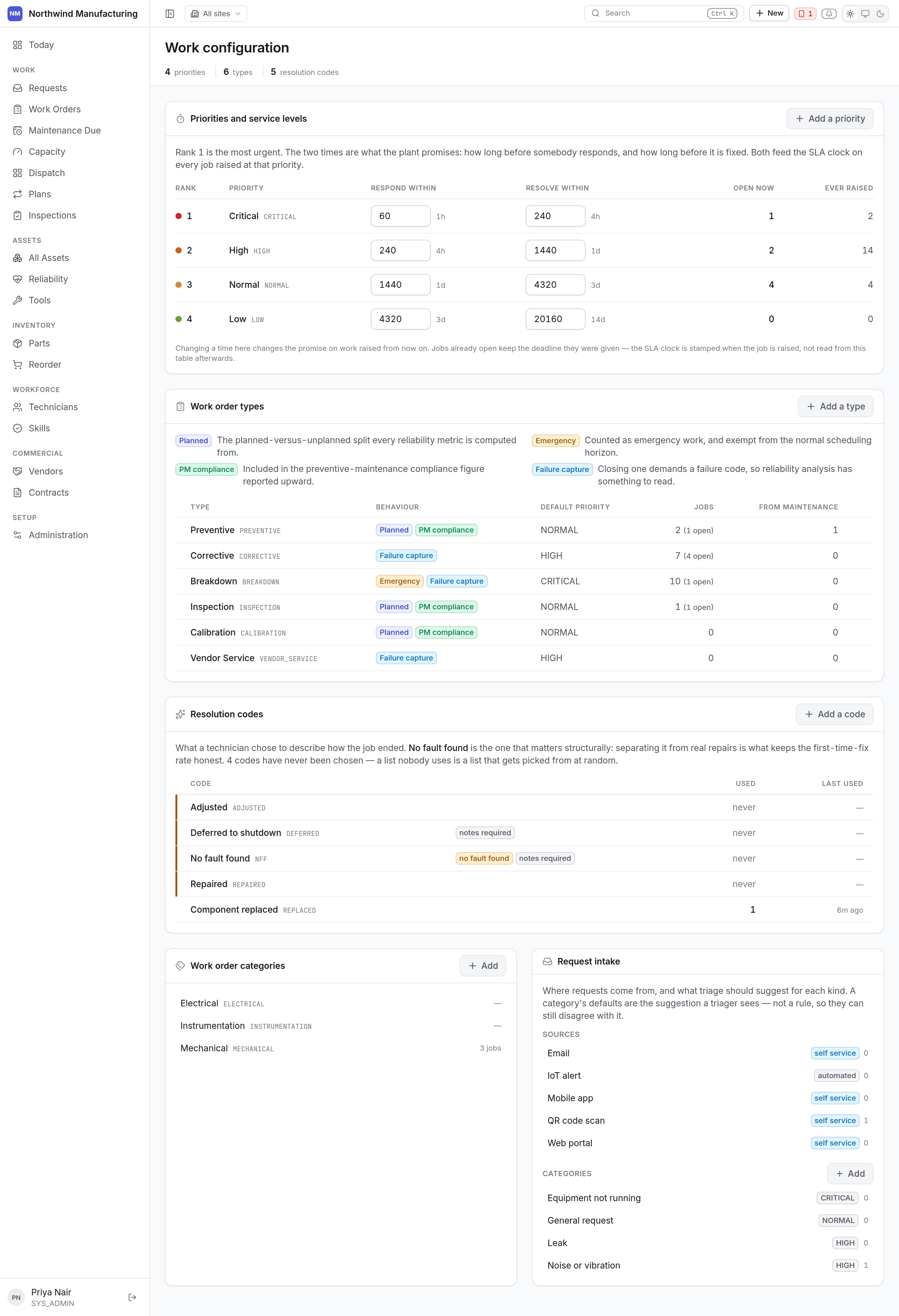 ## Priorities and service levels
A priority is a rung on a ladder, which is why they are edited together rather than as separate
records.
Each priority carries:
| Setting | Meaning |
| ------------------- | --------------------------------------------------------- |
| **Rank** | Its place in the order. What "critical" means is "rank 1" |
| **Label** | What people see |
| **Response time** | How long until somebody must be on it |
| **Resolution time** | How long until it must be finished |
Response and resolution are the **service level**. The clock runs against the site's working week —
so "four hours" on a site that works one shift means four working hours, not four wall-clock hours.
The clock pauses in on-hold states and stops at Completed. See
[the lifecycle](/work/lifecycle).
Ranks are what sorting and the *Critical* view use. Renaming "Critical" to "P1" changes the label
everywhere and breaks nothing.
## Work order types
What kind of job this is. The defaults:
| Type | For |
| -------------- | --------------------------------- |
| **Preventive** | Scheduled maintenance from a plan |
| **Corrective** | Fixing something found wrong |
| **Breakdown** | Something has stopped |
| **Inspection** | A round of checks |
Each type carries a **planned** flag. That flag — not a list of type codes — is what the
*planned against unplanned* chart on the [Executive dashboard](/get-started/dashboards) counts, so
adding your own type gets counted correctly without a change anywhere else.
## Work order categories
A second axis of classification, independent of type: mechanical, electrical, instrumentation,
civil, safety. Useful for reporting and for routing to the right trade.
## Resolution codes
What was actually done, chosen when a job is closed: *replaced*, *repaired*, *adjusted*,
*cleaned*, *no fault found*.
Resolution codes are worth taking seriously. *No fault found* appearing repeatedly on one machine is
a real signal, and only exists as a signal if people record it.
## Request sources
Where a [work request](/work/requests) came from — walk-up, telephone, email, the operator on the
line, a control system. Configure the list so you can tell later which channel a fault arrived
through.
## Request categories
The same idea as work order categories, applied to requests at intake.
## Adding to any of these lists
Each section has its own **New**. Entries can be deactivated rather than deleted, which keeps
historical records readable — a job closed against a resolution code you no longer offer still shows
what it was closed as.
## Related topics
- [Setting up the plant](/setup/overview.md)
- [Work requests](/work/requests.md)
- [The work order lifecycle](/work/lifecycle.md)
- [Workforce settings](/config/workforce.md)
- [Inspection settings](/config/inspections.md)
## Priorities and service levels
A priority is a rung on a ladder, which is why they are edited together rather than as separate
records.
Each priority carries:
| Setting | Meaning |
| ------------------- | --------------------------------------------------------- |
| **Rank** | Its place in the order. What "critical" means is "rank 1" |
| **Label** | What people see |
| **Response time** | How long until somebody must be on it |
| **Resolution time** | How long until it must be finished |
Response and resolution are the **service level**. The clock runs against the site's working week —
so "four hours" on a site that works one shift means four working hours, not four wall-clock hours.
The clock pauses in on-hold states and stops at Completed. See
[the lifecycle](/work/lifecycle).
Ranks are what sorting and the *Critical* view use. Renaming "Critical" to "P1" changes the label
everywhere and breaks nothing.
## Work order types
What kind of job this is. The defaults:
| Type | For |
| -------------- | --------------------------------- |
| **Preventive** | Scheduled maintenance from a plan |
| **Corrective** | Fixing something found wrong |
| **Breakdown** | Something has stopped |
| **Inspection** | A round of checks |
Each type carries a **planned** flag. That flag — not a list of type codes — is what the
*planned against unplanned* chart on the [Executive dashboard](/get-started/dashboards) counts, so
adding your own type gets counted correctly without a change anywhere else.
## Work order categories
A second axis of classification, independent of type: mechanical, electrical, instrumentation,
civil, safety. Useful for reporting and for routing to the right trade.
## Resolution codes
What was actually done, chosen when a job is closed: *replaced*, *repaired*, *adjusted*,
*cleaned*, *no fault found*.
Resolution codes are worth taking seriously. *No fault found* appearing repeatedly on one machine is
a real signal, and only exists as a signal if people record it.
## Request sources
Where a [work request](/work/requests) came from — walk-up, telephone, email, the operator on the
line, a control system. Configure the list so you can tell later which channel a fault arrived
through.
## Request categories
The same idea as work order categories, applied to requests at intake.
## Adding to any of these lists
Each section has its own **New**. Entries can be deactivated rather than deleted, which keeps
historical records readable — a job closed against a resolution code you no longer offer still shows
what it was closed as.
## Related topics
- [Setting up the plant](/setup/overview.md)
- [Work requests](/work/requests.md)
- [The work order lifecycle](/work/lifecycle.md)
- [Workforce settings](/config/workforce.md)
- [Inspection settings](/config/inspections.md)