> ## Documentation Index
> Fetch the complete documentation index at: https://docs.assetinfinity.ai/llms.txt
> Use this file to discover all available pages before exploring further.
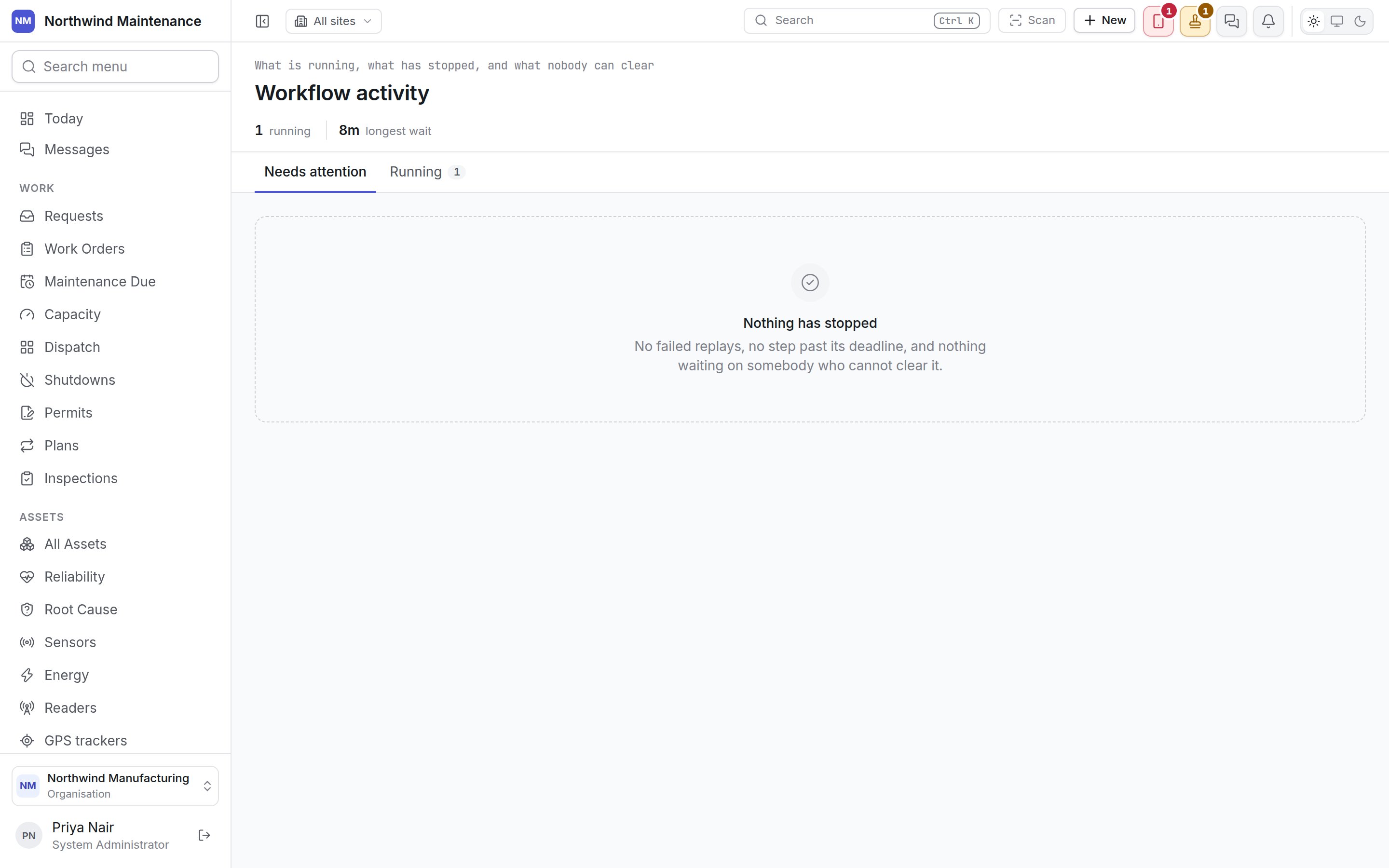
# Workflow activity
> What is running through approvals, what has stopped, and what nobody can clear — a monitor rather than an editor.
**Administration → Workflow activity** shows every request currently held by an [approval workflow](/config/workflows) — and, above all, the ones that have stopped — so an administrator sees what is blocked before the person waiting on it complains. It is a monitor: nothing here changes a workflow or decides a request.
 ## Who can use this screen
Seeing every request in the organisation takes **View rules and their evaluations** — System Administrator, Maintenance Administrator, Auditor and Executive by default. Anyone without it sees **You may not read this**. See [roles](/setup/roles).
## The figures in the header
Only the figures that are above zero are shown.
| Figure | What it counts |
| - | - |
| **running** | Requests waiting on at least one step |
| **failed** | Requests that were approved but could not be carried out |
| **nobody can clear** | Requests waiting on a step whose approvers resolve to nobody eligible |
| **overdue** | Requests with a step past its deadline |
| **escalated** | Requests where somebody senior has already been brought in |
| **reminded** | Requests whose approver has already been nudged |
| **longest wait** | How long the oldest waiting request has been waiting |
The list shows the 300 oldest requests. When there are more, the screen says so; the figures above always cover all of them.
## Needs attention
The first tab lists only what needs somebody to act. *Nothing has stopped — no failed replays, no step past its deadline, and nothing waiting on somebody who cannot clear it* means all is well.
| Headline | What it means | What to do |
| - | - | - |
| **Approved, but it could not be carried out** | Every approver signed, then the action was refused when the product came to perform it — a budget no longer covered it, a record had moved, or a permission had gone. The refusal's own message is shown. Nothing was written | Raise the request again. Retrying would fail the same way |
| **Nobody can clear this** | The step's approvers resolve to no eligible person — the named role or user may have gone, or the only candidate is the person who asked | Change the chain on [Approval workflows](/config/workflows), or withdraw the request. It will otherwise wait indefinitely |
| **N step(s) past the deadline** | A step has sat longer than its escalation allows. The detail says whether somebody senior has already been brought in, or that no escalation is configured on the step so it will keep waiting | Chase the approver, or add an escalation to the step |
| **Approved — being carried out** | Signed off; the product performs the action within a minute | Nothing, unless it is still here after five minutes — then the background job has stopped. Check [Operations](/config/operations) |
## Running
The second tab lists every request currently waiting, healthy or not, headed *Waiting on …* with *N of M steps outstanding*. *Nothing is held* means every write is going straight through.
## What each row shows
| Part | What it shows |
| - | - |
| Title | The record's summary, such as a purchase request number and description |
| Pills | **escalated** and **reminded** where they apply, and the request's status |
| Time | How long it has been waiting |
| **Asked by** | Who raised the request |
| **Raised** | When |
| **Workflow** | The workflow holding it |
| **Where** | The site the record is at, or *Not at a site* |
The decision itself is made on [Approvals](/work/approvals), by whoever the waiting step names.
This documentation is built and hosted on [Mintlify](https://mintlify.com), a developer documentation platform.
## Who can use this screen
Seeing every request in the organisation takes **View rules and their evaluations** — System Administrator, Maintenance Administrator, Auditor and Executive by default. Anyone without it sees **You may not read this**. See [roles](/setup/roles).
## The figures in the header
Only the figures that are above zero are shown.
| Figure | What it counts |
| - | - |
| **running** | Requests waiting on at least one step |
| **failed** | Requests that were approved but could not be carried out |
| **nobody can clear** | Requests waiting on a step whose approvers resolve to nobody eligible |
| **overdue** | Requests with a step past its deadline |
| **escalated** | Requests where somebody senior has already been brought in |
| **reminded** | Requests whose approver has already been nudged |
| **longest wait** | How long the oldest waiting request has been waiting |
The list shows the 300 oldest requests. When there are more, the screen says so; the figures above always cover all of them.
## Needs attention
The first tab lists only what needs somebody to act. *Nothing has stopped — no failed replays, no step past its deadline, and nothing waiting on somebody who cannot clear it* means all is well.
| Headline | What it means | What to do |
| - | - | - |
| **Approved, but it could not be carried out** | Every approver signed, then the action was refused when the product came to perform it — a budget no longer covered it, a record had moved, or a permission had gone. The refusal's own message is shown. Nothing was written | Raise the request again. Retrying would fail the same way |
| **Nobody can clear this** | The step's approvers resolve to no eligible person — the named role or user may have gone, or the only candidate is the person who asked | Change the chain on [Approval workflows](/config/workflows), or withdraw the request. It will otherwise wait indefinitely |
| **N step(s) past the deadline** | A step has sat longer than its escalation allows. The detail says whether somebody senior has already been brought in, or that no escalation is configured on the step so it will keep waiting | Chase the approver, or add an escalation to the step |
| **Approved — being carried out** | Signed off; the product performs the action within a minute | Nothing, unless it is still here after five minutes — then the background job has stopped. Check [Operations](/config/operations) |
## Running
The second tab lists every request currently waiting, healthy or not, headed *Waiting on …* with *N of M steps outstanding*. *Nothing is held* means every write is going straight through.
## What each row shows
| Part | What it shows |
| - | - |
| Title | The record's summary, such as a purchase request number and description |
| Pills | **escalated** and **reminded** where they apply, and the request's status |
| Time | How long it has been waiting |
| **Asked by** | Who raised the request |
| **Raised** | When |
| **Workflow** | The workflow holding it |
| **Where** | The site the record is at, or *Not at a site* |
The decision itself is made on [Approvals](/work/approvals), by whoever the waiting step names.
This documentation is built and hosted on [Mintlify](https://mintlify.com), a developer documentation platform.