> ## Documentation Index
> Fetch the complete documentation index at: https://docs.assetinfinity.ai/llms.txt
> Use this file to discover all available pages before exploring further.
# Working a job
> Accepting, travelling, working through the checklist, recording parts, hours, readings and evidence, and closing.
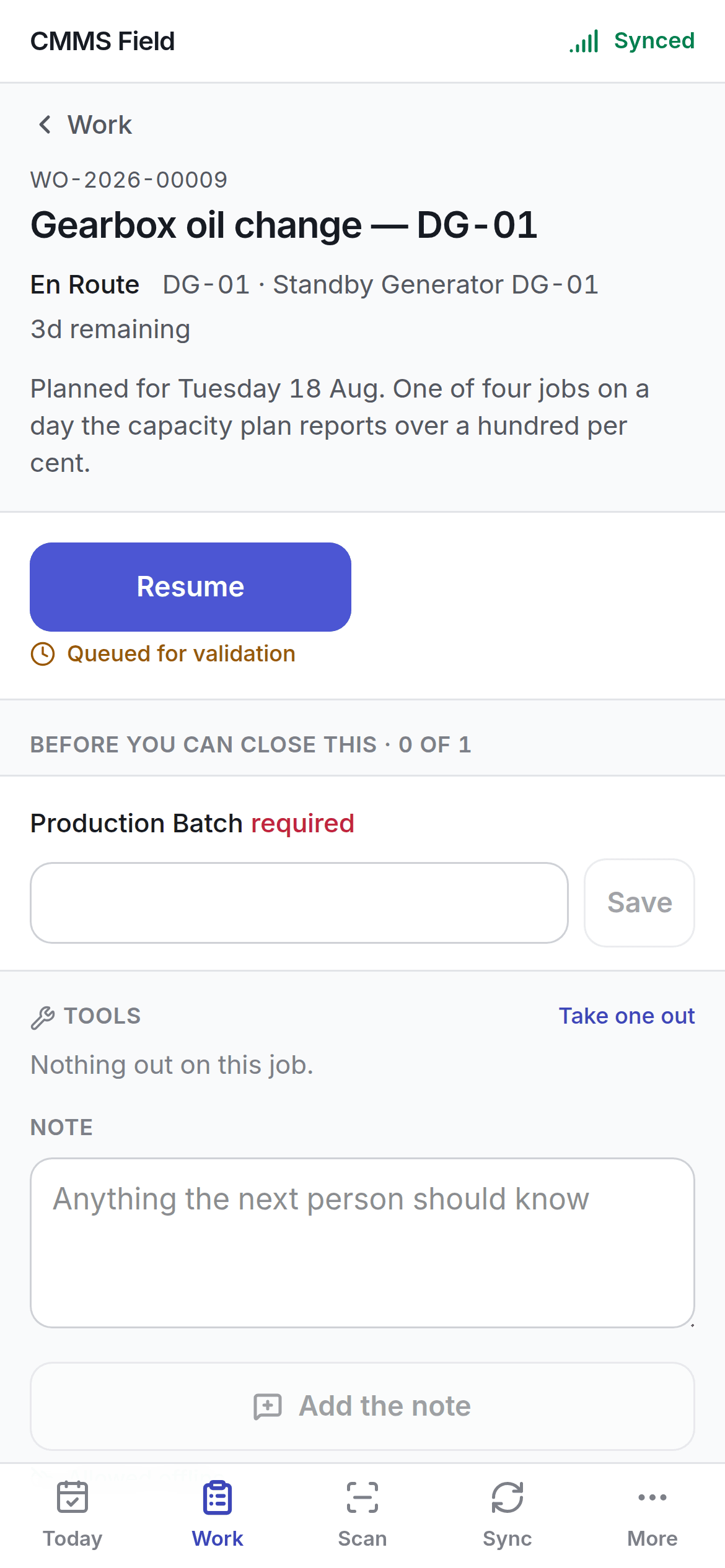
The screen the whole app exists for.
 ## The rule of this screen
**Pressing a button changes the screen now.** The job updates immediately, the change goes into a
queue, and a chip tells you the server has not agreed yet.
Nothing waits for a network, because there usually is not one.
## Moving the job along
The action button offers what your organisation's state model allows next — Accept, Depart, Start
work, Put on hold, Wait for parts, Resume, Complete. See [the lifecycle](/work/lifecycle).
Under it, a chip says where the change has got to:
| Chip | Meaning |
| ------------------------- | ---------------------------------------------------------------------------- |
| **Queued** | Waiting for signal. It will go |
| **Queued for validation** | Sent, waiting on the server's answer |
| **Synced** | The server has it |
| **Failed** | The server refused it — open **Sync** for the reason |
| **Needs a decision** | Somebody else changed the same job. See [conflicts](/field/offline-and-sync) |
## Before you can close this
Anything the job still needs before it can be closed is listed with a count — a mandatory checklist
step, a required custom field, a reading. The job cannot be completed until these are done, and
saying so up front beats discovering it after packing up.
## The checklist
Steps in order, with the mandatory ones marked. Tick them as you go.
A step may require **evidence** — a photograph, a signature or a measurement. Capture it on the spot;
photographs travel separately from the rest of the queue, so a big image does not hold up a status
change.
## Recording as you work
What you actually used. This reduces stock, costs the job, and feeds the consumption history
[reorder](/inventory/reorder) forecasts from.
Time on the job, against the rate that applies to you.
Run hours, cycles, pressures. Take them while you are standing at the counter — it is the most
reliable moment there is. See [meters](/assets/meters).
Take an instrument out against the job, and hand it back when done, so the register knows where
it is.
Anything the next person should know. Notes are the cheapest thing on this screen and the most
read.
## Completing
Complete the job, record what was wrong and what you did, and add the **resolution**. Where the job
fixed a failure, record it — that is what [Reliability](/assets/reliability) is computed from, and a
repair with no failure recorded teaches the plant nothing.
## Order is kept
Queued actions apply in the order you did them. A completion queued after a start applies after it,
even if both go up in the same batch when signal returns.
## Related topics
- [Working offline](/field/offline-and-sync.md)
- [Today and Work](/field/today-and-work.md)
- [Core concepts](/core-concepts.md)
- [The field app](/field/overview.md)
- [Inside a technician](/workforce/technician-detail.md)
## The rule of this screen
**Pressing a button changes the screen now.** The job updates immediately, the change goes into a
queue, and a chip tells you the server has not agreed yet.
Nothing waits for a network, because there usually is not one.
## Moving the job along
The action button offers what your organisation's state model allows next — Accept, Depart, Start
work, Put on hold, Wait for parts, Resume, Complete. See [the lifecycle](/work/lifecycle).
Under it, a chip says where the change has got to:
| Chip | Meaning |
| ------------------------- | ---------------------------------------------------------------------------- |
| **Queued** | Waiting for signal. It will go |
| **Queued for validation** | Sent, waiting on the server's answer |
| **Synced** | The server has it |
| **Failed** | The server refused it — open **Sync** for the reason |
| **Needs a decision** | Somebody else changed the same job. See [conflicts](/field/offline-and-sync) |
## Before you can close this
Anything the job still needs before it can be closed is listed with a count — a mandatory checklist
step, a required custom field, a reading. The job cannot be completed until these are done, and
saying so up front beats discovering it after packing up.
## The checklist
Steps in order, with the mandatory ones marked. Tick them as you go.
A step may require **evidence** — a photograph, a signature or a measurement. Capture it on the spot;
photographs travel separately from the rest of the queue, so a big image does not hold up a status
change.
## Recording as you work
What you actually used. This reduces stock, costs the job, and feeds the consumption history
[reorder](/inventory/reorder) forecasts from.
Time on the job, against the rate that applies to you.
Run hours, cycles, pressures. Take them while you are standing at the counter — it is the most
reliable moment there is. See [meters](/assets/meters).
Take an instrument out against the job, and hand it back when done, so the register knows where
it is.
Anything the next person should know. Notes are the cheapest thing on this screen and the most
read.
## Completing
Complete the job, record what was wrong and what you did, and add the **resolution**. Where the job
fixed a failure, record it — that is what [Reliability](/assets/reliability) is computed from, and a
repair with no failure recorded teaches the plant nothing.
## Order is kept
Queued actions apply in the order you did them. A completion queued after a start applies after it,
even if both go up in the same batch when signal returns.
## Related topics
- [Working offline](/field/offline-and-sync.md)
- [Today and Work](/field/today-and-work.md)
- [Core concepts](/core-concepts.md)
- [The field app](/field/overview.md)
- [Inside a technician](/workforce/technician-detail.md)