> ## Documentation Index
> Fetch the complete documentation index at: https://docs.assetinfinity.ai/llms.txt
> Use this file to discover all available pages before exploring further.
# FF&E plans
> A hotel's furniture, fixtures and equipment reserve over the current year and the five after it — revenue, the share set aside, the items to buy, and the budget heads Year 1 becomes.
An FF\&E plan is one hotel's reserve plan: the revenue it expects, the share of revenue the management agreement sets aside for furniture, fixtures and equipment, the items it intends to buy in each of the next five years, and whether the reserve will hold.
If you don't see this in your navigation, your administrator can switch the module on under **Administration → Modules**, or it may not be included in your plan.
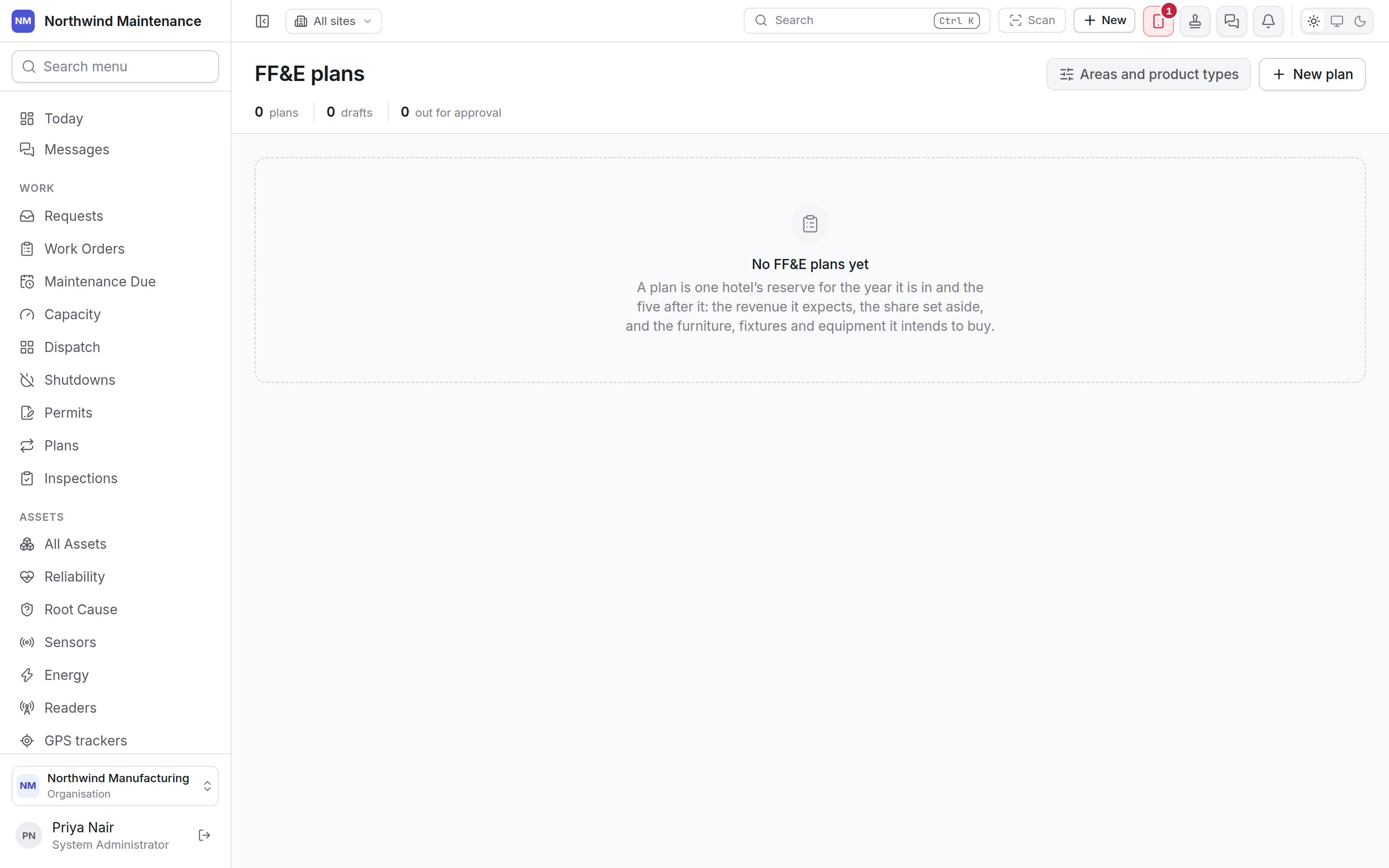
 Opening the screen needs **View FF\&E plans and the reserve each one forecasts**. **Areas and product types** opens the [FF\&E settings](/config/ffe-planning), where the areas (departments) and product types items are filed under, and the replacement reasons, are kept.
## The years
**Year 0** is the year the hotel is in now. **Year 1** is the first year the plan spends in, and the plan runs to **Year 5**. Year 0 is typed as totals; Years 1 to 5 are added up from the items.
## The register
**Stat strip:** **plans**, **drafts**, **out for approval** and **ending below zero**.
| Banner | What it means |
| - | - |
| **These reserves end Year 5 below zero** | The plan intends to spend more from the reserve than it will hold. Revenue, the rate or the items have to move, or some spend becomes owner funded |
| **Approved, with no budget heads opened** | Year 1 was approved and has nothing to be charged to until somebody with the release permission opens its heads |
| Column | What it shows |
| - | - |
| **Plan** | Name and code |
| **Hotel** | The hotel (site) |
| **Years** | Year 1 to Year 5 |
| **Status** | **Draft**, **Out for approval** or **Approved**, with a count of blocking checks or checks to read |
| **Items** | How many items |
| **Year 1 spend** | With the split between FF\&E reserve and owner funded |
| **Five-year total** | Total planned spend |
| **Reserve at end of Year 5** | The forecast closing balance |
There is no rejected status: a plan turned down goes back to draft with the reason shown first on the plan, as **Came back to draft**.
## Starting a plan
**New plan** needs **Start an FF\&E plan for a hotel**.
Opening the screen needs **View FF\&E plans and the reserve each one forecasts**. **Areas and product types** opens the [FF\&E settings](/config/ffe-planning), where the areas (departments) and product types items are filed under, and the replacement reasons, are kept.
## The years
**Year 0** is the year the hotel is in now. **Year 1** is the first year the plan spends in, and the plan runs to **Year 5**. Year 0 is typed as totals; Years 1 to 5 are added up from the items.
## The register
**Stat strip:** **plans**, **drafts**, **out for approval** and **ending below zero**.
| Banner | What it means |
| - | - |
| **These reserves end Year 5 below zero** | The plan intends to spend more from the reserve than it will hold. Revenue, the rate or the items have to move, or some spend becomes owner funded |
| **Approved, with no budget heads opened** | Year 1 was approved and has nothing to be charged to until somebody with the release permission opens its heads |
| Column | What it shows |
| - | - |
| **Plan** | Name and code |
| **Hotel** | The hotel (site) |
| **Years** | Year 1 to Year 5 |
| **Status** | **Draft**, **Out for approval** or **Approved**, with a count of blocking checks or checks to read |
| **Items** | How many items |
| **Year 1 spend** | With the split between FF\&E reserve and owner funded |
| **Five-year total** | Total planned spend |
| **Reserve at end of Year 5** | The forecast closing balance |
There is no rejected status: a plan turned down goes back to draft with the reason shown first on the plan, as **Came back to draft**.
## Starting a plan
**New plan** needs **Start an FF\&E plan for a hotel**.
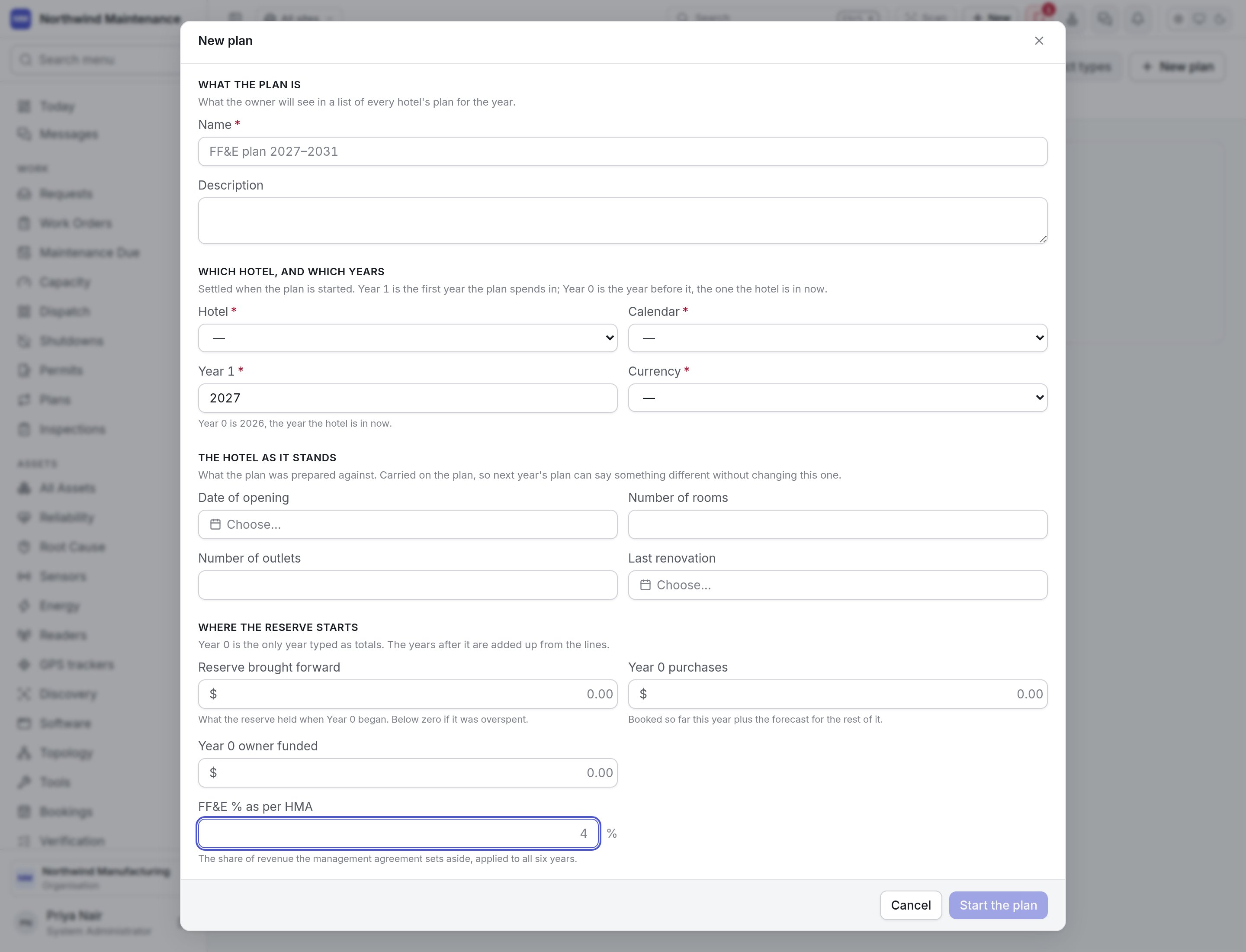
 | Section | Field | What it means | Notes |
| - | - | - | - |
| What the plan is | **Name** | What the owner sees in a list of every hotel's plan | Required |
| | **Description** | Longer explanation | |
| Which hotel, and which years | **Hotel** | The site the plan is for | Required |
| | **Calendar** | The fiscal calendar | Required. Year 1 becomes budget heads in this calendar's year. If none exists the form links to [fiscal calendars](/config/fiscal-calendars) |
| | **Year 1** | The first year the plan spends in | Required. The form shows which year is Year 0 |
| | **Currency** | The plan's currency | Required |
| | **Budget exchange rate** | What one unit of the plan's currency is worth in the company's currency, at the rate fixed for this round | Appears when the plan's currency differs from the company's. Without it, the plan cannot be sent and its heads cannot be opened |
| The hotel as it stands | **Date of opening**, **Number of rooms**, **Number of outlets**, **Last renovation** | What the plan was prepared against | Carried on the plan, so next year's can differ |
| Where the reserve starts | **Reserve brought forward** | What the reserve held when Year 0 began | Below zero if overspent |
| | **Year 0 purchases** | Booked so far this year plus the forecast for the rest | |
| | **Year 0 owner funded** | Owner-funded spend this year | |
| | **FF\&E % as per HMA** | The share of revenue the management agreement sets aside | Applied to all six years; can be changed per year later |
Click **Start the plan**.
## Inside a plan
The plan opens at `/ffe-plans/` followed by its identifier, so a link to a plan can be shared. The header shows how many items, Year 1 spend and the reserve at the end of Year 5.
| Button | When | What it does | Permission |
| - | - | - | - |
| **Edit** | Draft | Changes the plan header and Year 0 figures | **Change a draft FF\&E plan, import it from a workbook, and submit it** |
| **Import workbook** | Draft | Imports the hotel's filled-in FF\&E workbook — see below | Same |
| **Submit** | Draft | Sends it for approval. Disabled while blocking checks fail or the exchange rate is missing. Where nobody else has to sign, it is approved straight away | Same |
| **Take it back** | Out for approval | Returns it to draft and cancels the waiting approval, with an optional reason. Only the person who sent it | Same |
| **Open budget heads** | Approved | Opens Year 1's items as budget heads | **Release money into a budget, and change what it is sanctioned for** |
| **Delete plan** | Draft | Removes the plan and all its items | **Remove a draft FF\&E plan nobody has submitted** |
### Summary tab
Laid out like the workbook's Summary sheet:
| Section | What it shows |
| - | - |
| **The hotel** | H code, hotel, city, date of opening, years in operation, rooms, outlets, last renovation, currency and budget exchange rate |
| **The reserve** | Per year: **Total revenue**, **FF\&E % as per HMA**, **FF\&E provision**, **Reserve at year start**, **FF\&E purchases**, **Reserve at year end** and **Owner funded expenditures** |
| **Revenue and rates** | Edit revenue and the FF\&E % for Years 1 to 5. **Grow from Year 0 by** a yearly percentage and **Fill Years 1 to 5** to project revenue. A box left empty keeps what that year already holds; the rate is a percentage — 4 means four per cent |
| **Spend by area and product type** | Each year's spend per area and product type, split by funding, with totals **of which from the FF\&E reserve** and **of which owner funded** |
### Area tabs
One tab per area (department), with **New investments** and **Replacements** listed separately, in the workbook's order. Each item shows **Project #**, **Item**, **Reason**, **Product type**, **Funding**, **Last purchased**, **Life cycle**, each year's amount, **Total** and **Budget head**. **Add item** opens:
| Field | What it means | Notes |
| - | - | - |
| **Project number** | Assigned when the item is saved, and never changes | Quote it when the purchase comes back for approval |
| **Item** / **Description** | What is being bought | |
| **Area** / **Product type** | Where it is filed | Choose the area first |
| **Investment** | **New investment** or **Replacement** | |
| **Funding source** | **FF\&E reserve** or **Owner funded** | Owner-funded items are reported beside the reserve and do not draw it down |
| **Reason** | From your list; choose "Others" for anything else | |
| **Last purchased** | The year it was last bought | A four-digit year |
| **Life cycle (years)** | Expected life, 1 to 100 | Shows when it is due for replacement |
| **The five years** | **Qty** and **Unit price** per year; **Amount** is worked out | Zero or more |
Replacing an item before its life cycle is up is allowed, with a warning to say why in the description.
### Checks tab
Blocking findings and warnings with the project number, plan and what is wrong, worked out again every time the plan is read.
## Importing the workbook
**Import workbook** reads the hotel's filled-in `.xlsx` workbook — the Summary sheet and one sheet per department. Nothing is written until you have seen what it would change and pressed **Import**.
1. **Choose a workbook**, then **Check**. An older `.xls` file must be saved as `.xlsx` first.
2. Review **The years it plans** — revenue and FF\&E % in the workbook against what is on the plan now.
3. Under **Which area each sheet is**, confirm or choose the area for each department sheet. A guess is filled in where the sheet name matches an area.
4. Under **Reasons your list does not have**, map any reason the workbook spells differently.
5. Fix anything listed as unreadable or blocking in the workbook, then **Import**. It reports how many items were added, updated and taken off. Importing the same workbook again changes nothing.
Where Year 1's items become heads to charge purchases against.
The capital planning round for non-hotel organisations.
This documentation is built and hosted on [Mintlify](https://mintlify.com), a developer documentation platform.
| Section | Field | What it means | Notes |
| - | - | - | - |
| What the plan is | **Name** | What the owner sees in a list of every hotel's plan | Required |
| | **Description** | Longer explanation | |
| Which hotel, and which years | **Hotel** | The site the plan is for | Required |
| | **Calendar** | The fiscal calendar | Required. Year 1 becomes budget heads in this calendar's year. If none exists the form links to [fiscal calendars](/config/fiscal-calendars) |
| | **Year 1** | The first year the plan spends in | Required. The form shows which year is Year 0 |
| | **Currency** | The plan's currency | Required |
| | **Budget exchange rate** | What one unit of the plan's currency is worth in the company's currency, at the rate fixed for this round | Appears when the plan's currency differs from the company's. Without it, the plan cannot be sent and its heads cannot be opened |
| The hotel as it stands | **Date of opening**, **Number of rooms**, **Number of outlets**, **Last renovation** | What the plan was prepared against | Carried on the plan, so next year's can differ |
| Where the reserve starts | **Reserve brought forward** | What the reserve held when Year 0 began | Below zero if overspent |
| | **Year 0 purchases** | Booked so far this year plus the forecast for the rest | |
| | **Year 0 owner funded** | Owner-funded spend this year | |
| | **FF\&E % as per HMA** | The share of revenue the management agreement sets aside | Applied to all six years; can be changed per year later |
Click **Start the plan**.
## Inside a plan
The plan opens at `/ffe-plans/` followed by its identifier, so a link to a plan can be shared. The header shows how many items, Year 1 spend and the reserve at the end of Year 5.
| Button | When | What it does | Permission |
| - | - | - | - |
| **Edit** | Draft | Changes the plan header and Year 0 figures | **Change a draft FF\&E plan, import it from a workbook, and submit it** |
| **Import workbook** | Draft | Imports the hotel's filled-in FF\&E workbook — see below | Same |
| **Submit** | Draft | Sends it for approval. Disabled while blocking checks fail or the exchange rate is missing. Where nobody else has to sign, it is approved straight away | Same |
| **Take it back** | Out for approval | Returns it to draft and cancels the waiting approval, with an optional reason. Only the person who sent it | Same |
| **Open budget heads** | Approved | Opens Year 1's items as budget heads | **Release money into a budget, and change what it is sanctioned for** |
| **Delete plan** | Draft | Removes the plan and all its items | **Remove a draft FF\&E plan nobody has submitted** |
### Summary tab
Laid out like the workbook's Summary sheet:
| Section | What it shows |
| - | - |
| **The hotel** | H code, hotel, city, date of opening, years in operation, rooms, outlets, last renovation, currency and budget exchange rate |
| **The reserve** | Per year: **Total revenue**, **FF\&E % as per HMA**, **FF\&E provision**, **Reserve at year start**, **FF\&E purchases**, **Reserve at year end** and **Owner funded expenditures** |
| **Revenue and rates** | Edit revenue and the FF\&E % for Years 1 to 5. **Grow from Year 0 by** a yearly percentage and **Fill Years 1 to 5** to project revenue. A box left empty keeps what that year already holds; the rate is a percentage — 4 means four per cent |
| **Spend by area and product type** | Each year's spend per area and product type, split by funding, with totals **of which from the FF\&E reserve** and **of which owner funded** |
### Area tabs
One tab per area (department), with **New investments** and **Replacements** listed separately, in the workbook's order. Each item shows **Project #**, **Item**, **Reason**, **Product type**, **Funding**, **Last purchased**, **Life cycle**, each year's amount, **Total** and **Budget head**. **Add item** opens:
| Field | What it means | Notes |
| - | - | - |
| **Project number** | Assigned when the item is saved, and never changes | Quote it when the purchase comes back for approval |
| **Item** / **Description** | What is being bought | |
| **Area** / **Product type** | Where it is filed | Choose the area first |
| **Investment** | **New investment** or **Replacement** | |
| **Funding source** | **FF\&E reserve** or **Owner funded** | Owner-funded items are reported beside the reserve and do not draw it down |
| **Reason** | From your list; choose "Others" for anything else | |
| **Last purchased** | The year it was last bought | A four-digit year |
| **Life cycle (years)** | Expected life, 1 to 100 | Shows when it is due for replacement |
| **The five years** | **Qty** and **Unit price** per year; **Amount** is worked out | Zero or more |
Replacing an item before its life cycle is up is allowed, with a warning to say why in the description.
### Checks tab
Blocking findings and warnings with the project number, plan and what is wrong, worked out again every time the plan is read.
## Importing the workbook
**Import workbook** reads the hotel's filled-in `.xlsx` workbook — the Summary sheet and one sheet per department. Nothing is written until you have seen what it would change and pressed **Import**.
1. **Choose a workbook**, then **Check**. An older `.xls` file must be saved as `.xlsx` first.
2. Review **The years it plans** — revenue and FF\&E % in the workbook against what is on the plan now.
3. Under **Which area each sheet is**, confirm or choose the area for each department sheet. A guess is filled in where the sheet name matches an area.
4. Under **Reasons your list does not have**, map any reason the workbook spells differently.
5. Fix anything listed as unreadable or blocking in the workbook, then **Import**. It reports how many items were added, updated and taken off. Importing the same workbook again changes nothing.
Where Year 1's items become heads to charge purchases against.
The capital planning round for non-hotel organisations.
This documentation is built and hosted on [Mintlify](https://mintlify.com), a developer documentation platform.