> ## Documentation Index
> Fetch the complete documentation index at: https://docs.assetinfinity.ai/llms.txt
> Use this file to discover all available pages before exploring further.
# The part catalogue
> Spare parts and consumables across stores, with stock levels and shortage warnings.
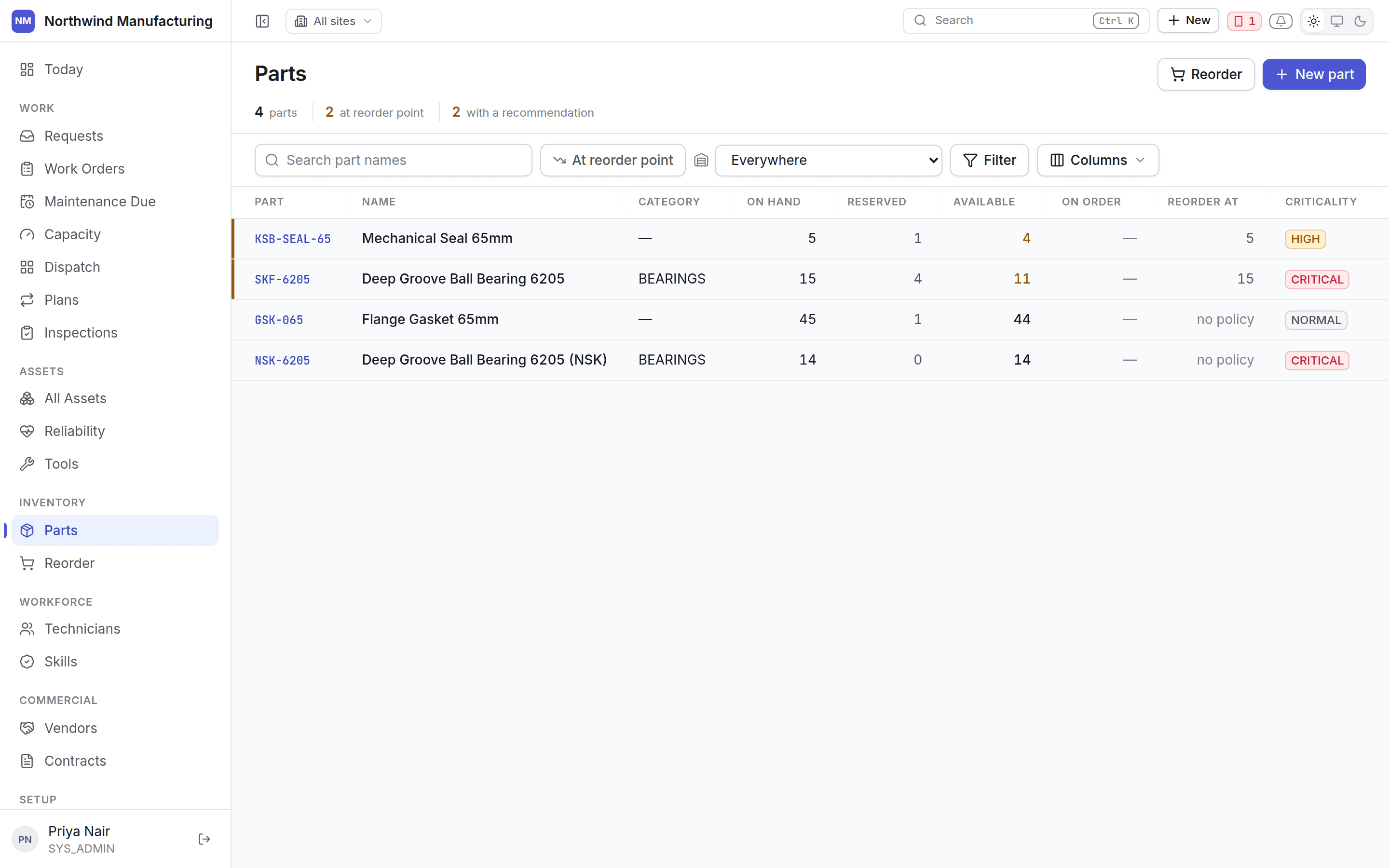
Every part you hold, with what is on hand across all your stores.
 ## Stock across stores
The catalogue totals stock across warehouses. But **"at or below reorder point" is asked per
store**, not against the total — because one store being empty is the fact worth surfacing.
Totalling would hide a shortage at the plant behind stock sitting in another building.
So a part can show healthy total stock and still be flagged: the store that needs it has none.
## Columns
| Column | Notes |
| ----------------- | ------------------------------------------------- |
| **Part number** | Your identifier — click to open |
| **Description** | What it is |
| **Category** | From your [inventory settings](/config/inventory) |
| **On hand** | Total across all stores |
| **Reserved** | Held for jobs, not available |
| **Available** | On hand minus reserved |
| **Reorder point** | The level that triggers a recommendation |
## Reserved against available
Reserving a part for a job holds it so another job cannot take it. **Available** is what you can
actually promise to a new job — which is the number that matters when readiness asks whether a job
can proceed.
## Adding a part
**New** on this screen, or **New → Create Part** in the header.
| Field | Notes |
| ---------------------------------- | ----------------------------------- |
| **Part number** | Must be unique |
| **Description** | What it is |
| **Category** | For grouping and reporting |
| **Unit of measure** | Each, litre, metre, kilogram |
| **Standard cost** | What consumption is valued at |
| **Reorder point** and **quantity** | Per store, under inventory settings |
## Where parts get used
* **On a job.** Parts are reserved as requirements and consumed when issued. See
[the work order](/work/work-order-detail).
* **From a maintenance plan.** Every round of a plan carries the parts it consumes, which is what
lets demand be forecast rather than discovered.
* **On an asset's BOM.** Which parts fit which machine, so "which filter does P-102 take" is
answerable at the counter.
Stock by store, transactions, suppliers, alternatives and consumption.
## Related topics
- [Inventory settings](/config/inventory.md)
- [Inside a part](/inventory/part-detail.md)
- [The work order lifecycle](/work/lifecycle.md)
- [Inside a work order](/work/work-order-detail.md)
- [Inside an asset](/assets/detail.md)
## Stock across stores
The catalogue totals stock across warehouses. But **"at or below reorder point" is asked per
store**, not against the total — because one store being empty is the fact worth surfacing.
Totalling would hide a shortage at the plant behind stock sitting in another building.
So a part can show healthy total stock and still be flagged: the store that needs it has none.
## Columns
| Column | Notes |
| ----------------- | ------------------------------------------------- |
| **Part number** | Your identifier — click to open |
| **Description** | What it is |
| **Category** | From your [inventory settings](/config/inventory) |
| **On hand** | Total across all stores |
| **Reserved** | Held for jobs, not available |
| **Available** | On hand minus reserved |
| **Reorder point** | The level that triggers a recommendation |
## Reserved against available
Reserving a part for a job holds it so another job cannot take it. **Available** is what you can
actually promise to a new job — which is the number that matters when readiness asks whether a job
can proceed.
## Adding a part
**New** on this screen, or **New → Create Part** in the header.
| Field | Notes |
| ---------------------------------- | ----------------------------------- |
| **Part number** | Must be unique |
| **Description** | What it is |
| **Category** | For grouping and reporting |
| **Unit of measure** | Each, litre, metre, kilogram |
| **Standard cost** | What consumption is valued at |
| **Reorder point** and **quantity** | Per store, under inventory settings |
## Where parts get used
* **On a job.** Parts are reserved as requirements and consumed when issued. See
[the work order](/work/work-order-detail).
* **From a maintenance plan.** Every round of a plan carries the parts it consumes, which is what
lets demand be forecast rather than discovered.
* **On an asset's BOM.** Which parts fit which machine, so "which filter does P-102 take" is
answerable at the counter.
Stock by store, transactions, suppliers, alternatives and consumption.
## Related topics
- [Inventory settings](/config/inventory.md)
- [Inside a part](/inventory/part-detail.md)
- [The work order lifecycle](/work/lifecycle.md)
- [Inside a work order](/work/work-order-detail.md)
- [Inside an asset](/assets/detail.md)