> ## Documentation Index
> Fetch the complete documentation index at: https://docs.assetinfinity.ai/llms.txt
> Use this file to discover all available pages before exploring further.
# Audit
> The audit trail: who changed what and when across every record, what each value was before, how to narrow it, and how to export it.
The **Audit** screen is the organisation-wide audit trail — who changed what, when, from where, and
what each value was before — across every record in the product.
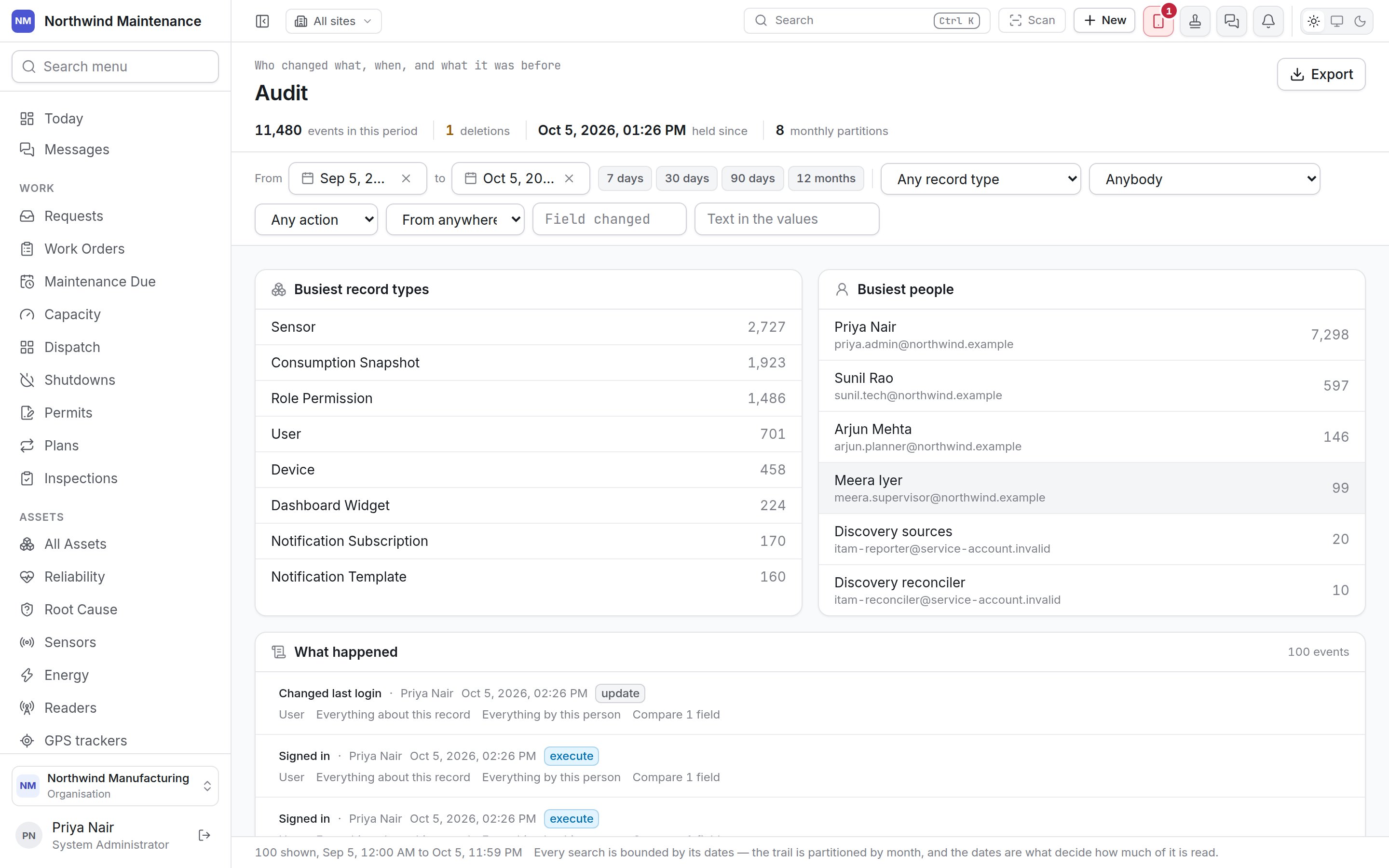
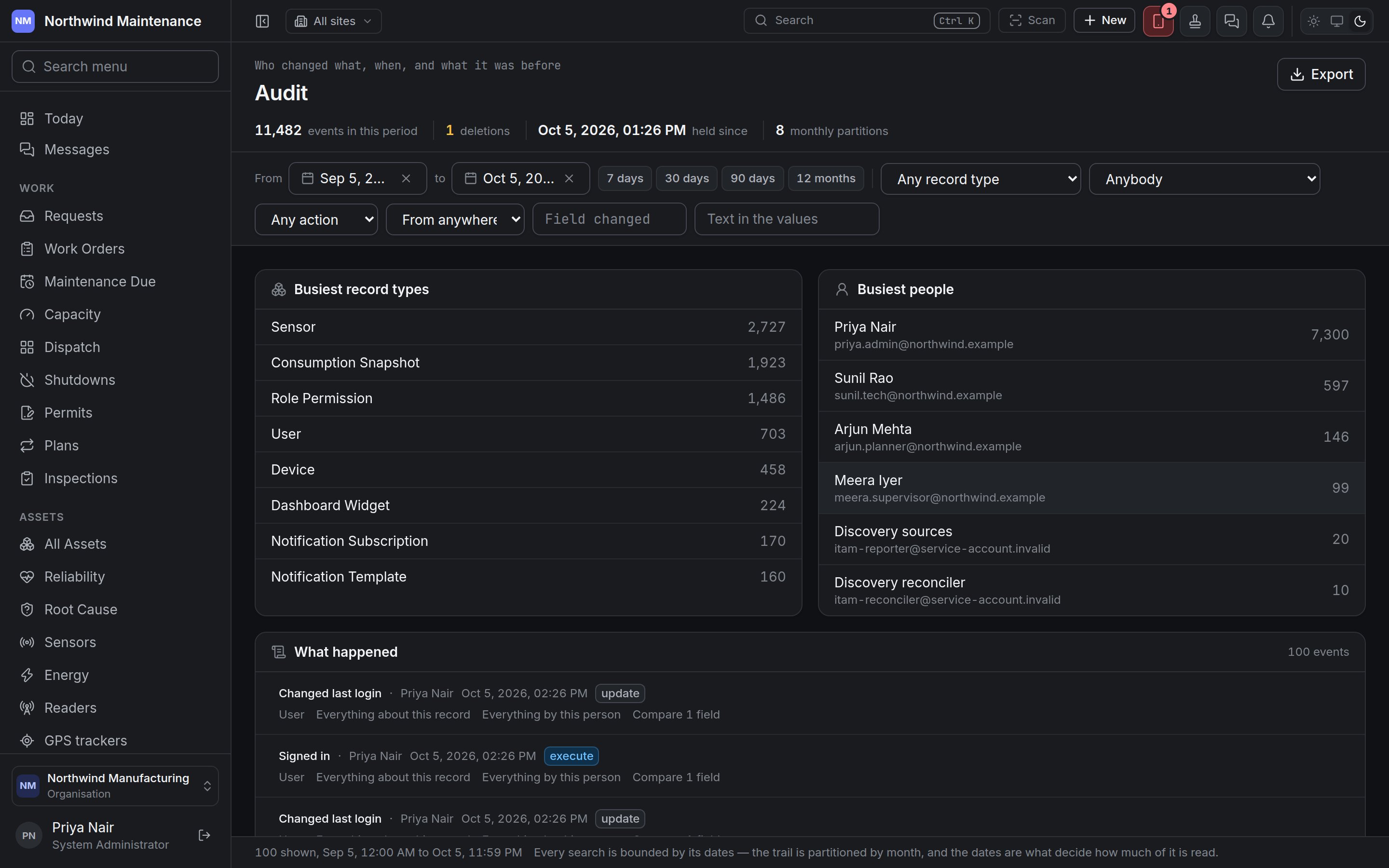 Open it from **Setup → Audit** in the navigation, or from the **Audit** card in
[Administration](/setup/overview). The menu item only appears for people who can read the audit
trail. Individual records — an asset, a site, a work order — also have their own history tab; this
screen is for the questions that do not start from one record: who changed anything last Tuesday,
what did this person touch before they left, show me every deletion.
## What is recorded
The product writes an event whenever a record is created, changed or deleted, and for actions such as
signing in. Each event records:
| Recorded | Meaning |
| - | - |
| **When** | The date and time |
| **Record type** and **Record** | What kind of record it was, and which one |
| **Action** | **create**, **insert**, **update**, **delete** or **execute** (an action such as signing in) |
| **Who** | The person or service account — "the product itself" for changes the product made on its own, such as a scheduled job |
| **From** | Where it came from: **web**, **mobile** (the field app), **api**, **worker** or **cron** (background and scheduled work), **sync**, **email** or **unknown** |
| **Fields changed** | Which fields changed, with their value before and after |
| **What happened** | A plain summary — "Signed in", "Changed last login" |
| **Reason** | The reason given, where the action asks for one |
Nobody can edit or delete an audit event, from this screen or anywhere else. The trail is kept in
monthly sections; the stat strip says how many it holds.
## The stat strip
| Figure | Meaning |
| - | - |
| **events in this period** | Events between the two dates |
| **deletions** | How many of those were deletions |
| **held since** | When the oldest event still held was recorded |
| **monthly partitions** | How many months the trail spans |
## Narrowing the trail
Every search is bounded by its dates — the dates decide how much of the trail is read, so narrow them
first for a fast answer.
| Filter | What it does | Notes |
| - | - | - |
| **From** / **to** | The period. | Defaults to the last 30 days. **7 days**, **30 days**, **90 days** and **12 months** set it in one click. |
| **Any record type** | One kind of record. | The busiest types in the period are listed first, then **Every record type**. |
| **Anybody** | One person. | Includes **Somebody since removed** for accounts that no longer exist. |
| **Any action** | One action. | create, delete, execute, insert, update. |
| **From anywhere** | Where the change came from. | web, mobile, api, worker, sync, cron, email, unknown. |
| **Field changed** | Only events that changed this field. | Type the field's name as the trail records it — for example `criticality_id`, `status`, `cost`. |
| **Text in the values** | Searches the before and after values and the reason. | Slow — narrow the dates first. |
**Clear filters** removes them all. On a phone the filters are behind **Filters**, closed with
**Done**.
## The overview
While only the dates are set, two panels summarise the period: **Busiest record types** and **Busiest
people**, each with a count. They cover the dates only, so they are hidden as soon as you narrow
anything else, and a note says so ("Narrowed — the totals above cover the dates only"). If nothing in
the period was done by a person, the people panel says every event was written by the product itself.
## What happened
The list of events, newest first, with a count. Each event shows its summary, who did it, when, its
action and record type, and three links:
| Link | What it does |
| - | - |
| **Everything about this record** | Narrows the list to this one record. **One record only — show the rest** undoes it. |
| **Everything by this person** | Narrows the list to this person. |
| **Open the record** | Opens the record itself, where it has a screen. |
| **Compare 1 field** / **Compare \{n} fields** | Shows each changed field with its value before and after. **Hide the changes** folds it again. |
Open it from **Setup → Audit** in the navigation, or from the **Audit** card in
[Administration](/setup/overview). The menu item only appears for people who can read the audit
trail. Individual records — an asset, a site, a work order — also have their own history tab; this
screen is for the questions that do not start from one record: who changed anything last Tuesday,
what did this person touch before they left, show me every deletion.
## What is recorded
The product writes an event whenever a record is created, changed or deleted, and for actions such as
signing in. Each event records:
| Recorded | Meaning |
| - | - |
| **When** | The date and time |
| **Record type** and **Record** | What kind of record it was, and which one |
| **Action** | **create**, **insert**, **update**, **delete** or **execute** (an action such as signing in) |
| **Who** | The person or service account — "the product itself" for changes the product made on its own, such as a scheduled job |
| **From** | Where it came from: **web**, **mobile** (the field app), **api**, **worker** or **cron** (background and scheduled work), **sync**, **email** or **unknown** |
| **Fields changed** | Which fields changed, with their value before and after |
| **What happened** | A plain summary — "Signed in", "Changed last login" |
| **Reason** | The reason given, where the action asks for one |
Nobody can edit or delete an audit event, from this screen or anywhere else. The trail is kept in
monthly sections; the stat strip says how many it holds.
## The stat strip
| Figure | Meaning |
| - | - |
| **events in this period** | Events between the two dates |
| **deletions** | How many of those were deletions |
| **held since** | When the oldest event still held was recorded |
| **monthly partitions** | How many months the trail spans |
## Narrowing the trail
Every search is bounded by its dates — the dates decide how much of the trail is read, so narrow them
first for a fast answer.
| Filter | What it does | Notes |
| - | - | - |
| **From** / **to** | The period. | Defaults to the last 30 days. **7 days**, **30 days**, **90 days** and **12 months** set it in one click. |
| **Any record type** | One kind of record. | The busiest types in the period are listed first, then **Every record type**. |
| **Anybody** | One person. | Includes **Somebody since removed** for accounts that no longer exist. |
| **Any action** | One action. | create, delete, execute, insert, update. |
| **From anywhere** | Where the change came from. | web, mobile, api, worker, sync, cron, email, unknown. |
| **Field changed** | Only events that changed this field. | Type the field's name as the trail records it — for example `criticality_id`, `status`, `cost`. |
| **Text in the values** | Searches the before and after values and the reason. | Slow — narrow the dates first. |
**Clear filters** removes them all. On a phone the filters are behind **Filters**, closed with
**Done**.
## The overview
While only the dates are set, two panels summarise the period: **Busiest record types** and **Busiest
people**, each with a count. They cover the dates only, so they are hidden as soon as you narrow
anything else, and a note says so ("Narrowed — the totals above cover the dates only"). If nothing in
the period was done by a person, the people panel says every event was written by the product itself.
## What happened
The list of events, newest first, with a count. Each event shows its summary, who did it, when, its
action and record type, and three links:
| Link | What it does |
| - | - |
| **Everything about this record** | Narrows the list to this one record. **One record only — show the rest** undoes it. |
| **Everything by this person** | Narrows the list to this person. |
| **Open the record** | Opens the record itself, where it has a screen. |
| **Compare 1 field** / **Compare \{n} fields** | Shows each changed field with its value before and after. **Hide the changes** folds it again. |
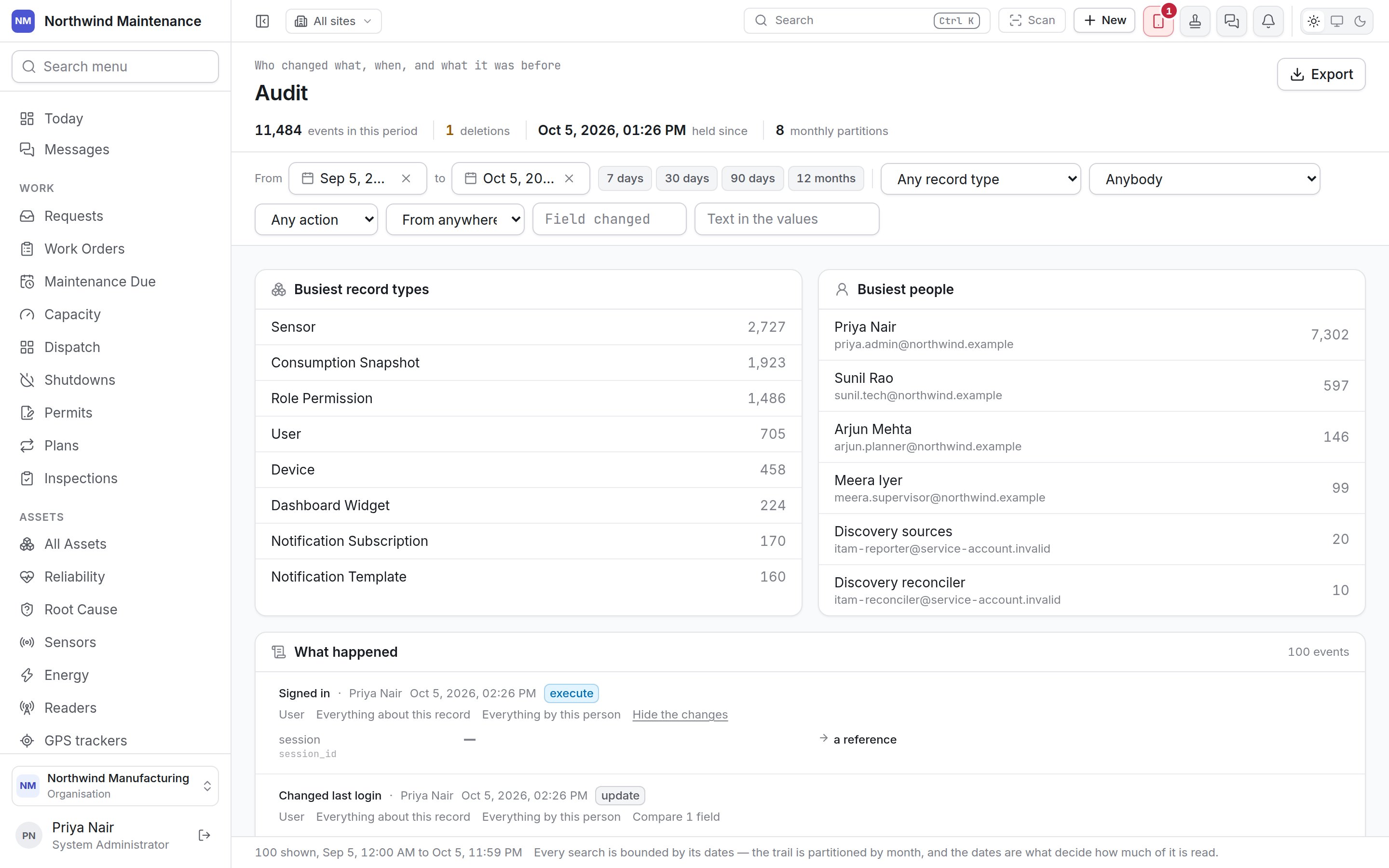
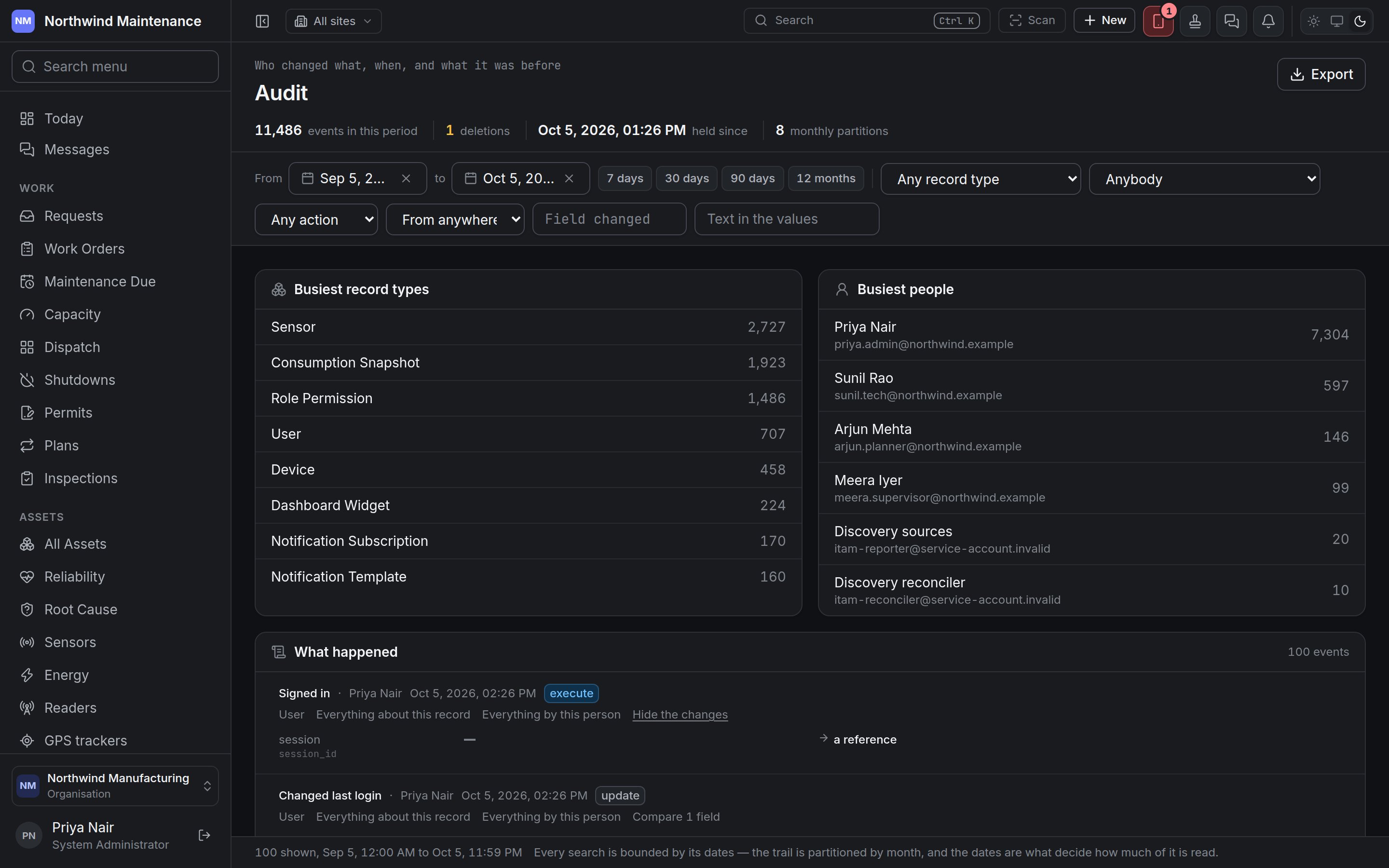 The list loads 100 events at a time; **Show \{n} more** loads the next, or export the period to read
the rest. The footer says how many are shown and for which dates.
An empty answer says which kind it is: "Nothing matches" when your filters exclude everything — the
trail is complete for the period, this is an empty answer, not a missing one — or "Nothing was
recorded in these dates" when the period itself is empty.
## Exporting
**Export** downloads the trail for the period as a CSV file, with the columns **When**, **Record
type**, **Record**, **Action**, **Who**, **From**, **Fields changed**, **What happened** and
**Reason**.
An export carries the dates, the record type and the person — nothing else. If you have set an
action, a source, a field or a text search, a note above the list says the file would be wider than
the list on screen. An export stops at 10,000 events; if it reaches that, a warning asks you to narrow
the dates and take it again.
To send the trail to your security team's SIEM continuously, see
[security events](/config/security-events).
## Who can use this screen
| To | Permission (as the grid shows it) |
| - | - |
| Open the screen and read the whole trail | **Audit · view** |
| Export it | **Audit · export** |
Somebody without **Audit · view** who opens the address is told that reading the whole trail needs
the audit permission; the history tab on a record they can already see is unaffected.
This documentation is built and hosted on [Mintlify](https://mintlify.com), a developer documentation platform.
The list loads 100 events at a time; **Show \{n} more** loads the next, or export the period to read
the rest. The footer says how many are shown and for which dates.
An empty answer says which kind it is: "Nothing matches" when your filters exclude everything — the
trail is complete for the period, this is an empty answer, not a missing one — or "Nothing was
recorded in these dates" when the period itself is empty.
## Exporting
**Export** downloads the trail for the period as a CSV file, with the columns **When**, **Record
type**, **Record**, **Action**, **Who**, **From**, **Fields changed**, **What happened** and
**Reason**.
An export carries the dates, the record type and the person — nothing else. If you have set an
action, a source, a field or a text search, a note above the list says the file would be wider than
the list on screen. An export stops at 10,000 events; if it reaches that, a warning asks you to narrow
the dates and take it again.
To send the trail to your security team's SIEM continuously, see
[security events](/config/security-events).
## Who can use this screen
| To | Permission (as the grid shows it) |
| - | - |
| Open the screen and read the whole trail | **Audit · view** |
| Export it | **Audit · export** |
Somebody without **Audit · view** who opens the address is told that reading the whole trail needs
the audit permission; the history tab on a record they can already see is unaffected.
This documentation is built and hosted on [Mintlify](https://mintlify.com), a developer documentation platform.