> ## Documentation Index
> Fetch the complete documentation index at: https://docs.assetinfinity.ai/llms.txt
> Use this file to discover all available pages before exploring further.
# Modules
> Which parts of the product your organisation has, every module switch and what it turns on or off, and what happens when you switch one off.
The **Modules** screen shows which parts of the product your organisation has, and lets an
administrator switch each one on or off.
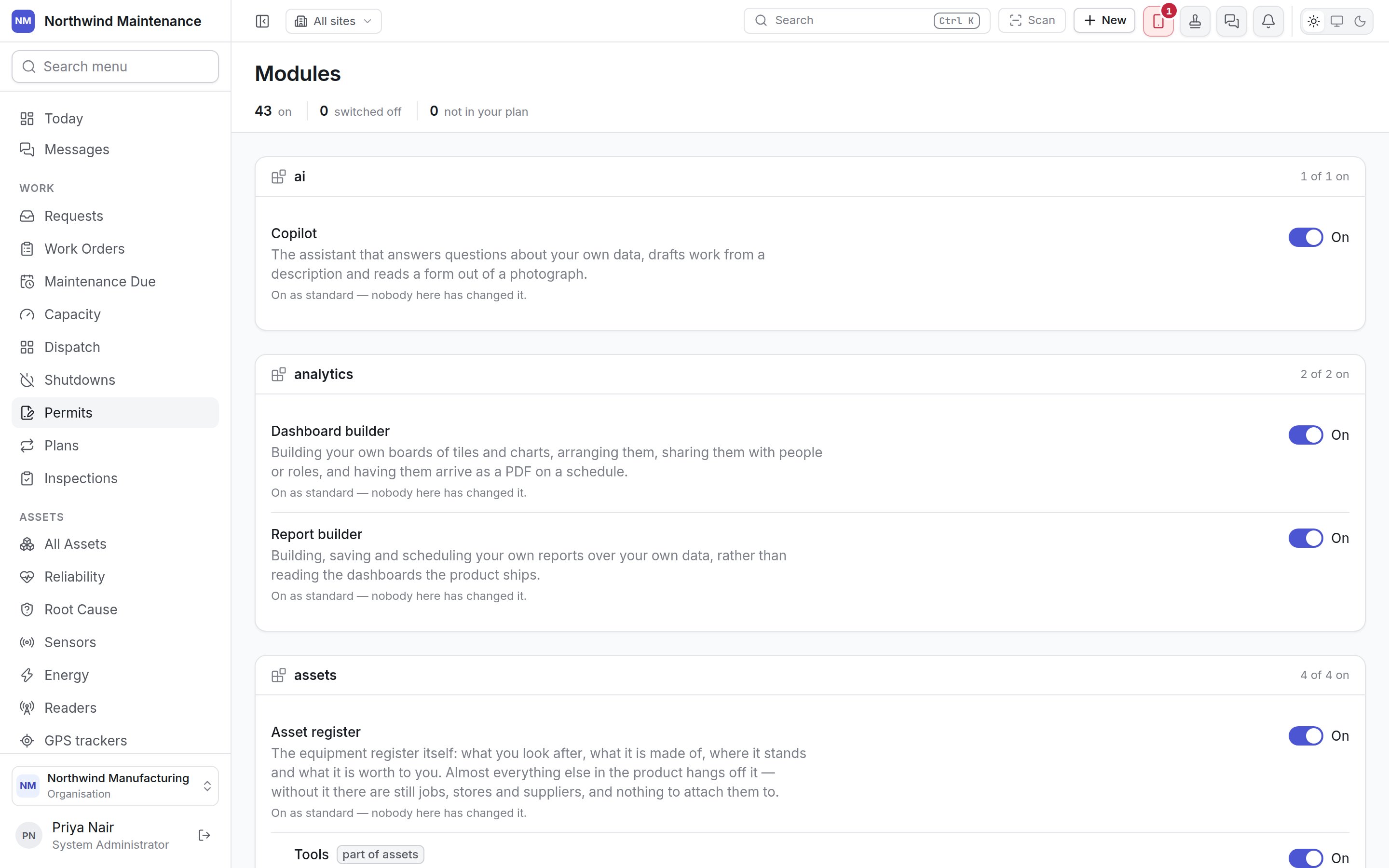
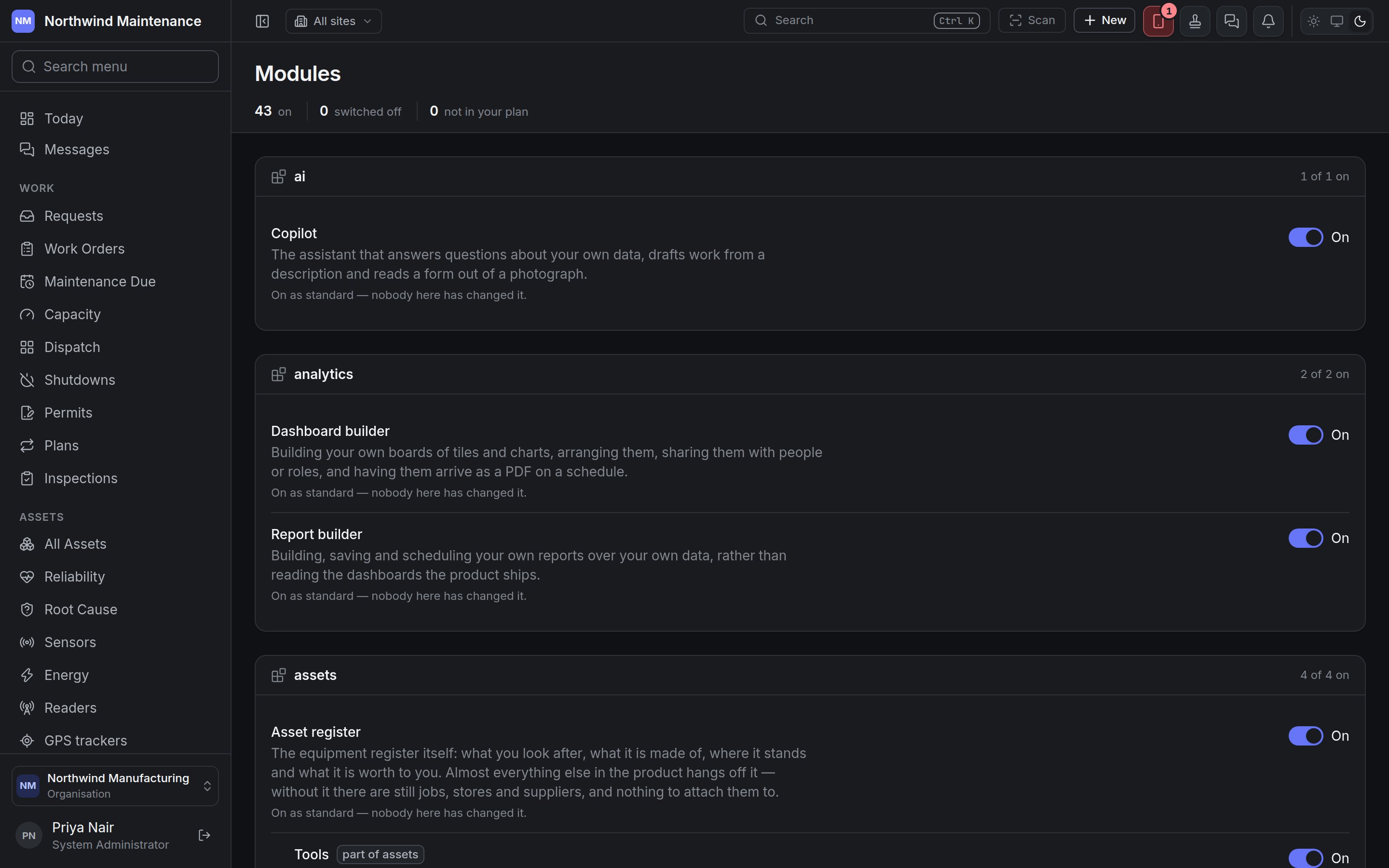 Open it from **Administration → Modules**. When somebody asks "why is there no Purchasing in our
menu", this is where the answer is.
## Reading the screen
The stat strip counts modules that are **on**, **switched off**, and **not in your plan**. Below it,
modules are grouped by product area — each group heading shows the area and how many of its modules
are on (**2 of 2 on**).
Each module row shows its name, what it is for, and its state:
| Row shows | Meaning |
| - | - |
| A switch, **On** | The module is available and switched on. |
| A switch, **Off** | Available, and switched off for your organisation. |
| **part of \{module}** | A sub-module, sold or withheld separately from the module it belongs to. |
| **hidden by \{module}** | Switched on, but hidden because the module it is part of is off. Switch the parent back on. |
| **waiting on \{module}** | Switched on, but hidden because a separate module it needs is off. |
| **Needs \{modules}.** | The modules this one depends on. |
| **trial until \{date}** / **trial ended \{date}** | The module is on a time-limited trial. |
| **On as standard — nobody here has changed it.** / **Off as standard — nobody here has switched it on.** | Your organisation is on the product's standard setting for this module. |
| **Switched on for this organisation.** / **Switched off for this organisation.** | Somebody here chose this setting. |
| **Use the standard setting** | Hands the decision back to the product's standard, undoing your organisation's choice. |
| **Ask your account manager** | The module is not in your plan — there is no switch, because nothing here can change that. |
## Switching a module off
Switching a module off asks first, in a dialog headed **Switch \{name} off?**, which says exactly what
will happen:
* everyone in the organisation loses it straight away — the menu items go, and anything they try to
save in it is refused;
* any other modules that are part of it or need it are listed under **These go with it:**, and come
back when it is switched back on;
* nothing is deleted, and switching it back on brings all of it back.
**Switch it off** confirms. Switching a module on takes effect at once, with no dialog.
When a module is off, its menu items disappear, its configuration cards leave
[Administration](/setup/overview), and its permissions leave the
[permission grid](/setup/roles#the-permission-grid). Pages throughout this documentation that
describe a switchable module carry a note saying so.
## Every module
Every module is **on as standard** unless your plan says otherwise. Sub-modules are listed under the
module they are part of.
### Copilot and analytics
| Module | What it switches on | Needs |
| - | - | - |
| **Copilot** | The assistant that answers questions about your own data, drafts work from a description and reads a form out of a photograph. See [Copilot](/analytics/copilot) and [AI settings](/config/ai). | |
| **Dashboard builder** | Building your own boards of tiles and charts, arranging them, sharing them with people or roles, and having them arrive as a PDF on a schedule. | |
| **Report builder** | Building, saving and scheduling your own reports over your own data, rather than reading the dashboards the product ships. See [reports](/analytics/reports). | |
### Assets
| Module | What it switches on | Needs |
| - | - | - |
| **Asset register** | The equipment register itself: what you look after, what it is made of, where it stands and what it is worth. Almost everything else hangs off it — without it there are still jobs, stores and suppliers, and nothing to attach them to. | |
| **Tools** (part of assets) | The tool crib: calibrated instruments and issued equipment, checked out to a person and expected back, with calibration due dates chased. | |
| **GPS tracking** (part of assets) | GPS trackers fitted to assets, calling in with where they are. Each asset's pin follows its tracker, and every position is kept so its trail can be drawn. Needs the trackers themselves pointed at your organisation. | |
| **IT asset discovery** (part of assets) | Agents, network collectors and connectors that report the computers, servers and network equipment actually out there, matched against the register, with what nobody can account for routed to whoever should. | |
| **Asset verification** | Physical verification rounds — somebody walking a site confirming that what the register says is there is there, with a photograph. | Asset register |
### Work and maintenance
| Module | What it switches on | Needs |
| - | - | - |
| **Work orders** | The jobs themselves: raising, assigning, working and closing them, with the labour, travel and parts that went into each. | |
| **Escalations** (part of work) | An escalation ladder on a job that is late or stuck — levels counted rather than chosen, acknowledged and resolved as separate acts, and raised automatically when an SLA breaches. | |
| **Requests** (part of work) | The queue somebody who is not a maintenance planner writes into: a report of something wrong, triaged, and either turned into a job or rejected with a reason. | |
| **Permits to work** (part of work) | The permit a crew has to be holding before they may start: what is isolated, what was tested, who issued and accepted it, valid between two times and printable for the gate. Without it, a job that needs a permit says so and nothing checks. | |
| **Dispatch board** (part of work) | The board a coordinator works from — every open job against every technician, a day at a time, assigned by dragging. Without it, jobs are assigned from their own screen. | |
| **Preventive maintenance** | Maintenance plans and schedules: what is done to what, how often, and what falls due when. Without it every job is raised by somebody deciding to raise it. | |
| **Inspections** | Checklists somebody walks: the questions, the answers, the photographs, and the findings that come out of them. | |
| **Shutdown planning** | Planned closures and turnarounds: the window, what comes off line, which jobs are in the package, and whether the parts, permits and people for them are ready. | |
### Reliability
| Module | What it switches on | Needs |
| - | - | - |
| **Reliability** | Failure rates, mean time between failures, and which assets cost the most trouble for their size. | Asset register, Work orders |
| **Root cause analysis** (part of reliability) | Structured investigations into why something failed, with corrective actions and a check that they worked. | |
### Inventory and purchasing
| Module | What it switches on | Needs |
| - | - | - |
| **Parts and stock** | The parts catalogue and what is on the shelf: stores and bins, quantities, issues to a job, transfers, adjustments and stock counts. Without it, parts used on a job are recorded as a cost rather than taken out of a store. | |
| **Reordering** (part of inventory) | Minimum and maximum levels per part per store, and the list of what has fallen below one. | |
| **Purchasing** | Purchase requests, orders, receipts and supplier invoices. Without it, parts are received into stock without a purchasing trail. | Suppliers |
| **Quoting** (part of procurement) | Asking several suppliers to quote and comparing what comes back, before an order is raised. | |
| **Receiving** (part of procurement) | Booking a delivery in against its order, line by line, with what was accepted and rejected, and putting the accepted quantity on the shelf. Without it, an invoice is matched against what was ordered rather than against what arrived. | Parts and stock |
### Suppliers and contracts
| Module | What it switches on | Needs |
| - | - | - |
| **Suppliers** | The supplier register: who you buy from and who works on your site, with their sites, contacts, rates and certificates. | |
| **Contracts** (part of commercial) | Service agreements and warranties: what is covered, what it costs, the visits owed and the claims made against them. | |
| **Bookings** | Reserving assets, spaces and people for a customer or a project, with deposits and charges — for sites that hire out what they maintain. | |
### Finance
| Module | What it switches on | Needs |
| - | - | - |
| **Finance** | The financial year your money is counted in: when it starts, how it is divided into periods, and which are still open. Everything else in Finance is counted against one of these calendars. | |
| **Fixed assets and depreciation** (part of finance) | The fixed asset subledger: what each asset is worth in each set of books, what it cost the year, and the journals that go to your accounting system. | Asset register |
| **Budgets** (part of finance) | What a capital spend is approved against, and what is left once orders in flight are counted. | |
| **Capex planning** (part of finance) | The annual round that decides next year's capital spend: unit plans consolidated into a division's, phased month by month, reviewed scheme by scheme, and turned into budget heads once approved. | Budgets |
| **FF\&E planning** (part of finance) | A hotel's five-year plan for furniture, fixtures and equipment: revenue times the management agreement's rate, the reserve that builds up, the items each year buys, and budget heads for Year 1 once approved. | Budgets |
### Sites, energy and devices
| Module | What it switches on | Needs |
| - | - | - |
| **Energy** | Utility meters, tariffs and consumption — what each site and asset costs to run, and when that changes without anybody deciding it should. | |
| **Sensors** | Live readings from equipment sensors, with alerts when one goes outside its limits. Without it, condition data is entered as meter readings by hand. | Asset register |
| **Readers** (part of iot) | RFID and Bluetooth gateways that report what is in a room without anybody scanning it. | |
| **Label printing** | Designing and printing the asset, part and location labels a phone scans, including the label designer and the printer register. | |
| **Lost and found** | A register of what was handed in and what was reported missing, and the matching between the two — for sites open to the public. | |
| **Visitors and devices** | Who is on site, what they brought with them, and whether a laptop leaving was declared and signed for: an employee declares a device, a manager authorises it to enter or leave, and security scans it at the gate. | |
### People, documents and communication
| Module | What it switches on | Needs |
| - | - | - |
| **People** | The technicians: who they are, what they are qualified to do, when they are available and what an hour of their time costs. Without it a job is assigned to nobody and closed by whoever was signed in. | |
| **Document register** | Procedures, drawings, manuals, certificates and permits, filed in folders, versioned, and linked to the assets and jobs they are about. Without it a file still hangs off the record it was attached to. | |
| **Controlled documents** (part of documents) | Revision control on procedures and drawings — a revision is approved, supersedes the last and keeps its file, and expiry and review dates are chased. | |
| **Knowledge base** | Articles, troubleshooting guides, technician notes and lessons learned, searchable together and offered on the job they apply to. | |
| **Messages** | Conversations between people, alongside the discussions on records, with a message able to point at any work order, asset or purchase request. Without it, records can still be commented on. | |
| **Mail arriving** | Raising work by emailing an address, and answering a notification by replying to it. Without it the product still sends email; what goes is hearing the answer. | |
The groups above are arranged for reading; the screen groups modules by their product area.
## Who can use this screen
| To | Permission (as the grid shows it) |
| - | - |
| See which modules your organisation has | **Feature · view** |
| Switch a module on or off, or hand it back to the standard setting | **Feature · admin** |
This documentation is built and hosted on [Mintlify](https://mintlify.com), a developer documentation platform.
Open it from **Administration → Modules**. When somebody asks "why is there no Purchasing in our
menu", this is where the answer is.
## Reading the screen
The stat strip counts modules that are **on**, **switched off**, and **not in your plan**. Below it,
modules are grouped by product area — each group heading shows the area and how many of its modules
are on (**2 of 2 on**).
Each module row shows its name, what it is for, and its state:
| Row shows | Meaning |
| - | - |
| A switch, **On** | The module is available and switched on. |
| A switch, **Off** | Available, and switched off for your organisation. |
| **part of \{module}** | A sub-module, sold or withheld separately from the module it belongs to. |
| **hidden by \{module}** | Switched on, but hidden because the module it is part of is off. Switch the parent back on. |
| **waiting on \{module}** | Switched on, but hidden because a separate module it needs is off. |
| **Needs \{modules}.** | The modules this one depends on. |
| **trial until \{date}** / **trial ended \{date}** | The module is on a time-limited trial. |
| **On as standard — nobody here has changed it.** / **Off as standard — nobody here has switched it on.** | Your organisation is on the product's standard setting for this module. |
| **Switched on for this organisation.** / **Switched off for this organisation.** | Somebody here chose this setting. |
| **Use the standard setting** | Hands the decision back to the product's standard, undoing your organisation's choice. |
| **Ask your account manager** | The module is not in your plan — there is no switch, because nothing here can change that. |
## Switching a module off
Switching a module off asks first, in a dialog headed **Switch \{name} off?**, which says exactly what
will happen:
* everyone in the organisation loses it straight away — the menu items go, and anything they try to
save in it is refused;
* any other modules that are part of it or need it are listed under **These go with it:**, and come
back when it is switched back on;
* nothing is deleted, and switching it back on brings all of it back.
**Switch it off** confirms. Switching a module on takes effect at once, with no dialog.
When a module is off, its menu items disappear, its configuration cards leave
[Administration](/setup/overview), and its permissions leave the
[permission grid](/setup/roles#the-permission-grid). Pages throughout this documentation that
describe a switchable module carry a note saying so.
## Every module
Every module is **on as standard** unless your plan says otherwise. Sub-modules are listed under the
module they are part of.
### Copilot and analytics
| Module | What it switches on | Needs |
| - | - | - |
| **Copilot** | The assistant that answers questions about your own data, drafts work from a description and reads a form out of a photograph. See [Copilot](/analytics/copilot) and [AI settings](/config/ai). | |
| **Dashboard builder** | Building your own boards of tiles and charts, arranging them, sharing them with people or roles, and having them arrive as a PDF on a schedule. | |
| **Report builder** | Building, saving and scheduling your own reports over your own data, rather than reading the dashboards the product ships. See [reports](/analytics/reports). | |
### Assets
| Module | What it switches on | Needs |
| - | - | - |
| **Asset register** | The equipment register itself: what you look after, what it is made of, where it stands and what it is worth. Almost everything else hangs off it — without it there are still jobs, stores and suppliers, and nothing to attach them to. | |
| **Tools** (part of assets) | The tool crib: calibrated instruments and issued equipment, checked out to a person and expected back, with calibration due dates chased. | |
| **GPS tracking** (part of assets) | GPS trackers fitted to assets, calling in with where they are. Each asset's pin follows its tracker, and every position is kept so its trail can be drawn. Needs the trackers themselves pointed at your organisation. | |
| **IT asset discovery** (part of assets) | Agents, network collectors and connectors that report the computers, servers and network equipment actually out there, matched against the register, with what nobody can account for routed to whoever should. | |
| **Asset verification** | Physical verification rounds — somebody walking a site confirming that what the register says is there is there, with a photograph. | Asset register |
### Work and maintenance
| Module | What it switches on | Needs |
| - | - | - |
| **Work orders** | The jobs themselves: raising, assigning, working and closing them, with the labour, travel and parts that went into each. | |
| **Escalations** (part of work) | An escalation ladder on a job that is late or stuck — levels counted rather than chosen, acknowledged and resolved as separate acts, and raised automatically when an SLA breaches. | |
| **Requests** (part of work) | The queue somebody who is not a maintenance planner writes into: a report of something wrong, triaged, and either turned into a job or rejected with a reason. | |
| **Permits to work** (part of work) | The permit a crew has to be holding before they may start: what is isolated, what was tested, who issued and accepted it, valid between two times and printable for the gate. Without it, a job that needs a permit says so and nothing checks. | |
| **Dispatch board** (part of work) | The board a coordinator works from — every open job against every technician, a day at a time, assigned by dragging. Without it, jobs are assigned from their own screen. | |
| **Preventive maintenance** | Maintenance plans and schedules: what is done to what, how often, and what falls due when. Without it every job is raised by somebody deciding to raise it. | |
| **Inspections** | Checklists somebody walks: the questions, the answers, the photographs, and the findings that come out of them. | |
| **Shutdown planning** | Planned closures and turnarounds: the window, what comes off line, which jobs are in the package, and whether the parts, permits and people for them are ready. | |
### Reliability
| Module | What it switches on | Needs |
| - | - | - |
| **Reliability** | Failure rates, mean time between failures, and which assets cost the most trouble for their size. | Asset register, Work orders |
| **Root cause analysis** (part of reliability) | Structured investigations into why something failed, with corrective actions and a check that they worked. | |
### Inventory and purchasing
| Module | What it switches on | Needs |
| - | - | - |
| **Parts and stock** | The parts catalogue and what is on the shelf: stores and bins, quantities, issues to a job, transfers, adjustments and stock counts. Without it, parts used on a job are recorded as a cost rather than taken out of a store. | |
| **Reordering** (part of inventory) | Minimum and maximum levels per part per store, and the list of what has fallen below one. | |
| **Purchasing** | Purchase requests, orders, receipts and supplier invoices. Without it, parts are received into stock without a purchasing trail. | Suppliers |
| **Quoting** (part of procurement) | Asking several suppliers to quote and comparing what comes back, before an order is raised. | |
| **Receiving** (part of procurement) | Booking a delivery in against its order, line by line, with what was accepted and rejected, and putting the accepted quantity on the shelf. Without it, an invoice is matched against what was ordered rather than against what arrived. | Parts and stock |
### Suppliers and contracts
| Module | What it switches on | Needs |
| - | - | - |
| **Suppliers** | The supplier register: who you buy from and who works on your site, with their sites, contacts, rates and certificates. | |
| **Contracts** (part of commercial) | Service agreements and warranties: what is covered, what it costs, the visits owed and the claims made against them. | |
| **Bookings** | Reserving assets, spaces and people for a customer or a project, with deposits and charges — for sites that hire out what they maintain. | |
### Finance
| Module | What it switches on | Needs |
| - | - | - |
| **Finance** | The financial year your money is counted in: when it starts, how it is divided into periods, and which are still open. Everything else in Finance is counted against one of these calendars. | |
| **Fixed assets and depreciation** (part of finance) | The fixed asset subledger: what each asset is worth in each set of books, what it cost the year, and the journals that go to your accounting system. | Asset register |
| **Budgets** (part of finance) | What a capital spend is approved against, and what is left once orders in flight are counted. | |
| **Capex planning** (part of finance) | The annual round that decides next year's capital spend: unit plans consolidated into a division's, phased month by month, reviewed scheme by scheme, and turned into budget heads once approved. | Budgets |
| **FF\&E planning** (part of finance) | A hotel's five-year plan for furniture, fixtures and equipment: revenue times the management agreement's rate, the reserve that builds up, the items each year buys, and budget heads for Year 1 once approved. | Budgets |
### Sites, energy and devices
| Module | What it switches on | Needs |
| - | - | - |
| **Energy** | Utility meters, tariffs and consumption — what each site and asset costs to run, and when that changes without anybody deciding it should. | |
| **Sensors** | Live readings from equipment sensors, with alerts when one goes outside its limits. Without it, condition data is entered as meter readings by hand. | Asset register |
| **Readers** (part of iot) | RFID and Bluetooth gateways that report what is in a room without anybody scanning it. | |
| **Label printing** | Designing and printing the asset, part and location labels a phone scans, including the label designer and the printer register. | |
| **Lost and found** | A register of what was handed in and what was reported missing, and the matching between the two — for sites open to the public. | |
| **Visitors and devices** | Who is on site, what they brought with them, and whether a laptop leaving was declared and signed for: an employee declares a device, a manager authorises it to enter or leave, and security scans it at the gate. | |
### People, documents and communication
| Module | What it switches on | Needs |
| - | - | - |
| **People** | The technicians: who they are, what they are qualified to do, when they are available and what an hour of their time costs. Without it a job is assigned to nobody and closed by whoever was signed in. | |
| **Document register** | Procedures, drawings, manuals, certificates and permits, filed in folders, versioned, and linked to the assets and jobs they are about. Without it a file still hangs off the record it was attached to. | |
| **Controlled documents** (part of documents) | Revision control on procedures and drawings — a revision is approved, supersedes the last and keeps its file, and expiry and review dates are chased. | |
| **Knowledge base** | Articles, troubleshooting guides, technician notes and lessons learned, searchable together and offered on the job they apply to. | |
| **Messages** | Conversations between people, alongside the discussions on records, with a message able to point at any work order, asset or purchase request. Without it, records can still be commented on. | |
| **Mail arriving** | Raising work by emailing an address, and answering a notification by replying to it. Without it the product still sends email; what goes is hearing the answer. | |
The groups above are arranged for reading; the screen groups modules by their product area.
## Who can use this screen
| To | Permission (as the grid shows it) |
| - | - |
| See which modules your organisation has | **Feature · view** |
| Switch a module on or off, or hand it back to the standard setting | **Feature · admin** |
This documentation is built and hosted on [Mintlify](https://mintlify.com), a developer documentation platform.