> ## Documentation Index
> Fetch the complete documentation index at: https://docs.assetinfinity.ai/llms.txt
> Use this file to discover all available pages before exploring further.
# Setting up the plant
> What an administrator configures, in the order it makes sense to do it.
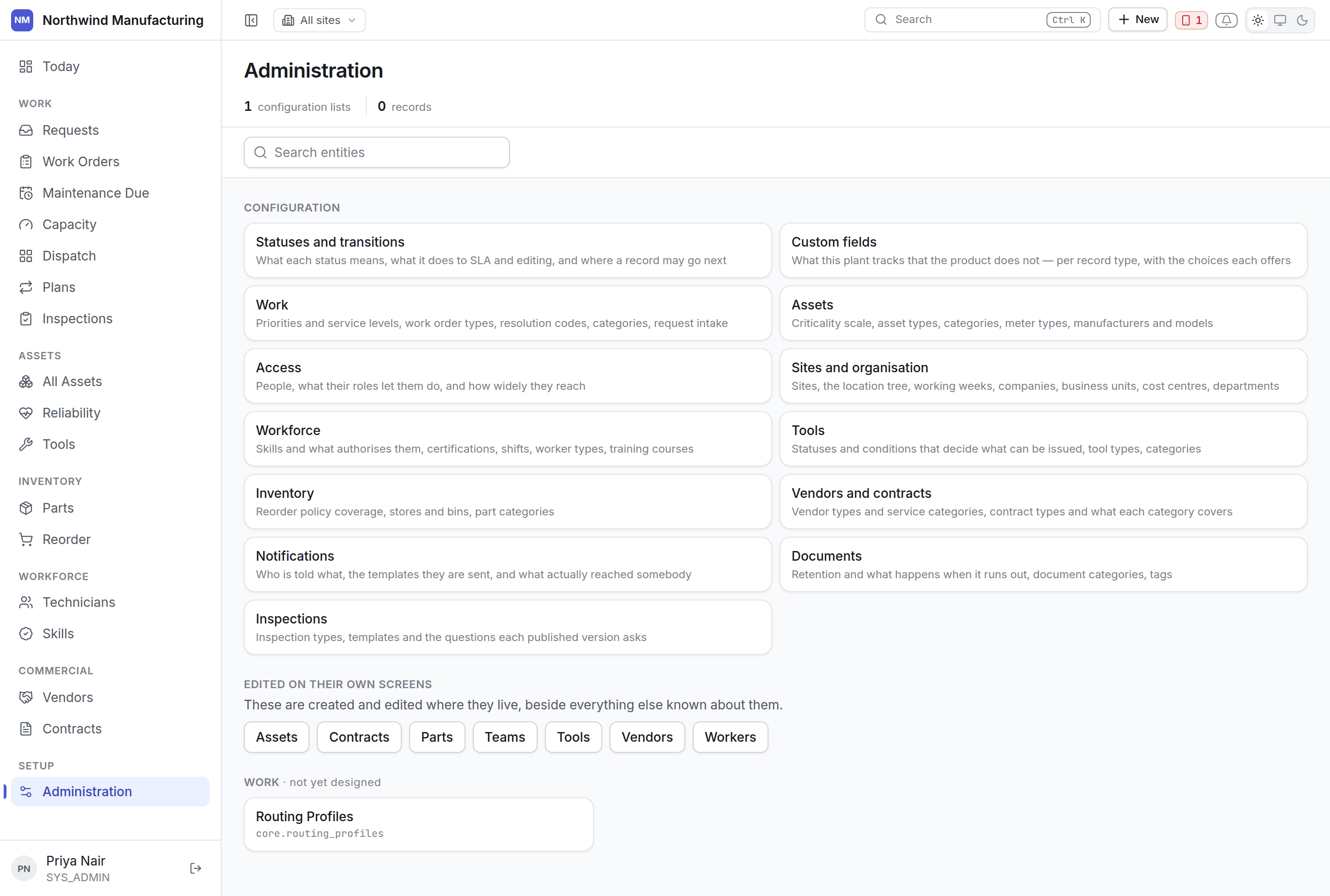
Administration is **configuration, and only configuration** — the closed lists a plant sets up once.
 ## What is not here
Assets, vendors, contracts and parts are **not** administered here, even though they are records you
create. They are edited on their own screens, beside their meters, their contracts, their coverage
and their stock — because that context is the reason those screens exist. Administration links out
to them rather than offering a generic table.
## The order to do it in
Everything hangs off where things are. [Sites and organisation](/setup/sites)
Users, their roles, and how widely each reaches. [People and access](/setup/access)
Types, categories, criticality, meter types, manufacturers and models — before you load assets.
[Asset settings](/config/assets)
Priorities and their service levels, work order types, categories, resolution codes.
[Work settings](/config/work)
Skills, certifications, shifts and worker types. [Workforce settings](/config/workforce)
Stores and bins, part categories, reorder policy, tool statuses and conditions.
[Inventory](/config/inventory) · [Tools](/config/tools)
Vendor and contract types, and what each coverage category means.
[Commercial settings](/config/commercial)
Adjust the lifecycles and add the fields your plant tracks. Do this once you have seen the
defaults in use. [Statuses](/config/statuses) · [Custom fields](/config/custom-fields)
Who is told what, and on which channel. [Notifications](/config/notifications)
## Configuration screens
Each module has a designed screen rather than a row of generic tables, because a priority is a rung
on a ladder and belongs beside the other rungs.
| Screen | Covers |
| -------------------------------------------- | -------------------------------------------------------------------------------- |
| [Statuses and transitions](/config/statuses) | What each status means and where a record may go next |
| [Rules](/config/rules) | What the product should do by itself, and what it has actually done |
| [Currency](/config/currency) | Exchange rates, and the money no rate can convert |
| [Custom fields](/config/custom-fields) | What this plant tracks that the product does not |
| [Work](/config/work) | Priorities, service levels, types, categories, resolution codes, request sources |
| [Assets](/config/assets) | Criticality, types, categories, meter types, manufacturers, models |
| [Access](/setup/access) | People, roles, and how widely they reach |
| [Sites and organisation](/setup/sites) | Sites, locations, working weeks, companies, cost centres |
| [Workforce](/config/workforce) | Skills, certifications, shifts, worker types, training |
| [Tools](/config/tools) | Statuses and conditions that decide what can be issued |
| [Inventory](/config/inventory) | Stores and bins, part categories, reorder policy |
| [Vendors and contracts](/config/commercial) | Vendor and contract types, coverage categories |
| [Notifications](/config/notifications) | Who is told what, and what actually arrived |
| [Documents](/config/documents) | Retention, categories, tags |
| [Inspections](/config/inspections) | Types, templates and the questions each version asks |
## Everything else
Smaller closed lists — tool conditions, skill categories, location types — are edited in a generic
table, which is the right answer for them. Nobody wants a bespoke screen for Tool Conditions.
See [administered lists](/config/administered-lists).
## Related topics
- [Ways to sign in](/setup/sign-in-methods.md)
- [Role reference](/setup/roles.md)
- [People and access](/setup/access.md)
- [Sites and organisation](/setup/sites.md)
- [Creating an organisation](/setup/sign-up.md)
## What is not here
Assets, vendors, contracts and parts are **not** administered here, even though they are records you
create. They are edited on their own screens, beside their meters, their contracts, their coverage
and their stock — because that context is the reason those screens exist. Administration links out
to them rather than offering a generic table.
## The order to do it in
Everything hangs off where things are. [Sites and organisation](/setup/sites)
Users, their roles, and how widely each reaches. [People and access](/setup/access)
Types, categories, criticality, meter types, manufacturers and models — before you load assets.
[Asset settings](/config/assets)
Priorities and their service levels, work order types, categories, resolution codes.
[Work settings](/config/work)
Skills, certifications, shifts and worker types. [Workforce settings](/config/workforce)
Stores and bins, part categories, reorder policy, tool statuses and conditions.
[Inventory](/config/inventory) · [Tools](/config/tools)
Vendor and contract types, and what each coverage category means.
[Commercial settings](/config/commercial)
Adjust the lifecycles and add the fields your plant tracks. Do this once you have seen the
defaults in use. [Statuses](/config/statuses) · [Custom fields](/config/custom-fields)
Who is told what, and on which channel. [Notifications](/config/notifications)
## Configuration screens
Each module has a designed screen rather than a row of generic tables, because a priority is a rung
on a ladder and belongs beside the other rungs.
| Screen | Covers |
| -------------------------------------------- | -------------------------------------------------------------------------------- |
| [Statuses and transitions](/config/statuses) | What each status means and where a record may go next |
| [Rules](/config/rules) | What the product should do by itself, and what it has actually done |
| [Currency](/config/currency) | Exchange rates, and the money no rate can convert |
| [Custom fields](/config/custom-fields) | What this plant tracks that the product does not |
| [Work](/config/work) | Priorities, service levels, types, categories, resolution codes, request sources |
| [Assets](/config/assets) | Criticality, types, categories, meter types, manufacturers, models |
| [Access](/setup/access) | People, roles, and how widely they reach |
| [Sites and organisation](/setup/sites) | Sites, locations, working weeks, companies, cost centres |
| [Workforce](/config/workforce) | Skills, certifications, shifts, worker types, training |
| [Tools](/config/tools) | Statuses and conditions that decide what can be issued |
| [Inventory](/config/inventory) | Stores and bins, part categories, reorder policy |
| [Vendors and contracts](/config/commercial) | Vendor and contract types, coverage categories |
| [Notifications](/config/notifications) | Who is told what, and what actually arrived |
| [Documents](/config/documents) | Retention, categories, tags |
| [Inspections](/config/inspections) | Types, templates and the questions each version asks |
## Everything else
Smaller closed lists — tool conditions, skill categories, location types — are edited in a generic
table, which is the right answer for them. Nobody wants a bespoke screen for Tool Conditions.
See [administered lists](/config/administered-lists).
## Related topics
- [Ways to sign in](/setup/sign-in-methods.md)
- [Role reference](/setup/roles.md)
- [People and access](/setup/access.md)
- [Sites and organisation](/setup/sites.md)
- [Creating an organisation](/setup/sign-up.md)