> ## Documentation Index
> Fetch the complete documentation index at: https://docs.assetinfinity.ai/llms.txt
> Use this file to discover all available pages before exploring further.
# Creating an organisation
> Self-service signup, what gets created with a new organisation, and the first things to do.
Where your deployment allows it, you can create an organisation yourself.
 ## Signing up
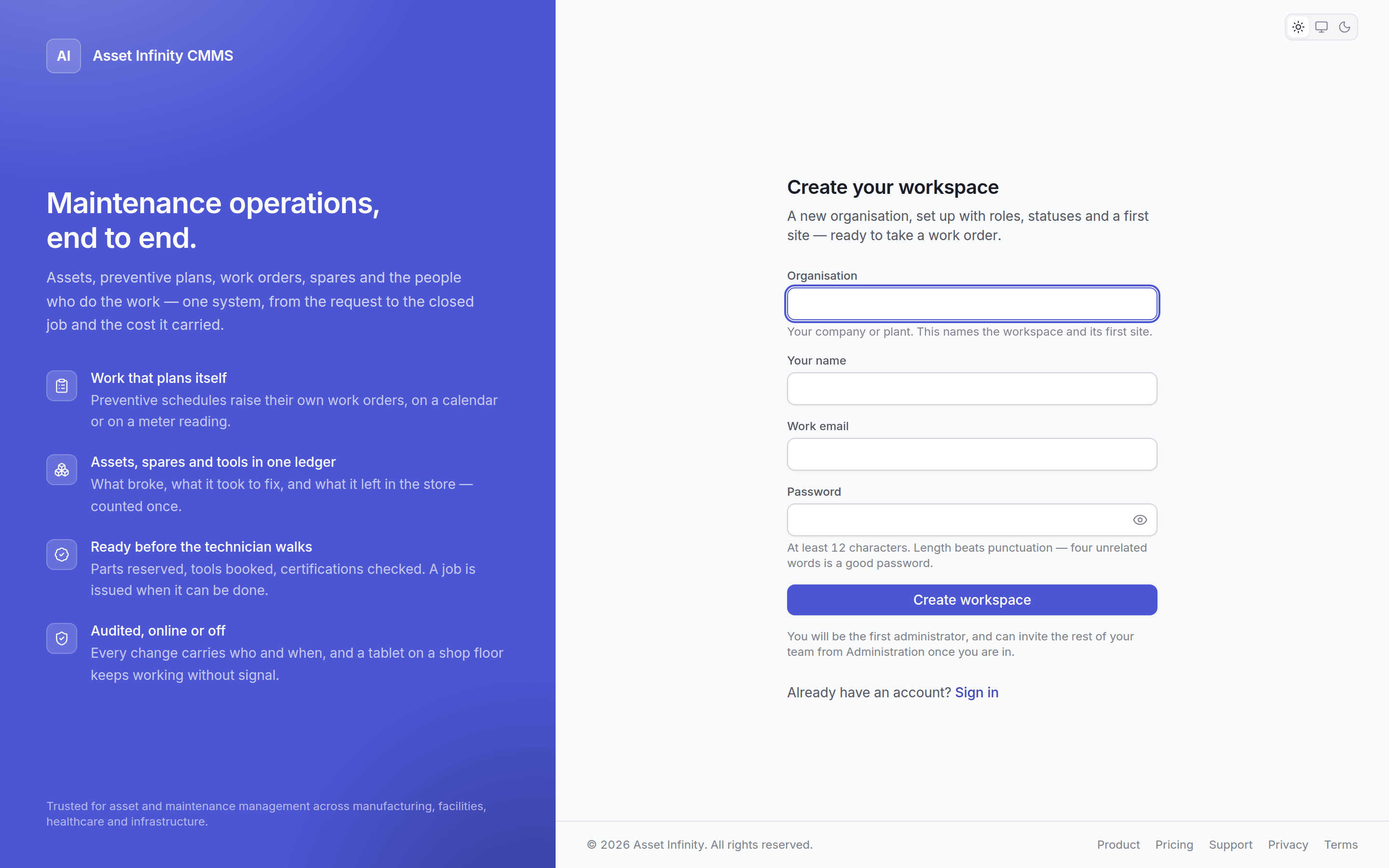
Enter your organisation's name, your name, your work email and a password. That creates the whole
organisation and signs you in as its first administrator.
Some deployments provision organisations by hand instead. If self-service signup is switched off,
the sign-up page will not be offered and your administrator creates the account for you.
## What you get
A new organisation is not empty. It arrives with:
| Created | Detail |
| -------------------------- | --------------------------------------------------------------------- |
| **12 roles** | From System Administrator to Requester. See [roles](/setup/roles) |
| **State models** | Work order, request, asset and vendor lifecycles, published and ready |
| **Notification templates** | For SLA, contract expiry, certification expiry and comments |
| **A first site** | Which you should rename to your actual plant |
| **You** | As the first administrator, holding `SYS_ADMIN` |
So the product works from the first sign-in. Everything above is then yours to change.
## First things to do
Under [sites and organisation](/setup/sites). The default site is a placeholder.
Buildings, floors, lines, rooms. Assets need somewhere to live.
Add users and give them roles under [people and access](/setup/access).
Asset types, categories, criticality and meter types before you load assets — it is much easier
than reclassifying afterwards. See [asset settings](/config/assets).
See [the asset register](/assets/register).
See [the plan builder](/maintenance/plan-builder).
## Multiple companies and sites
One organisation can hold several companies, business units, cost centres and departments, and as
many sites as you need. You do not need a second organisation for a second plant — and you should
not create one, because reporting across them would then be impossible.
See [sites and organisation](/setup/sites).
## Related topics
- [The work order list](/work/work-orders.md)
- [Sites and organisation](/setup/sites.md)
- [Copilot](/analytics/copilot.md)
- [What this system does](/introduction.md)
- [The work order lifecycle](/work/lifecycle.md)
## Signing up
Enter your organisation's name, your name, your work email and a password. That creates the whole
organisation and signs you in as its first administrator.
Some deployments provision organisations by hand instead. If self-service signup is switched off,
the sign-up page will not be offered and your administrator creates the account for you.
## What you get
A new organisation is not empty. It arrives with:
| Created | Detail |
| -------------------------- | --------------------------------------------------------------------- |
| **12 roles** | From System Administrator to Requester. See [roles](/setup/roles) |
| **State models** | Work order, request, asset and vendor lifecycles, published and ready |
| **Notification templates** | For SLA, contract expiry, certification expiry and comments |
| **A first site** | Which you should rename to your actual plant |
| **You** | As the first administrator, holding `SYS_ADMIN` |
So the product works from the first sign-in. Everything above is then yours to change.
## First things to do
Under [sites and organisation](/setup/sites). The default site is a placeholder.
Buildings, floors, lines, rooms. Assets need somewhere to live.
Add users and give them roles under [people and access](/setup/access).
Asset types, categories, criticality and meter types before you load assets — it is much easier
than reclassifying afterwards. See [asset settings](/config/assets).
See [the asset register](/assets/register).
See [the plan builder](/maintenance/plan-builder).
## Multiple companies and sites
One organisation can hold several companies, business units, cost centres and departments, and as
many sites as you need. You do not need a second organisation for a second plant — and you should
not create one, because reporting across them would then be impossible.
See [sites and organisation](/setup/sites).
## Related topics
- [The work order list](/work/work-orders.md)
- [Sites and organisation](/setup/sites.md)
- [Copilot](/analytics/copilot.md)
- [What this system does](/introduction.md)
- [The work order lifecycle](/work/lifecycle.md)