> ## Documentation Index
> Fetch the complete documentation index at: https://docs.assetinfinity.ai/llms.txt
> Use this file to discover all available pages before exploring further.
# The work order list
> Finding the jobs you care about — views, filters, columns, bulk actions and export.
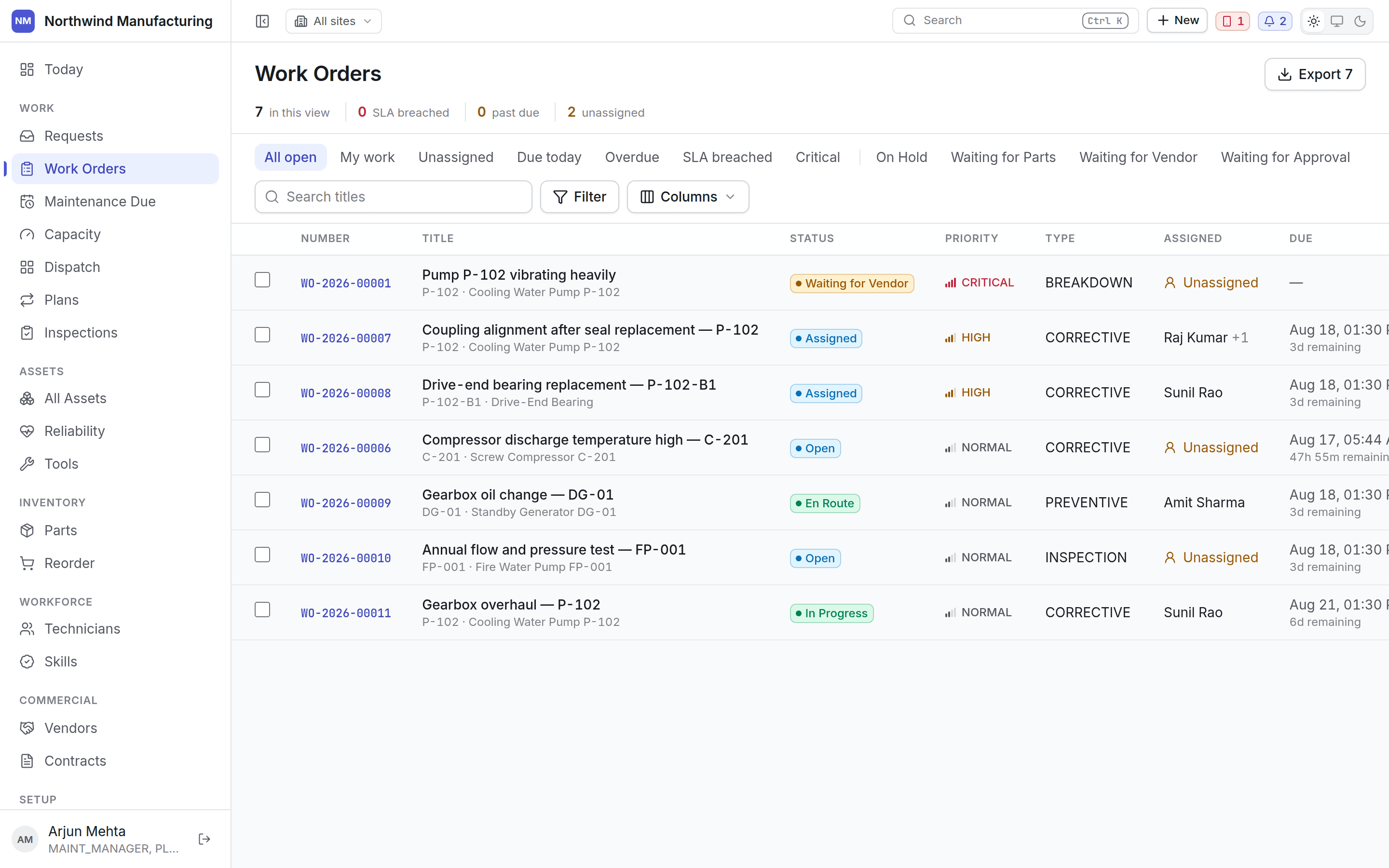
Every open job in one place, with views for the questions people actually ask.
 ## The summary line
Above the views: how many jobs are in the current view, how many have breached their service level,
how many are past due, and how many are unassigned. It reflects the view you are in, so narrowing to
*Critical* narrows the counts too.
## Views
The first group is fixed:
| View | Shows |
| ---------------- | ---------------------------------- |
| **All open** | Everything not closed or cancelled |
| **My work** | Jobs assigned to you |
| **Unassigned** | Nobody on it yet |
| **Due today** | Due before tonight |
| **Overdue** | Past its due date |
| **SLA breached** | Past its service-level promise |
| **Critical** | Top-rank priority |
After the divider, one chip per status and type your organisation has configured — *On Hold*,
*Waiting for Parts*, *Waiting for Vendor*, *Waiting for Approval*, and your work order types.
These chips are built from your configuration. Rename `WAITING_PARTS` to "Awaiting spares" and the
chip is called Awaiting spares. Add a fourth on-hold state and you get a fourth chip.
## Columns
| Column | Notes |
| ------------ | ---------------------------------------------------------- |
| **Number** | The work order number — click to open |
| **Title** | With the asset beneath it |
| **Status** | Your label, coloured by category |
| **Priority** | Ranked, so sorting is meaningful |
| **Type** | Preventive, corrective, breakdown, inspection, or your own |
| **Assigned** | The technician, or *Unassigned*. `+1` means more than one |
| **Due** | The date, with time remaining or overdue beneath |
Use **Columns** to change what is shown and in what order. Your layout is remembered per list, per
browser.
## Filtering and searching
**Search titles** matches the title and the number. **Filter** narrows on any column — status,
priority, type, assignee, asset, site, dates. Filters combine with the view you are in.
## Export
**Export** downloads what is in view, with the filters applied. The button carries the row count so
you know what you are about to get. It exports the view, not the table.
## Bulk actions
Tick rows to act on several at once — assigning a batch of unassigned jobs to one technician, for
example. Only moves your state model allows from the states of *all* selected rows are offered.
## Creating a work order
**New** on this screen, or **New → Create Work Order** in the header. The useful minimum is the
asset, a title, a type and a priority. Everything else — requirements, assignment, scheduling — can
follow.
Most work should not be created here at all. Preventive work comes from
[maintenance plans](/maintenance/plans); reported faults come from
[work requests](/work/requests). Creating jobs by hand is for the ones that fit neither.
What each tab on the job does.
## Related topics
- [Statuses and transitions](/config/statuses.md)
- [Inside a work order](/work/work-order-detail.md)
- [Work settings](/config/work.md)
- [Custom fields](/config/custom-fields.md)
- [The work order lifecycle](/work/lifecycle.md)
## The summary line
Above the views: how many jobs are in the current view, how many have breached their service level,
how many are past due, and how many are unassigned. It reflects the view you are in, so narrowing to
*Critical* narrows the counts too.
## Views
The first group is fixed:
| View | Shows |
| ---------------- | ---------------------------------- |
| **All open** | Everything not closed or cancelled |
| **My work** | Jobs assigned to you |
| **Unassigned** | Nobody on it yet |
| **Due today** | Due before tonight |
| **Overdue** | Past its due date |
| **SLA breached** | Past its service-level promise |
| **Critical** | Top-rank priority |
After the divider, one chip per status and type your organisation has configured — *On Hold*,
*Waiting for Parts*, *Waiting for Vendor*, *Waiting for Approval*, and your work order types.
These chips are built from your configuration. Rename `WAITING_PARTS` to "Awaiting spares" and the
chip is called Awaiting spares. Add a fourth on-hold state and you get a fourth chip.
## Columns
| Column | Notes |
| ------------ | ---------------------------------------------------------- |
| **Number** | The work order number — click to open |
| **Title** | With the asset beneath it |
| **Status** | Your label, coloured by category |
| **Priority** | Ranked, so sorting is meaningful |
| **Type** | Preventive, corrective, breakdown, inspection, or your own |
| **Assigned** | The technician, or *Unassigned*. `+1` means more than one |
| **Due** | The date, with time remaining or overdue beneath |
Use **Columns** to change what is shown and in what order. Your layout is remembered per list, per
browser.
## Filtering and searching
**Search titles** matches the title and the number. **Filter** narrows on any column — status,
priority, type, assignee, asset, site, dates. Filters combine with the view you are in.
## Export
**Export** downloads what is in view, with the filters applied. The button carries the row count so
you know what you are about to get. It exports the view, not the table.
## Bulk actions
Tick rows to act on several at once — assigning a batch of unassigned jobs to one technician, for
example. Only moves your state model allows from the states of *all* selected rows are offered.
## Creating a work order
**New** on this screen, or **New → Create Work Order** in the header. The useful minimum is the
asset, a title, a type and a priority. Everything else — requirements, assignment, scheduling — can
follow.
Most work should not be created here at all. Preventive work comes from
[maintenance plans](/maintenance/plans); reported faults come from
[work requests](/work/requests). Creating jobs by hand is for the ones that fit neither.
What each tab on the job does.
## Related topics
- [Statuses and transitions](/config/statuses.md)
- [Inside a work order](/work/work-order-detail.md)
- [Work settings](/config/work.md)
- [Custom fields](/config/custom-fields.md)
- [The work order lifecycle](/work/lifecycle.md)