> ## Documentation Index
> Fetch the complete documentation index at: https://docs.assetinfinity.ai/llms.txt
> Use this file to discover all available pages before exploring further.
# Inside a technician
> Skills, certifications, schedule, availability, current work, history and performance for one person.
 ## Tabs
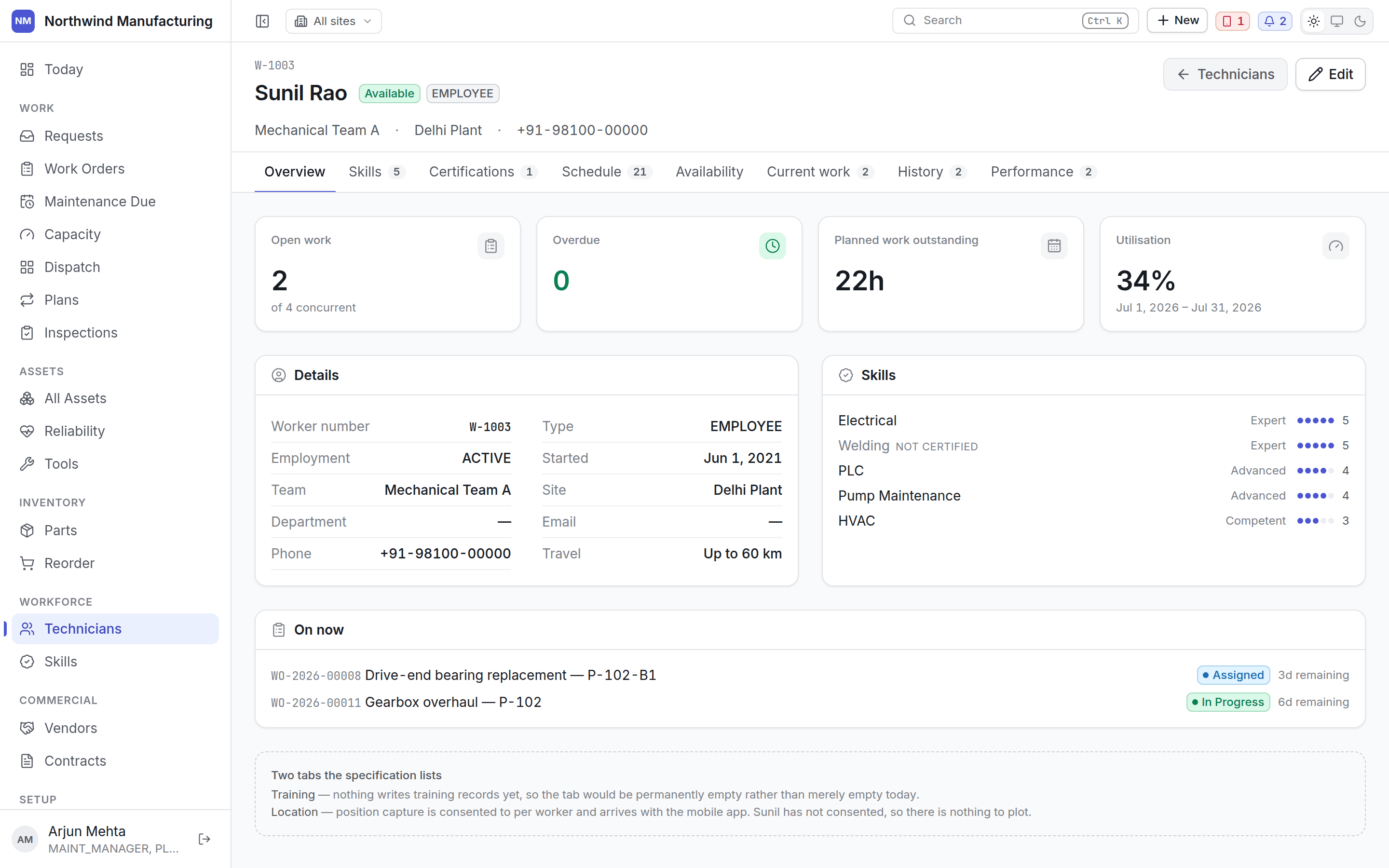
Worker number, name, type, team, site, contact details, and the rate that applies to their
booked hours.
What this person can do, and to what level.
## Tabs
Worker number, name, type, team, site, contact details, and the rate that applies to their
booked hours.
What this person can do, and to what level.
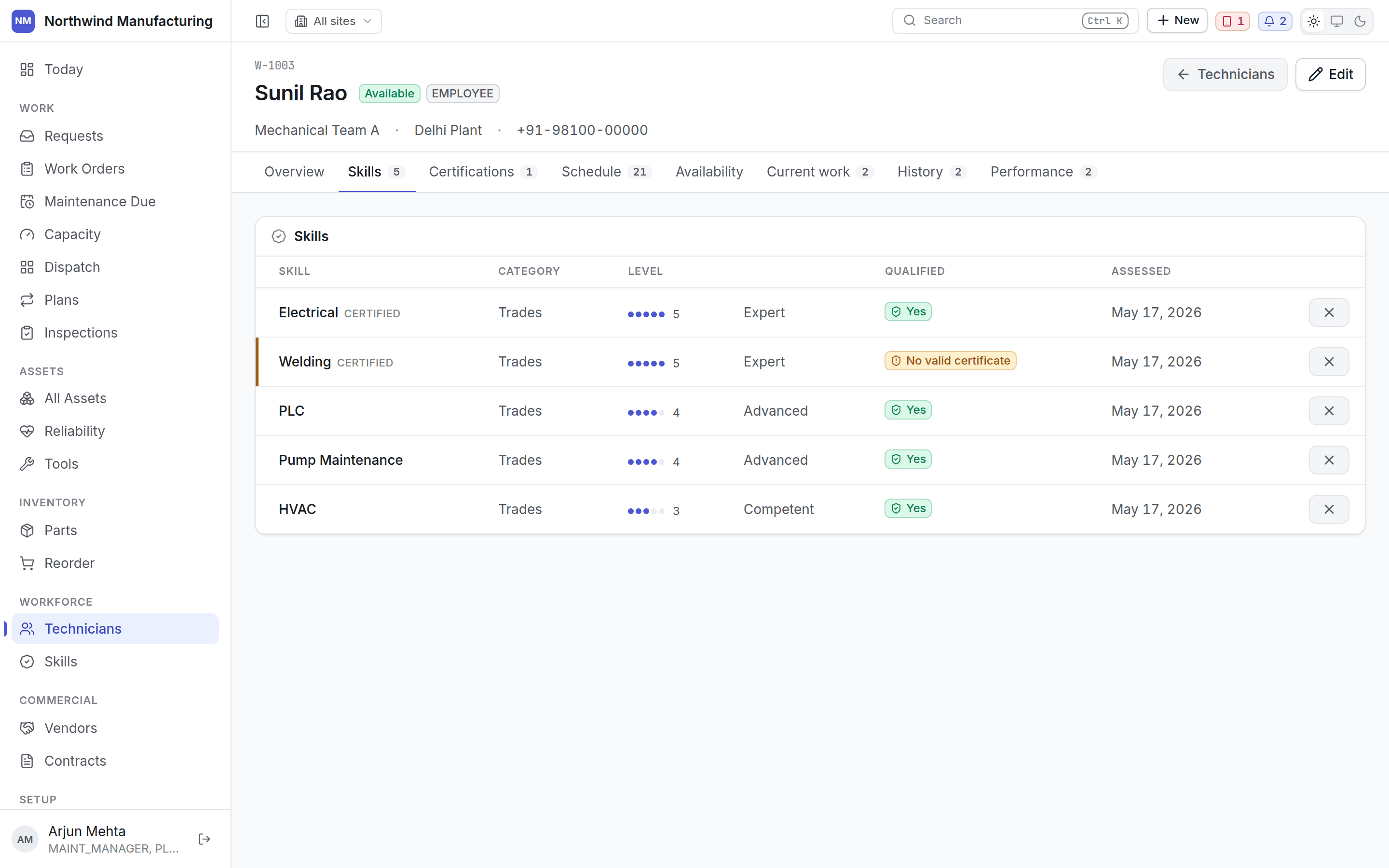 Skills drive routing and dispatch: a job requiring a skill nobody available holds shows as a
shortage on readiness rather than being discovered at the machine.
Formal tickets with expiry dates — pressure systems, electrical, confined space, working at
height.
A certification is different from a skill: skills degrade quietly, certifications **expire on a
date**, and an expired one stops an assignment rather than warning about it. Expiry raises a
[notification](/config/notifications) ahead of time.
When this person is in — shifts and working windows.
When they are *not* — leave, absence, and anything else that removes them from the roster.
Schedule and Availability read the same underlying roster and are separate tabs because they
answer opposite questions. This is the one that carries the write: booking leave is done here.
What is on them now — assigned, accepted, in progress. This is what the dispatch board's load
bar counts.
Everything they have completed, with dates and durations.
Computed from what they actually did: jobs completed, average time against estimate, first-time
fix rate, and service levels met.
Performance is read-only, because it is derived rather than entered. Read it as a picture of
the work that came their way as much as of the person — somebody who gets the hard jobs will
show slower times.
## Location
Position tracking is off for everybody by default and is consented to per person rather than
switched on for a plant.
## Managing skills across the team
To ask "who else can do this when Sunil is on leave", use the
[skills matrix](/workforce/skills) — a per-person list can never answer it.
## Related topics
- [Technicians](/workforce/technicians.md)
- [Inside a vendor](/commercial/vendor-detail.md)
- [Inside an asset](/assets/detail.md)
- [Inside a work order](/work/work-order-detail.md)
- [Inventory settings](/config/inventory.md)
Skills drive routing and dispatch: a job requiring a skill nobody available holds shows as a
shortage on readiness rather than being discovered at the machine.
Formal tickets with expiry dates — pressure systems, electrical, confined space, working at
height.
A certification is different from a skill: skills degrade quietly, certifications **expire on a
date**, and an expired one stops an assignment rather than warning about it. Expiry raises a
[notification](/config/notifications) ahead of time.
When this person is in — shifts and working windows.
When they are *not* — leave, absence, and anything else that removes them from the roster.
Schedule and Availability read the same underlying roster and are separate tabs because they
answer opposite questions. This is the one that carries the write: booking leave is done here.
What is on them now — assigned, accepted, in progress. This is what the dispatch board's load
bar counts.
Everything they have completed, with dates and durations.
Computed from what they actually did: jobs completed, average time against estimate, first-time
fix rate, and service levels met.
Performance is read-only, because it is derived rather than entered. Read it as a picture of
the work that came their way as much as of the person — somebody who gets the hard jobs will
show slower times.
## Location
Position tracking is off for everybody by default and is consented to per person rather than
switched on for a plant.
## Managing skills across the team
To ask "who else can do this when Sunil is on leave", use the
[skills matrix](/workforce/skills) — a per-person list can never answer it.
## Related topics
- [Technicians](/workforce/technicians.md)
- [Inside a vendor](/commercial/vendor-detail.md)
- [Inside an asset](/assets/detail.md)
- [Inside a work order](/work/work-order-detail.md)
- [Inventory settings](/config/inventory.md)