

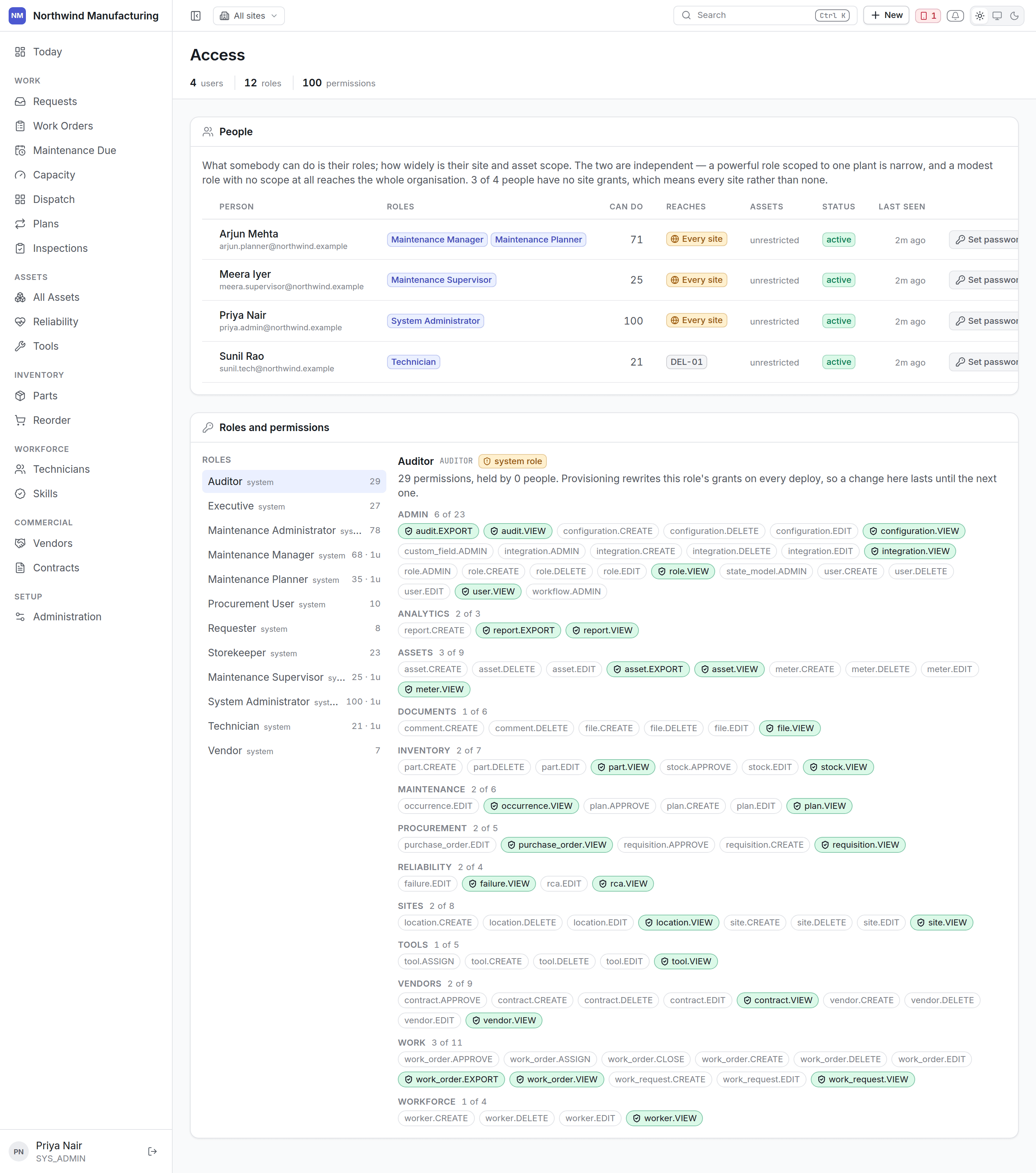
Why this is one screen
Roles, site scope and asset scope only mean anything together. Edited as three unrelated tables they are how somebody grants far more than they meant to.The rule that catches people out
This screen says “every site” in as many words where that is the situation, rather than leaving a blank column that says nothing.People
Add a person on this screen. Each row also carries Edit and Remove.
The user is issued a password and asked to change it on first sign-in, because somebody other than
its owner knows it.
Roles, sites and assets for one person
Expand a person’s row and their grants appear as three panels side by side — Roles, Sites, Assets — each with its own Grant a… control. Add or remove a grant in one panel without touching the others.The Sites panel is where the “no grants means every site” rule lives day to day. Granting the
first site narrows that person to just it; removing the last site grant widens them back to
every site. There is no in-between state that means “no sites.”
Roles
A role is a bundle of permissions. Give somebody more than one and they get the union. Add a role on this screen, with Edit and Delete per row. Deleting a role that people currently hold shows how many, as a warning — the people themselves aren’t deleted, just left without that role’s grants. The twelve defaults cover most plants. See the role reference for exactly what each can do, and for what editing a system role does and doesn’t change.Permissions
Open a role and its permissions are a grid: one row per resource, grouped under module headings, one column per action — View, Create, Edit, Assign, Close, Export, Delete, Approve, Admin. The dangerous verbs, Delete, Approve and Admin, are flagged so they don’t get granted by accident while scanning down a column. A cell is one of three things:
Three levels of bulk toggle, each scoped to whatever’s currently visible or filtered:
- Column header — grant or revoke a whole verb, e.g. every Export permission on screen.
- Module band — grant or revoke everything under one module heading.
- Row label — grant or revoke every verb on one resource.
Site and asset scope
Two levels of narrowing, both optional, each its own panel on a person’s row:- Site access — which plants this person may reach.
- Asset access — which machines, for cases where even one site is too wide. A contractor maintaining only the compressors is the usual reason.
Scope is enforced by the server on every read, not by hiding menu items. A user who cannot reach a
site cannot reach it by typing a URL either.