

If you don’t see Bookings on Home, your administrator can switch the module on under Administration → Modules, or it may not be included in your plan. You also need permission to see bookings. Booking from this screen needs permission to make bookings.
Choosing what to look at
Reading the calendar
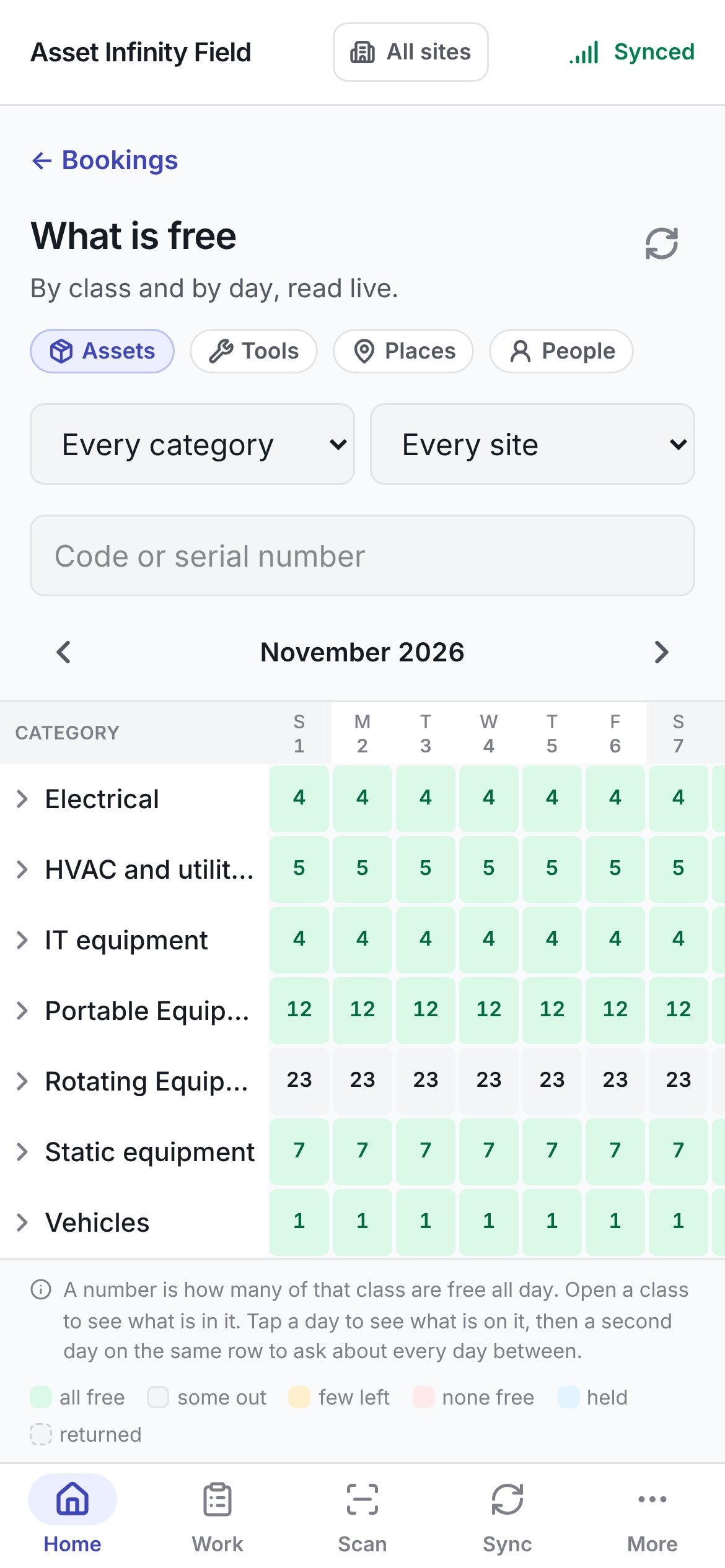
The calendar is a table of classes down the side and the month’s days across the top. The days scroll sideways while the class names stay where they are; today’s date is highlighted and weekends are shaded. Each class’s day shows how many of that class are free all day, coloured by how much is left:
Tap a class’s name to open it. Under it come the classes filed inside it, then each machine — its code and name — with a row of its own days. On a machine’s row a held day is shaded held and shows the initials of the person it is held for, and a day it was booked and has since come back is shaded returned. A class with nothing directly under it says Nothing is filed directly under this one.
What is on a day
Tap a day on any row to see what is on it. A panel opens below the calendar with the class or machine, the date, and Everything in this class on the day (or This one, on the day for a machine’s row). Each line is a machine, place or person with its code, its name, its class and its state:
Tap the same day again, or the cross, to close the panel.
A span of days
After tapping one day, tap a second day on the same row to ask about every day between the two. The panel then says Free for every day of the span (or Whether this one is free for every day for a machine) and lists only what is free for the whole of it. If nothing is, it says Nothing is free for the whole span. Tap a single day to see what is holding it. On a handset with a mouse or pen you can drag across the row instead, as on the web.Booking from the calendar
Where you may make bookings and you are looking at assets, each free asset in the panel has Book, which opens New booking with that asset and the days you asked about. A span with more than one free asset also offers Book all together, which puts all of them on one booking. A span that started in the past is booked from today, and a day already over offers nothing to book. Tools, places and people are booked in the web app, as are several machines picked across classes into one booking and the calendar’s export.What is free needs a connection. It is read live, because it changes while you are on your way. Nothing is kept on the handset, so without a signal the screen says Needs a connection — What is free is read live, because it changes while you are on your way. Nothing is kept on this device. — and offers Try again.